
A prompt library, in the sense that matters for power users, is a cloud-synced, searchable collection of prompts you can inject straight into ChatGPT, Claude, Gemini, and other AI tools without retyping or hunting through old chats. For anyone working across multiple devices and platforms, the right setup is a browser extension backed by a server-side library, not a folder of Google Docs. That combination saves real time and keeps every prompt version consistent no matter where you're working.
TL;DR:
- Using a cloud-synced prompt library becomes cost-effective for teams managing over 50 prompts across multiple devices and AI platforms.
- A structured approach with metadata like owner, version, and review date ensures prompts remain searchable, current, and safe over time.
- Cross-platform prompt reuse relies on a master prompt with platform-specific overlays, using placeholders and version tracking to reduce duplication.
- Subscriptions for cloud-synced setups typically cost $5 to $10 monthly, with more advanced options like git vaults available for technical teams.
- Moving to a dedicated prompt management tool is recommended once manual documents or local storage limits hinder efficiency at scale.
Table of Contents
- Why a Cross-Platform Prompt Library Matters for AI Power Users
- Choosing the Right Prompt Storage Architecture
- What to Store With Every Prompt
- Governance, Versioning, and the Prompt Lifecycle
- Cross-Platform Injection Without Constant Rework
- How Promptchief Maps to This Architecture
- What Prompt Libraries Look Like in a Year
- Try Promptchief for Cross-Platform Prompt Management
- Sources
- FAQ
Why a Cross-Platform Prompt Library Matters for AI Power Users
Every time you copy a prompt from a doc, reformat it for a different model, and paste it into a new chat window, you pay what amounts to a sync tax. It sounds small until you tally it. A marketer running five campaigns across ChatGPT and Gemini might reformat the same core prompt a dozen times a week, tweaking tone instructions here, stripping markdown there.
Cloud-synced setups typically cost $5 to $10 a month and often pay for themselves within a month for anyone running multiple AI sessions daily, according to Prompt Architects, because the time saved on reformatting and rework outweighs the subscription almost immediately.
The tipping point for moving off manual docs usually shows up at a specific scale:
- You're maintaining more than 50 reusable prompts across projects
- You switch between two or more devices during a normal workday
- You or your team use three or more AI platforms regularly
- You've caught yourself rewriting the same prompt from memory more than once
Unmanaged libraries fail in predictable ways. Prompts go stale because nobody owns them, duplicates pile up because search is nonexistent, and sensitive client language ends up scattered across chat histories with no audit trail. A structured library heads off all three problems before they start.
Choosing the Right Prompt Storage Architecture
Not every user needs the same setup, and picking the wrong one wastes either time or money. Four architectures cover almost every real-world case, and the right one depends on how many prompts you manage and how many devices and platforms you touch.
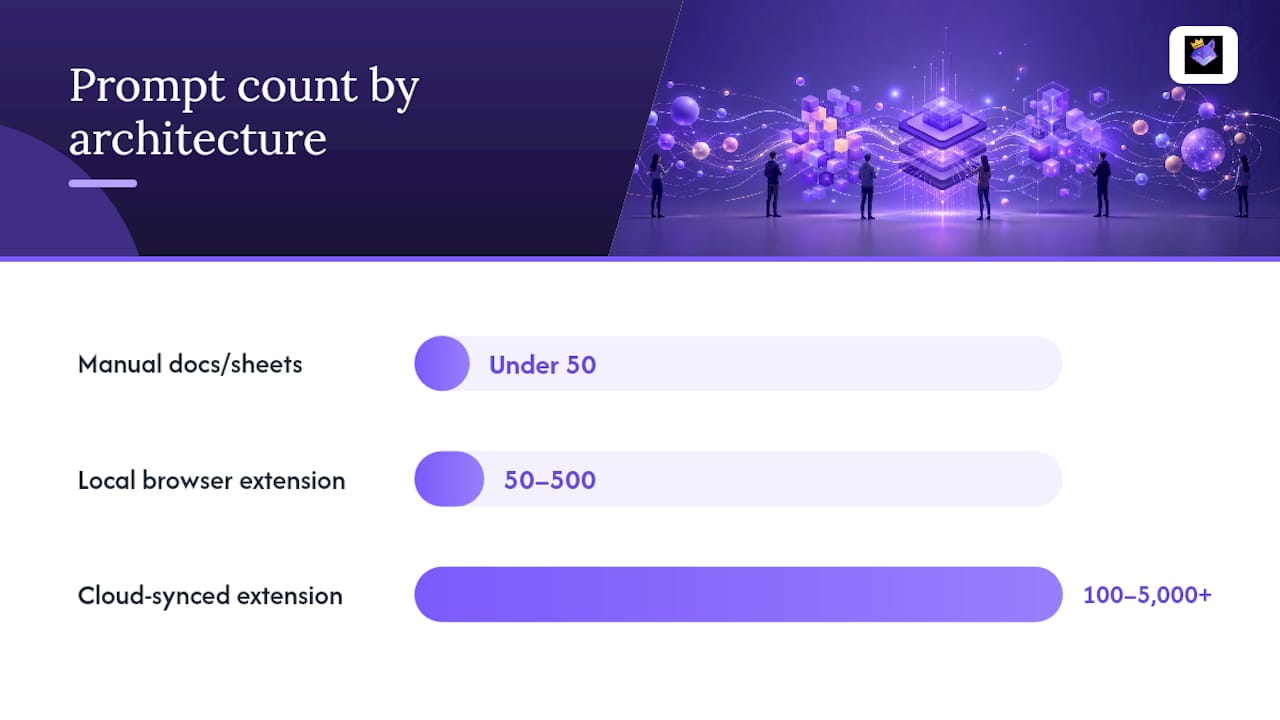
Manual storage (a doc or spreadsheet) works fine under 50 prompts used by one person on one machine. Once you cross that threshold, or start switching devices, manual copy-paste turns into the sync tax described above. A local browser extension handles the 50 to 500 prompt range well for a single device, but it hits a wall the moment you need the same library on a laptop and a phone, since many extensions cap storage through browser sync limits.
A cloud-synced extension backed by a server library is the setup that scales past that wall. It supports libraries from 100 to 5,000-plus prompts and pushes edits to every device within seconds, avoiding the storage caps that hem in local-only tools. Developers running heavier automation sometimes prefer a git-backed vault instead, trading convenience for version control granularity that plain sync doesn't offer.
| Architecture | Best for | Prompt count | Main trade-off |
|---|---|---|---|
| Manual docs/sheets | Solo, occasional use | Under 50 | No search, no sync |
| Local browser extension | Single device, single browser | 50 to 500 | Storage caps, no cross-device sync |
| Cloud-synced extension + server library | Multi-device, multi-platform teams | 100 to 5,000+ | Subscription cost |
| Git-backed vault | Developers, code-adjacent workflows | Any size | Requires technical setup |
Cross-browser support varies more than people expect. Some extensions sync flawlessly between Chrome instances on different machines but break down when a teammate uses a different browser entirely, so check compatibility before standardizing a team on one tool.
What to Store With Every Prompt
A prompt library only earns its keep if every entry carries enough metadata to be found, trusted, and reused safely months later. Skimping here is the single most common reason libraries collapse into unsearchable junk drawers within a year.
At minimum, each prompt record needs:
- ID and title for quick reference and search matching
- The prompt template itself, with placeholders clearly marked
- Model compatibility (which platforms it's tested against)
- Parameters like temperature or max tokens where relevant
- A worked example showing real input and output
- Owner (who's accountable for keeping it current)
- Version number and status (draft, approved, deprecated)
- A risk or sensitivity tag flagging anything containing client data or confidential context
- Last review date
Structured intent taxonomies, tagging by purpose (drafting, summarizing, coding, ideation) crossed with domain (marketing, support, engineering), consistently outperform freeform folder systems for discovery in multi-team environments. Freeform folders work until three people start naming things differently, then search breaks down entirely.
Fuzzy search matters more than most people assume. If someone remembers a prompt did something about "onboarding emails" but not the exact title, fuzzy matching and example indexing surface it anyway, instead of forcing an exact-string guess. Tools like Promptchief's own prompt library structure guide walk through building this schema from scratch.
Pro Tip: Tag every prompt containing client names, financial figures, or personal data with a "restricted" risk flag the moment you save it, not after someone else finds it in a shared search.
Governance, Versioning, and the Prompt Lifecycle
A prompt library without governance is just a bigger mess than the one it replaced. Teams that treat prompts as production assets, not throwaway text, follow a handful of non-negotiable rules.
- Assign a named owner to every prompt. Someone has to be accountable for accuracy, or nobody updates it when the underlying model changes behavior.
- Use semantic versioning. A patch-level change (wording tweak) should not carry the same version bump as a structural rewrite that changes the output format.
- Gate promotion with review. Nothing moves from draft to production status without at least one other set of eyes checking it against known edge cases.
- Run automated evaluation before deployment. Governed libraries pair named ownership with automated tests and staged environments, sample outputs against a test set, and require a pass threshold before a prompt reaches production.
- Separate dev, staging, and production environments. A prompt that's still being tuned should never sit in the same tier a customer-facing workflow pulls from.
- Deprecate on a schedule, not by accident. Set a last-review date on every entry and retire anything that's gone stale, keeping an audit log of what changed and when.
Teams with mature libraries following this discipline report saving over 200 engineer-hours per quarter, largely because nobody's re-debugging a prompt that already broke once before.
Cross-Platform Injection Without Constant Rework
The trick to reusing prompts across ChatGPT, Claude, and Gemini isn't writing three separate versions. It's writing one master prompt and layering small, platform-specific overlays on top.
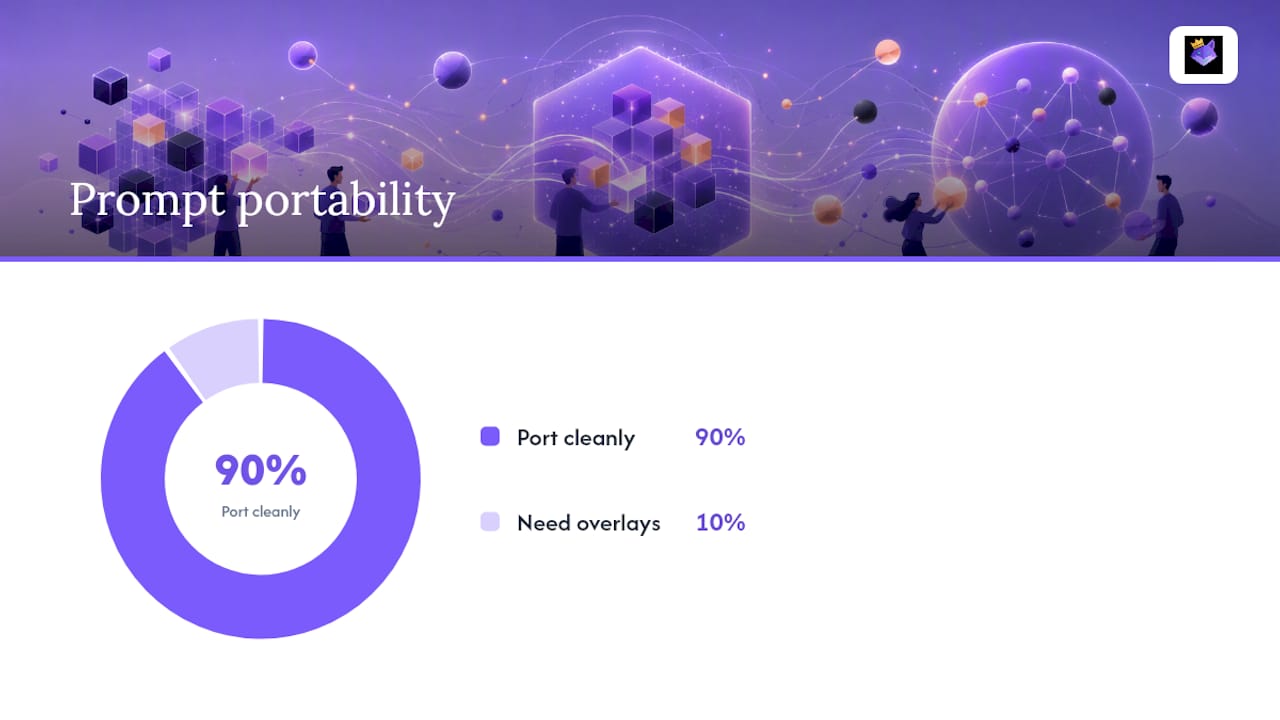
About 90% of well-structured prompts port cleanly between models with no changes at all. Keep that canonical prompt as your single source of truth, then store a short overlay for each platform that needs one.
Practical patterns that cut duplication:
- Use placeholders (like
{{client_name}}or{{tone}}) so one template serves dozens of use cases - Build prompt chains for multi-step workflows, such as a research prompt that feeds its output into a drafting prompt
- Store overlays as small diffs against the master, not full duplicate copies
- Log cost and latency per prompt version so you can compare models fairly
When you're testing whether a rewritten prompt actually performs better, run a simple A/B split. Send half your traffic or use-cases to the old version, half to the new one, and compare outcomes before rolling the winner out everywhere. You don't need a CI pipeline for this. A shared spreadsheet tracking version, date, and result works for teams under a dozen people. Promptchief's guide on reusing prompts across AI tools covers overlay patterns in more depth.
How Promptchief Maps to This Architecture
Everything described above, cloud sync, metadata, versioning, cross-platform overlays, is exactly what a prompt manager needs to implement in practice, and it's the core of what Promptchief builds toward. A Chrome extension pairs with a server-synced library so prompts saved on a desktop show up instantly on a laptop or a different browser session, no manual export required.
Search often runs on fuzzy matching rather than exact-string lookup, so a half-remembered prompt title still surfaces the right result. Prompt chains handle multi-step workflows natively, and fillable templates cover the placeholder pattern without extra setup. Team workspace features add the ownership and access layer that governance requires; teammates can see who last touched a shared prompt and when.
On privacy, keep genuinely sensitive prompts (anything with client data, contracts, or regulated information) local or marked non-synced rather than pushed to any cloud service, Promptchief included. For everything else, sync conflicts are rare because edits merge at the field level rather than overwriting a whole file, and any real conflict surfaces as a flagged item rather than a silent overwrite.
- Cloud sync across devices and browsers
- Fuzzy search plus tagging for fast retrieval
- Prompt chains and fillable templates for reuse
- Team workspaces with shared ownership visibility
Individuals can test the free tier before deciding whether team features on the pricing page are worth the upgrade.
What Prompt Libraries Look Like in a Year
Prompt libraries are heading toward the same status version control systems reached for code: not optional tooling, but basic infrastructure any serious AI workflow assumes exists. Teams that treat prompts as disposable text will keep re-solving problems they already solved twice before.
If you're starting from nothing, don't overthink the first move. Inventory what you're already using, however scattered it is. Draft a minimal schema (even five fields beats zero). Assign an owner to anything shared. Then pick an architecture that matches your actual device and platform count, not the one that sounds most impressive.
— John
Try Promptchief for Cross-Platform Prompt Management
This prompt manager is built around the architecture this guide recommends: a cloud-synced extension backed by a server library, so your prompts follow you across multiple AI tools instead of living in scattered docs.

Search runs on fuzzy matching so half-remembered prompts still surface fast, prompt chains handle multi-step workflows, and team workspaces give shared libraries the ownership and access structure governance actually requires. The free plan costs $0 per month and lets you test cloud sync and search before committing to anything. If you manage a team's prompts, the Plus plan runs $8.11 per month, and Teams pricing runs $12 to $15 per seat per month for shared workspace access.
Start by moving your most-used prompts into the free tier this week, then check whether team features on the pricing page fit once you see how much rework disappears.
Sources
For deeper technical detail on syncing prompts across platforms, see Prompt Architects' sync guide. For team-scale governance structures, read AIPA's guide to building a team prompt library. For versioning and review pipelines specifically, this governance breakdown covers the mechanics in detail.
- Sync Your Prompts Across ChatGPT, Claude, and Gemini (2026 Guide) | Prompt Architects
- How to Build a Prompt Library for Your Team | AIPA
- Building a Team Prompt Library with Governance
FAQ
What Is a Prompt Library?
A prompt library is a saved, searchable collection of reusable AI prompts you can inject into tools like ChatGPT, Claude, or Gemini without retyping them. The best versions sync across devices, so the same library follows you between a laptop and a phone. Promptchief structures this around cloud sync, tags, and fuzzy search specifically for that purpose.
When Should I Move From Docs to a Dedicated Tool?
Once you're managing more than 50 reusable prompts, working across two or more devices, or juggling three or more AI platforms, manual docs start costing more time than they save. A cloud-synced extension removes the reformatting and copy-paste overhead at that scale.
How Much Does Promptchief Cost?
Promptchief's Free plan costs $0 per month. The Plus plan is $8.11 per month, the Pro plan is $17.39 per month, and Teams pricing runs $12 to $15 per seat per month, all listed on the pricing page.
How Do I Keep Prompts Consistent Across ChatGPT and Claude?
The remaining edits usually involve how each platform handles system-level instructions.
What Metadata Should Every Saved Prompt Include?
At minimum, capture an ID, title, the prompt template with placeholders marked, model compatibility, an owner, a version number, a status, and a last-review date. Adding a risk tag for anything containing sensitive data prevents governance problems before they start.