
Secure prompt sharing means storing, syncing, and distributing reusable AI prompts through an access-controlled system instead of a shared doc or a Slack thread. The single best move any team can make right now is adopting a governed prompt manager with role-based access control, version history, audit logs, and encrypted cloud sync, the kind of setup a platform like Promptchief already builds in.
TL;DR:
- Most teams fail to implement comprehensive prompt lifecycle management, risking chaos, errors, and difficulty tracking prompt changes and approvals.
- Using a shared spreadsheet or untracked notes for prompts creates no record of changes, ownership, or access permissions, which can lead to unintended prompt edits in critical workflows.
- An effective prompt management system should include role-based access control, version history, audit logs, encrypted cloud sync, and a clear ownership and approval process.
- Proper governance scales with prompt risk level, with high-risk prompts requiring CI testing, security reviews, and rollback plans before deployment.
- Platforms like Promptchief simplify secure prompt sharing by providing built-in controls, making governance accessible without extensive engineering resources.
Table of Contents
- What Does Secure Prompt Sharing Actually Require?
- A Quick Checklist to Audit Your Current Setup
- How Do You Set Up Secure Prompt Sharing?
- Who Should Own and Approve Shared Prompts?
- Which Storage Option Fits Your Team?
- How Do You Keep Sensitive Data Out of Shared Prompts?
- What Happens When Prompt Data Gets Lost or Corrupted?
- Why Treating Prompts Like Code Changes Everything
- Get the Controls Without Building Them Yourself
- Sources
- FAQ
What Does Secure Prompt Sharing Actually Require?
A prompt stops being a scratch note the moment more than one person depends on it. Once a marketing team's onboarding email prompt or a support team's escalation script gets used daily, it becomes production infrastructure, and it needs the same discipline as code. Enterprise guides on prompt management treat prompts as versioned assets kept separate from application code, precisely so they can be updated, reviewed, and rolled back without touching anything else.
That separation is the whole point. A copy-pasted prompt in a Google Doc has no owner, no history, and no record of who changed what. A governed prompt lives in a system that tracks all three, plus who can see it and who can edit it. The standard industry term for this discipline is prompt lifecycle management, and it covers everything from initial drafting through version control, access permissions, and retirement.
Teams that skip this step usually don't notice the cost until something breaks: a prompt gets edited mid-campaign, nobody knows why the output changed, and there's no changelog to check.
A Quick Checklist to Audit Your Current Setup
Before building anything new, run your existing prompt workflow against this list. Most teams fail at least two or three of these on the first pass.
- RBAC and SSO enforced at the platform level, not just requested through Slack etiquette.
- Version history and changelogs on every prompt, so edits are traceable and reversible.
- A searchable catalog with metadata, tags, and use-case labels, not a folder named "prompts_final_v3."
- Audit logs that record who viewed, edited, or ran each prompt and when.
- Encrypted cloud sync and backup, so a lost laptop doesn't mean a lost prompt library.
- A clear ownership and approval workflow before any prompt touches a production system.
If your team is storing prompts in a shared spreadsheet or a personal notes app, you're likely missing all six. That's common, and it's fixable in a weekend, not a quarter.
How Do You Set Up Secure Prompt Sharing?
Building this out doesn't require a six-month IT project. It requires sequencing the right decisions in the right order.
- Pick your storage model first. Git works well for engineering teams comfortable with pull requests, but it's a poor fit for marketers or writers who need a visual catalog. A hosted prompt manager gives you a UI, built-in RBAC, and sync out of the box. Many mature teams land on a hybrid: Git as the source of truth, with a synced catalog UI on top, a pattern practitioner guides increasingly recommend for balancing developer workflows against non-technical access.
- Define a metadata schema before you migrate anything. Decide on tags for risk tier, use case, owner, and model target. Retrofitting metadata onto 200 prompts later is miserable.
- Turn on versioning and changelogs immediately. Every edit should generate a diff, not overwrite the last version silently.
- Set RBAC roles and connect SSO. Separate who can view, who can edit, and who can approve a prompt for production use.
- Add cloud sync and browser extension access without loosening any of the controls above. Sync should extend permissions across devices, not bypass them.
- Implement CI-style checks for high-risk prompts. Lint the template, validate variables, and test output against gold examples before approving a change, and keep a documented rollback plan for when a new version underperforms.
Pro Tip: Start with a minimal governance standard covering just risk tier and ownership, then expand the schema as adoption grows. Overbuilding the system in week one is a faster way to kill adoption than under-building it.
Who Should Own and Approve Shared Prompts?
Governance sounds bureaucratic until a bad prompt ships to production and nobody can say who approved it. A workable ownership model usually has three roles: the author who drafts the prompt, a business owner who signs off on its intent, and a technical reviewer who checks it against risk and formatting standards. Guides on building team prompt libraries call this the triad model, and it maps cleanly onto how most content and engineering teams already review work.
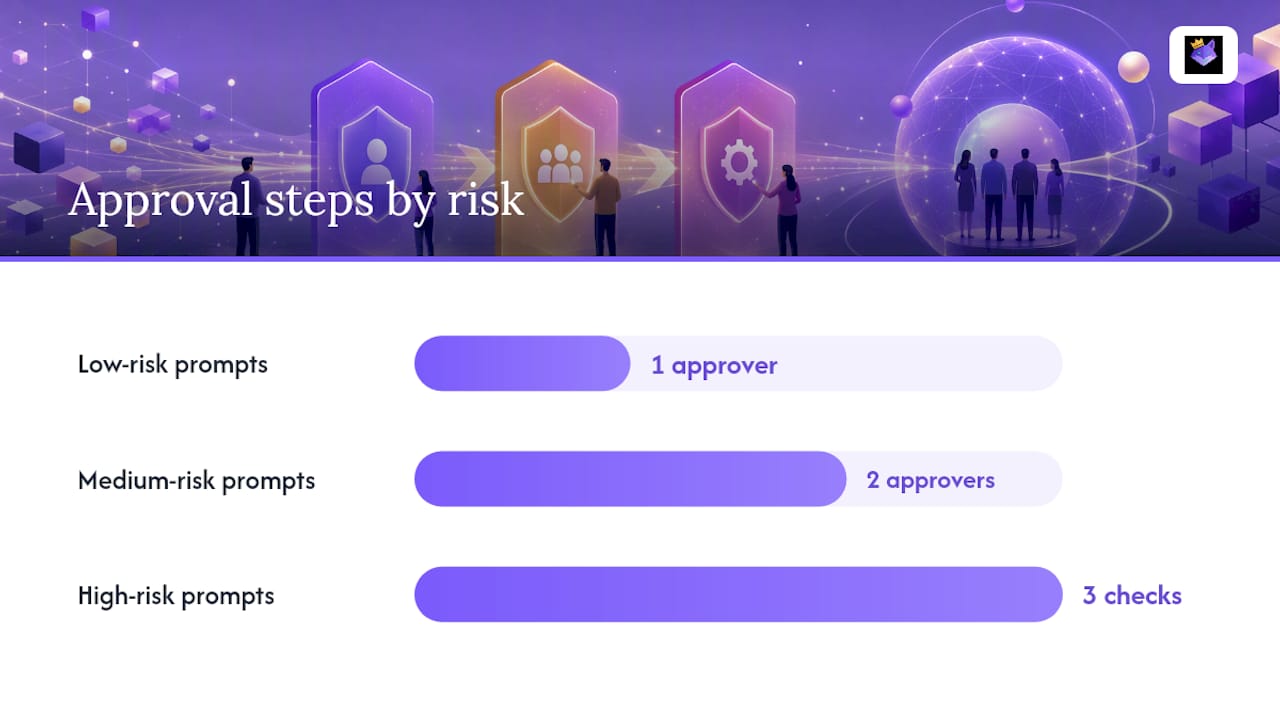
Approval strictness should scale with risk. A social caption template doesn't need the same sign-off as a prompt feeding customer financial data into a chatbot.
- Low-risk prompts (internal brainstorming, first drafts): light review, single approver.
- Medium-risk prompts (customer-facing copy, marketing automation): two approvers, changelog required.
- High-risk prompts (support scripts, anything touching personal or financial data): full CI testing, security review, and a documented rollback plan.
Audit logs and changelogs aren't paperwork here. Centralized registries and RBAC alone aren't enough; teams also need to pull hardcoded business logic out of the prompt text itself and connect prompts to a governed context layer, according to enterprise frameworks built around this exact failure mode. Set a retention policy too. Old prompt versions should archive, not vanish, in case a rollback is needed six months later.
Which Storage Option Fits Your Team?
The right storage pattern depends less on company size and more on who touches the prompts daily.
- Git repositories give engineers precise version control and a familiar review flow, but non-technical staff generally won't open a pull request to fix a typo in a marketing prompt.
- Hosted prompt managers add RBAC, a browser-friendly catalog, usage analytics, and cloud sync, functionality dedicated platforms are built specifically to provide at scale.
- Self-hosted vaults suit regulated industries that need full data residency control; open-source, self-hostable options exist for teams that can't send prompt data to third-party SaaS at all.
- Hybrid setups pair Git as the source of truth with a synced catalog interface, giving developers their workflow while non-engineers get a searchable UI.
Whatever you pick, confirm export and backup options up front. A prompt storage strategy that can't produce a clean export if you switch platforms later is a trap disguised as convenience.
How Do You Keep Sensitive Data Out of Shared Prompts?
The fastest way to leak customer data isn't a hack. It's a well-meaning employee pasting a real customer email into a test prompt and sharing it in a public channel. Sanitize inputs and outputs as a standing rule: no credentials, no personally identifiable information, no internal API keys inside prompt text, ever.
- Encrypt prompt data both in transit and at rest, and apply device-level policies so sync doesn't mean sync-to-anywhere.
- Enforce least-privilege RBAC and SSO, with temporary sharing tokens for one-off collaborator access instead of permanent editor rights.
- Run quarterly permission reviews, since abandoned accounts and stale editor access are how most leaks actually happen.
- Publish a documented privacy policy and state your data residency choices plainly, especially for teams operating under GDPR or similar regional frameworks.
Enterprise guidance is consistent on one point: RBAC, SSO, and audit logging need to be enforced at the infrastructure layer, not left as a written instruction inside the prompt itself. A note that says "do not share externally" inside a prompt body stops nobody. For a deeper look at locking down collaborator access specifically, see this guide on protecting prompts during team collaboration. Teams handling regulated data should also review broader practices on preventing data leakage in regulated industries, since prompt leakage often follows the same patterns as other document leaks.
What Happens When Prompt Data Gets Lost or Corrupted?
Disaster recovery for prompts gets ignored until the moment it's needed, usually right after a sync error overwrites a working production prompt with a stale draft. That single incident tends to trigger every governance conversation a team has been postponing.
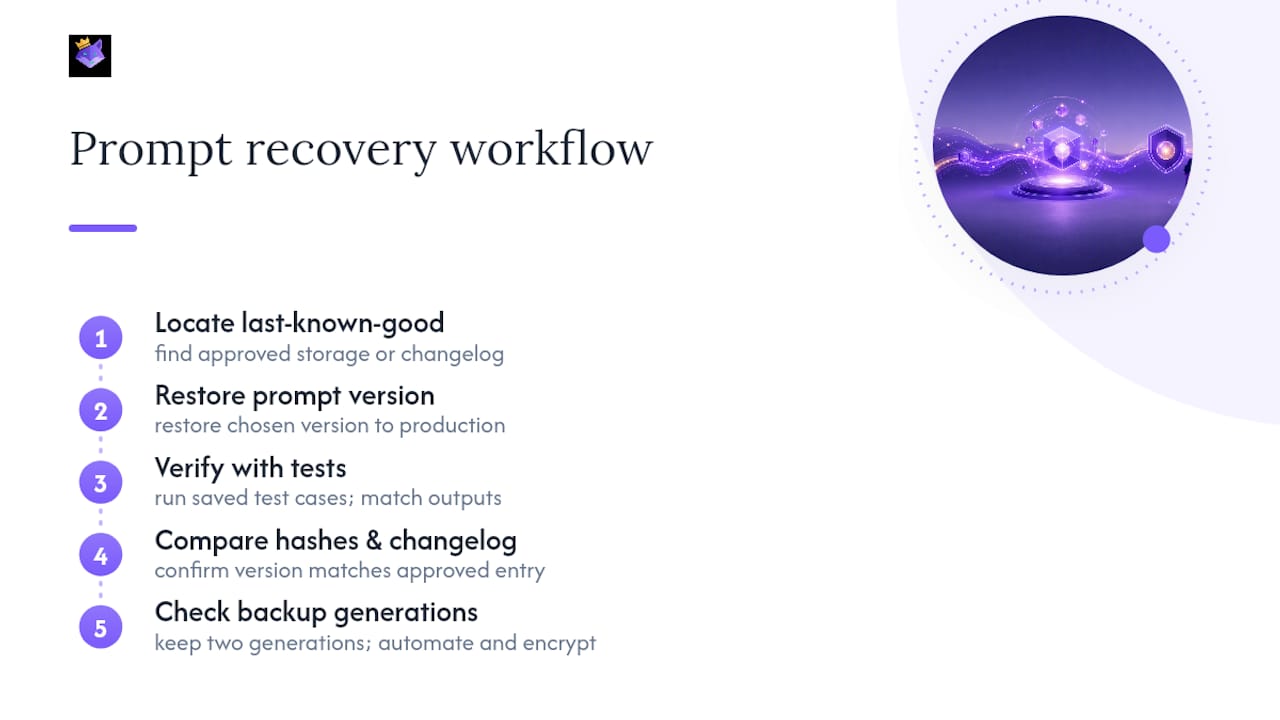
A workable recovery plan starts with three questions: Where does the last known-good version live? How fast can it be restored? And how do you confirm the restored version is actually correct, not just present? That third question is where most informal setups fail. A file that "looks right" isn't the same as a file verified against a gold-standard output.
Practical integrity checks include running restored prompts against saved test cases to confirm outputs match expected results, comparing checksums or version hashes against the last approved changelog entry, and keeping at least two backup generations, not just the most recent one, in case corruption gets synced before anyone notices. Encrypted, automated backups matter here specifically because manual backups get forgotten. Nobody remembers to export their prompt library the week before a laptop dies.
Recovery time matters less than recovery confidence. A team that can restore a prompt library in ten minutes but isn't sure the restored version is the right one hasn't actually solved the problem. Verification against test cases and changelogs closes that gap, and it's the difference between a minor hiccup and a week spent tracing which version of a customer-facing prompt actually shipped.
Why Treating Prompts Like Code Changes Everything
Most teams still treat prompts like sticky notes: useful, disposable, and nobody's official responsibility. That instinct is backwards. A prompt driving a customer support flow or a content pipeline carries as much operational weight as the code calling it, and it deserves the same version control, review, and audit trail.
What surprises people is how little of this requires new skills. Marketers and writers don't need to learn Git to get versioning, RBAC, and changelogs. They need a system that gives them those controls without the engineering overhead, which is exactly the gap Promptchief's cloud sync, searchable catalog, and access permissions are built to close. The checklist earlier in this piece isn't theoretical; it maps directly onto features teams can turn on today rather than build from scratch.
The teams that get burned aren't the ones without a security budget. They're the ones who assumed a shared doc was "fine for now" until a stale prompt shipped to a client, or an ex-employee's access never got revoked. Governance isn't overhead you add later. It's the thing that makes prompt sharing usable at all once more than two people touch the same asset.
— John
Get the Controls Without Building Them Yourself
Every control covered above, RBAC, versioning, audit logs, encrypted sync, a searchable catalog, is already built into Promptchief's prompt management platform, so your team doesn't spend a quarter engineering governance from scratch.

Instead of stitching together Git for developers, a spreadsheet for marketers, and a separate approval process for anyone in between, Promptchief gives every role one synced catalog with permissions baked in from day one. Prompts sync across devices through the Chrome extension and web app, so a writer's approved prompt and a developer's production version stay in the same governed system instead of drifting apart in separate tools. Team workspaces handle the ownership and approval layer directly, so the triad model described earlier isn't a policy document, it's a setting.
If you're deciding whether to build this internally or adopt a platform that already does it, start by comparing your current setup against the checklist above using Promptchief's prompt management software, then bring your team in on a shared workspace to see how quickly version history and access control actually get used once they're one click away instead of a policy nobody enforces.
Sources
- Enterprise Prompt Management: From Chaos to Control
- Your Prompts Are Production Code. Treat Them | PE Collective
- Building a Team Prompt Library with Governance
- Centralized Prompt Management for Enterprise: 2026 Framework
FAQ
What Is the Safest Way to Store Shared Prompts?
A hosted prompt manager or self-hosted vault with RBAC, encryption, and version control is safer than a shared document, since it enforces permissions and logs every change automatically.
Can I Share Prompts Containing Customer Data?
Avoid it entirely. Sanitize any prompt of personally identifiable information or credentials before sharing, and route genuinely sensitive workflows through encrypted, access-controlled systems only.
Should Our Team Use Git for Prompt Sharing?
Git works well for engineering-heavy teams that already use pull requests, but non-technical collaborators usually need a hosted catalog UI on top, often paired with Git as the underlying source of truth.
Why Do Audit Logs Matter for Prompt Sharing?
Audit logs record who viewed, edited, or approved a prompt, giving teams the traceability needed to investigate errors, satisfy compliance reviews, and confirm accountability for production changes.
Does Promptchief Support Secure Team Sharing?
Yes. Promptchief combines cloud sync, role-based team workspaces, and a searchable catalog so teams can share and govern prompts across devices without relying on unsecured documents.