
Prompt version control means treating every prompt as an immutable, tracked artifact rather than a string you edit in place. The model that works: assign each change a permanent version ID, point movable labels like staging or production at specific versions, and gate every promotion behind automated evaluation. Do this well and you get three things that ad hoc prompt editing never gives you: reproducibility, one-command rollback, and an audit trail that survives an incident review.
TL;DR:
- Prompt versioning must include immutable identifiers and content hashes to prevent unnoticed changes and ensure tamper-evident integrity.
- Releasing prompts to production requires evaluation gates, role-based access, and attached metadata to enable auditability and safeguard quality.
- Using fetch-by-label supports flexible rollouts, while fetching by version ID guarantees exact reproducibility for troubleshooting or audits.
- Promotion workflows should mimic software deployment with staged testing, review, gradual rollouts, and clear rollback procedures to maintain control.
- Post-deployment monitoring must track latency, accuracy, and drift at the version level, with logs including resolved version IDs to facilitate debugging.
Table of Contents
- What Does Prompt Version Control Actually Require?
- How Should You Fetch Prompts at Runtime?
- What Does a Safe Promotion Workflow Look Like?
- How Do You Build an Eval Gate That Actually Blocks Bad Prompts?
- Which Storage Pattern Fits Your Team?
- What Should You Monitor After a Prompt Ships?
- Who Should Be Allowed to Touch Production Prompts?
- Prompt Version Control Checklist for Engineering Teams
- How Promptchief Maps to These Practices
- Why Most Teams Get Prompt Versioning Backwards
- Try Prompt Version Control Without Building Your Own System
- Sources
- FAQ
What Does Prompt Version Control Actually Require?
A prompt-versioning system needs to record more than text. It needs a data model that captures identity, intent, and proof of quality together, so six months from now you can answer "why did we change this, and did it work?"
Start with two identifiers for every version: a sequential number (or a semver-style string, per the Semver) for human readability, and a SHA-256 hash of the actual prompt content for tamper-evident integrity. The hash matters more than people assume. If two team members claim to be running "v12" but one has a stray whitespace edit, the hash catches it instantly while the version number stays silent.
Beyond identity, a minimal schema should track:
- Author and timestamp of the change
- A written reason ("fixed hallucinated citations in RAG responses")
- Tags for the use case (support, summarization, extraction)
- Linked test results from the last eval run
- Target environment (draft, staging, production)
Line-level semantic diffing belongs in this layer too. A one-word change to a system prompt, like swapping "concise" for "brief," can shift model behavior more than a paragraph of reordered instructions. Tools built specifically for this, like promptctl, surface diffs at the line and semantic level rather than treating the prompt as an opaque blob.
Statistic callout: Open-source versioning projects consistently converge on the same feature set. reaatech/prompt-version-control documents SHA-256 checksums, tag-based lifecycles, eval-gated promotion, A/B serving, and per-version metrics as the baseline, not the extra credit.
Labels deserve their own rule: some are protected. production should never be movable by a direct write. It moves only through a promotion action that has passed its gates.

How Should You Fetch Prompts at Runtime?
Two fetch patterns cover almost every real deployment, and picking the wrong one for the wrong context causes most of the incidents teams report.
Fetch by label when you want fast, coordinated rollouts. Your application code asks for "the production prompt for the support-bot flow" and gets whatever version currently holds that label. Fetch by concrete version ID when you need exact reproducibility, such as replaying a customer complaint against the exact prompt that generated the original response.
Runtime resolution systems that decouple prompt updates from code deployment let teams experiment and roll back without shipping a new build, which is a meaningful velocity gain over baking prompts into application code, according to LaunchDarkly's work on runtime control for AI.
A few operational habits keep this safe; for example, you can build audit ready gates for human in the loop AI to ensure prompt changes meet governance standards.
- Cache resolved prompts locally with a short refresh window (30 to 60 seconds is common) so a label change propagates fast without hammering your prompt store on every request.
- Bundle a default prompt inside the application binary as a fallback if the prompt service is unreachable. Availability should never depend on a network call succeeding.
- Lock the
productionlabel behind role-based permissions so a bad edit can't reach live traffic without review.
Pro Tip: Log both the label requested and the resolved version ID with every inference call. When someone reports a weird output next week, you need the exact version, not just the label name.
What Does a Safe Promotion Workflow Look Like?
Promoting a prompt from someone's laptop to production traffic should follow the same discipline as a code deploy, not the informal "just update the string" habit most teams start with.
- Draft. A prompt engineer edits and tests locally or in a sandbox environment, running it against a small internal sample.
- Staging. The version gets promoted to a
staginglabel, where it runs against the full test suite and, ideally, a slice of shadow traffic. - Approval. A second reviewer checks the diff, the eval results, and the stated reason for the change before signing off.
- Production, often via canary. Instead of a full cutover, route a small percentage of traffic (a small percentage of traffic is typical). Route a small percentage of traffic to the new version with sticky sessions, so a given user sees consistent behavior during the test window.
- Full promotion or rollback. If metrics hold, widen the rollout. If they don't, re-point the
productionlabel back to the prior version ID. Rollback should never mean deleting or overwriting history; it means creating a new pointer to an old, still-intact version.
Every step in that chain should attach evidence: the eval scores, the sample size, and a one-line reason. That reason field is what turns a version history into an actual audit trail instead of a list of timestamps nobody can interpret later.
How Do You Build an Eval Gate That Actually Blocks Bad Prompts?
A test suite for prompts needs to look like a real sample of production traffic, not a handful of happy-path examples someone wrote in five minutes. Pull real (anonymized) queries, weight them toward your highest-volume intents, and refresh the set quarterly as usage patterns shift.
Useful metrics to track per version:
- Accuracy against labeled reference answers or rubric scoring
- Hallucination rate on fact-sensitive tasks
- Token cost per request
- Latency (p50 and p95)
- Downstream signals like thumbs-up rate or ticket reopen rate
Because LLM outputs are probabilistic rather than deterministic, comparing two prompt versions means comparing distributions of outputs across the test set, not expecting identical text twice, a point LaunchDarkly's prompt versioning guide makes directly.
Statistic callout: Effective gating systems combine absolute thresholds (accuracy must clear 90%) with regression limits (no metric may drop more than 2 to 3 percentage points versus the current production version), following the eval-gated promotion pattern documented in promptctl. A prompt that passes the floor but regresses sharply against its predecessor still gets blocked.
Which Storage Pattern Fits Your Team?
There's no single correct answer here. The right pattern depends on team size, how many non-engineers touch prompts, and how much deploy friction you can tolerate.
- Git gives you auditability and atomic deploys for free, since prompts live alongside code and ship together. The tradeoff, as Hamel Husain notes, is that it's slow for non-engineers who want to tweak a prompt without opening a pull request.
- Local-first stores (a single SQLite file plus a CLI) work well for solo developers or early-stage teams who don't need multi-user coordination yet, an approach tools like promptledger are built around.
- Hosted prompt stores give product managers and writers a UI to iterate fast and control runtime behavior directly, though they add a layer of indirection between "what's in the store" and "what's in your codebase."
- Hybrid setups use Git as the source of truth while syncing to a hosted layer via CI/CD or webhooks, per Agenta's prompt versioning guide, which tends to be the pattern that scales past the first few engineers. Our own guide on prompt storage patterns walks through migration paths between these options.
What Should You Monitor After a Prompt Ships?
A diff tells you what changed. It never tells you what happened once real traffic hit that change, which is why observability has to sit on top of your version control, not replace it.
Track these per version, not just in aggregate:
- Latency and token cost, broken out by version ID
- Success rate or accuracy proxy, sampled continuously in production
- Rate of flagged or escalated outputs
- Distributional drift versus the previous version's baseline
Every log line and trace should carry the resolved version ID, not just the label. Without that, debugging a regression means guessing which of the last five "production" versions actually generated the bad output someone is complaining about.
Pro Tip: *Set alerts on rate-of-change, not just absolute thresholds.
Who Should Be Allowed to Touch Production Prompts?
Governance is the part teams skip until an incident forces the conversation. Define it before that happens.
- Assign roles explicitly: who can edit drafts, who can approve staging promotions, and who holds the (small) list of people permitted to move the
productionlabel. - Protect production labels at the platform or repository level so a promotion requires an approval step, not just a direct commit.
- Require every promotion to carry attached eval evidence and a written reason, not a bare "updated prompt" commit message.
- Standardize your commit message and metadata format across the team so an audit six months from now doesn't require reverse-engineering five different personal conventions.
Our prompt management best practices guide goes deeper on setting these conventions up before you have twenty contributors instead of two.
Prompt Version Control Checklist for Engineering Teams
- Do assign every prompt an immutable ID and a content hash on save.
- Do require an evaluation pass before any label move to
production. - Do protect production labels with role-based access.
- Do keep a living test suite that mirrors real traffic, refreshed regularly.
- Don't scatter prompt strings across a dozen files with no shared source of truth.
- Don't skip the reason and metadata fields, even for "small" edits.
- Start small. Pilot the full workflow on one agent or one flow before rolling it out company-wide.
| Do | Don't |
|---|---|
| Version with IDs + hashes | Hardcode prompts inline across files |
| Gate promotions with evals | Promote on gut feel |
| Protect production labels | Let anyone write to production |
| Track per-version metrics | Rely on diffs alone |
How Promptchief Maps to These Practices
Most of what this guide recommends is a workflow problem before it's a tooling problem, but the tooling determines whether the workflow survives contact with a busy week. Promptchief's cloud-synced prompt library gives every saved prompt a persistent home instead of a scattering of documents and chat threads, which is the first prerequisite for any version history that actually holds together.
- Cloud sync across devices means a version saved by one team member is immediately visible to the rest of the team, not stuck in a local file.
- The community Hub and fillable templates give non-engineers a structured way to contribute prompt variations without touching a repository directly.
- Team workspace functionality supports the role separation that governance requires, keeping draft experimentation separate from shared, production-facing prompts.
- Prompt chains and the built-in enhancer support iterating on multi-step flows without losing track of which step changed.
Details on current plan limits and team seat pricing are available on the pricing page.
Why Most Teams Get Prompt Versioning Backwards
Most teams treat prompt versioning as a documentation exercise. They keep a changelog. They rename files v2_final_FINAL.txt. That's not version control, it's archaeology, and it falls apart the moment two people edit the same flow in the same week.
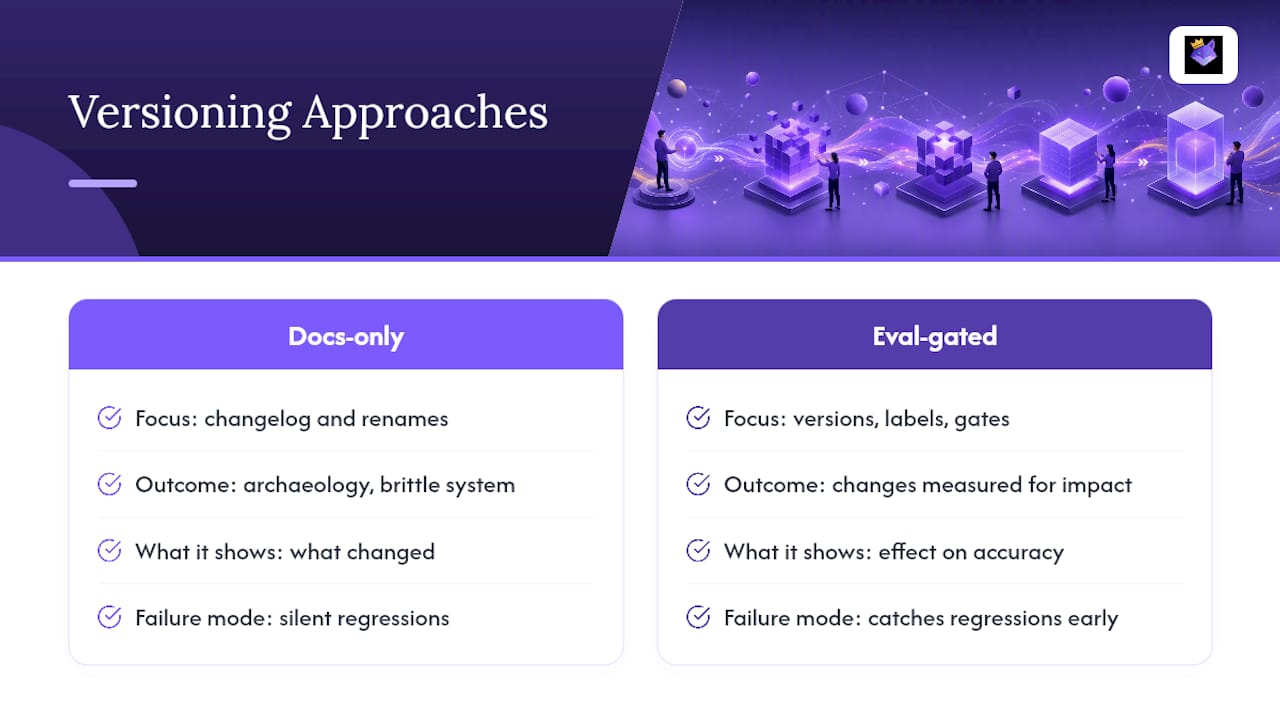
The uncomfortable truth is that prompt versioning only earns its keep when it's paired with evaluation. A version history with no gate behind it just tells you what changed, never whether the change helped. Teams that skip the eval step usually don't realize it until a "small wording tweak" quietly tanks accuracy for two weeks before anyone notices the trend.
Start small. Pilot the full loop, versions, labels, gates, on one low-risk flow before asking the whole team to adopt it.
— John
Try Prompt Version Control Without Building Your Own System
Setting up immutable versions, protected labels, and eval gates from scratch is a real engineering project, one most teams don't have the bandwidth to build well on the first try. Promptchief gives you the cloud-synced prompt library, templates, and team workspace pieces of that system already built, so you can start applying the version discipline this guide describes without standing up your own infrastructure first.
If you're managing prompts across various AI platforms, a free cloud-synced prompt organization tool can help evaluate whether such a system solves your immediate organizational challenges before you commit. Paid tiers offer various pricing options including monthly and annual subscriptions. Check the pricing page and start organizing your prompt library on the Promptchief landing page today.
Sources
- naya-ai/promptctl (promptctl)
- How should I version and manage prompts? – Hamel’s Blog
- LaunchDarkly: AI configs and runtime control for prompts
- Semver
FAQ
What Are the Three Types of Version Control?
Version control systems are generally grouped as local, centralized, and distributed. Prompt versioning tools mirror the same split: local-first stores like SQLite-based CLIs, centralized hosted prompt stores, and distributed Git-based repositories.
What Does Prompt Versioning Mean?
Prompt versioning means assigning a permanent, unique identifier (and often a content hash) to each distinct edit of a prompt, so you can track, compare, and roll back to any prior state on demand.
How Do You Do Prompt Versioning in Practice?
Assign each prompt edit an immutable ID and a SHA-256 hash, attach metadata like author and reason, run it through an evaluation suite, and only then promote it by moving a label such as production to point at that version.
What Are the 5 P's of Effective Prompting?
There's no single, universally agreed definition of "5 P's" for prompting; frameworks vary by source. What matters more consistently across guides is structure: a clear purpose, defined persona or role, precise instructions, relevant context, and a specified output format.
Does Promptchief Support Prompt Version Tracking?
Promptchief's cloud sync and prompt library keep saved prompt variations organized and accessible across devices, which supports the kind of centralized tracking this guide recommends for team workflows. Full feature details are on the prompt management page.