
The best developer prompt workflows are harness-agnostic and repo-first: prompt files live in version control, a phased sequence (clarify, plan, implement, review, test, commit, finalize) governs every task, and reasoning-heavy planning runs on a strong model while mechanical execution runs cheaper. That's it. Everything else is implementation detail.
Three rules make this work in practice. First, prompts belong in the repo, not in someone's notes app or Slack history. Second, one lens per prompt: a security review prompt should never also hunt for style nits. Third, every finding needs file:line evidence, or it doesn't ship.
Here's what you can do in the next 10 minutes:
- Clone a dev-workflow scaffold or similar template into a test repo.
- Add a single prompt file under
.github/prompts/code-review.md. - Run it against your last merged PR and see what it flags.
Pro Tip: Don't start with your production repo. Test the workflow on a side project first so a bad prompt doesn't block a real release.
Key Takeaways
Reliable developer prompt workflows depend on repo-resident prompt files, a phased lifecycle with clear gates, and single-lens prompts backed by strict output contracts.
| Point | Details |
|---|---|
| Store prompts in version control | Keep prompt files in .github/prompts/ so they're versioned and shared, not stuck on one machine. |
| Split planning from execution | Run reasoning-heavy planning on a frontier model and mechanical steps on cheaper or local models. |
| Enforce one lens per prompt | Separate security, bug, and performance reviews into distinct prompts with file:line evidence. |
| Start with low-risk automation | Automate test generation and PR summaries first, then expand to security-critical tasks. |
| Use a prompt manager for cross-tool consistency | Promptchief syncs and versions prompts across Claude Code, Copilot, and other tools your team uses. |
Table of Contents
- The Seven-Phase Lifecycle Behind Reliable Prompt Workflows
- How Do You Structure a Master Prompt for Code Review?
- Which Orchestration Pattern Fits Your Team?
- Where Should Prompts Live in Your Repo?
- Three Recipe Prompts You Can Paste Into Your Repo Today
- How Do You Control Costs and Protect Secrets in Prompt Workflows?
- Rolling Out Prompt Workflows Across a Team
- What I've Learned Running These Workflows
- A Prompt Manager Makes These Patterns Stick
- Sources
- FAQ
The Seven-Phase Lifecycle Behind Reliable Prompt Workflows
Every reliable developer prompt workflow breaks into seven phases, and each one has a different job for the model.
- Intake. Turn a vague request into a scoped ticket. Needs a reasoning model; output is a written problem statement.
- Planning. Draft a spec, task list, and acceptance criteria before any code exists. Industry guidance on plan-first workflows shows this step cuts rework substantially by giving the model something concrete to verify against.
- Implementation. Generate the diff. This can often run on a cheaper or local model once the plan is locked.
- Code review. A single-lens prompt checks one thing (security, bugs, or performance) and cites file:line.
- Testing. Generate or run tests tied to the acceptance criteria from planning.
- Commit/ship. Package the diff, tests, and a PR summary.
- Knowledge compounding. Feed outcomes back into the prompt library so the next ticket starts smarter.
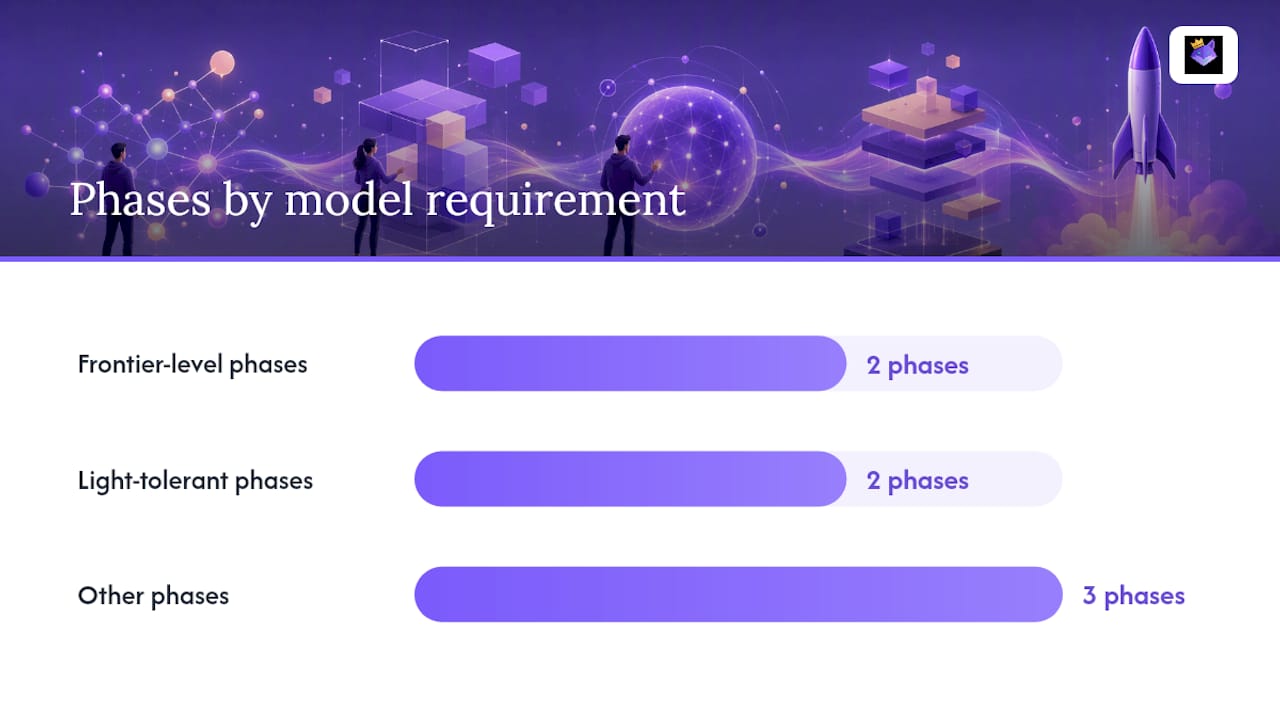
Planning and code review need frontier-level reasoning. Implementation and test generation tolerate lighter models fine.
Pro Tip: Break tickets small enough that one phase fits in a single context window. Models degrade fast once you cram three features into one prompt.
How Do You Structure a Master Prompt for Code Review?
A master prompt that survives contact with a real team follows a fixed shape: Role → Scope → Method → Output contract → Clarifying questions. Role tells the model what kind of reviewer it is. Scope draws a hard boundary around what it should and shouldn't touch. Method describes how to reason through the code. The output contract dictates the exact shape of the response.
Single-lens prompts consistently beat do-everything prompts. A prompt asked to find security issues, style problems, and performance regressions in one pass tends to under-deliver on all three. A curated set of code-review master prompts backs this up: narrowing scope to one lens per run produces sharper, more actionable findings.
A solid output contract includes:
- Severity rating (critical, major, minor)
- Exact file:line reference for every finding
- Confidence score
- A copy-ready fix, not just a description of the problem
Pro Tip: Add a one-line changelog at the top of every prompt file. Six months from now you'll want to know why someone tightened the security lens.
Which Orchestration Pattern Fits Your Team?
Three patterns dominate developer prompt workflows right now: IDE slash-command plugins, CLI-driven pipelines, and harness-agnostic orchestrators using manifest folders like .pipeline/, .dw/, or .claude/. A harness-agnostic pipeline scaffold demonstrates the third pattern well, letting a team pick Claude Code, OpenAI, or a local Ollama runtime per phase without rewriting the workflow logic.
The split that matters most: run planning on a frontier reasoning model, then hand execution to whatever is cheapest that still passes your tests. Formatting, boilerplate, and small refactors rarely need a top-tier model.
| Dimension | Slash commands | CLI pipelines | Harness-agnostic orchestrator |
|---|---|---|---|
| When to use | Quick, IDE-bound tasks | Repeatable CI-triggered jobs | Multi-model teams, planner/executor split |
| Model/harness compatibility | Tied to one IDE integration | Flexible, script-controlled | Broadest, supports Claude Code, OpenAI, Copilot, Ollama |
| Latency/cost | Fast, interactive | Batch-friendly, moderate cost | Tunable per phase, lowest average cost |
| Security/privacy | Local to the developer session | Depends on CI runner config | Easiest to audit centrally |
Pro Tip: If your team already splits work between a senior reviewer and junior implementers, mirror that split with your models. It's a familiar mental model that ports directly.
Where Should Prompts Live in Your Repo?
Prompts stored anywhere outside version control disappear the moment their author changes laptops. Store them in .github/prompts/, which multiple practitioner guides treat as the de facto standard because it makes prompts discoverable as slash commands and keeps them versioned alongside the code they review.
Wire prompts into CI by running the reviewer as a pre-merge job. A gate like /dw-secure-audit or dw-verify should block merges until it passes, the same way a linter does today.
Version prompts with a simple date tag or semver number in the file header, and keep a manifest file listing every active prompt and its owner.
Minimal bootstrap steps to copy into your pipeline:
- Add
.github/prompts/with two starter files:code-review.mdandpr-summary.md. - Add a manifest file (
prompts.json) listing each prompt, its version, and last-updated date. - Add a CI step that runs the code-review prompt on every pull request and posts findings as comments.
- Add a required-status-check rule so merges block until the review step reports zero critical findings.
Three Recipe Prompts You Can Paste Into Your Repo Today
These three recipes cover the highest-value, lowest-risk automations: test generation, PR summaries, and boilerplate reviews are where teams see the fastest measurable wins, long before anyone touches security-critical automation.
/code-review-security. Role: senior security reviewer. Scope: this diff only, security lens only. Output contract: file:line, severity, confidence, copy-ready fix. Adaptation note: tune the vulnerability checklist per language (SQL injection patterns differ from XSS patterns)./generate-tests. Inputs: file path, existing test framework (Jest, PyTest, JUnit). Output: new test file matching existing naming conventions and assertion style. Adaptation note: point the prompt at one existing test file as a style reference./generate-pr-summary. Inputs: diff and commit messages. Output: reviewer-focused PR body with a change summary, risk notes, and a test checklist. A pull request description generator built for exactly this task shows what the output should look like.
Before committing any recipe to your team repo, run it against three or four small, already-merged PRs. Count false positives, tune the prompt's method section, and only then require it in CI.
Pro Tip: Require the model to ask up to three clarifying questions before it runs a full review. It sounds slower, but it catches ambiguous scope before the model hallucinates a fix for a problem that doesn't exist.
How Do You Control Costs and Protect Secrets in Prompt Workflows?
Validation before merge should include automated tests, static analysis, a security gate (SAST plus a secrets scanner like gitleaks), and human sign-off on anything security-critical. No prompt output merges on its own say-so.

Cost control comes down to routing: reasoning-heavy steps go to a frontier model, mechanical steps go local or cheap. Teams that track token spend per pipeline run against measured outcomes can tune that split instead of guessing at it. Batch related questions into one session and prune stale context rather than re-sending an entire file history each turn.
Treat every prompt and response as an auditable artifact. Watch for prompt injection in anything sourced from user content, and never send secrets or customer PII to a third-party model endpoint.
Track these regularly:
- Token spend per pipeline run
- False-positive rate on review findings
- Time-to-merge before and after automation
Rolling Out Prompt Workflows Across a Team
A harness-agnostic rollout follows a simple sequence: clone a scaffold, pick your harness (Claude Code, OpenAI, Copilot, or a local Ollama setup), initialize the manifest, then run the orchestrator with a planner/executor split where it makes sense.
- Bootstrap the repo scaffold and prompt manifest.
- Add CI hooks and initial prompt files for review and test generation.
- Add monitoring hooks for token spend and false-positive rate.
- Define gating rules for what blocks a merge versus what just warns.
Track time saved per PR, tests generated per change, review time, and token spend over a four to six week pilot. Success looks like a measurable drop in review time without a rise in post-merge bugs.
Pro Tip: Start with test generation and PR summaries. Save security-critical automation for after the team trusts the pipeline.
What I've Learned Running These Workflows
The failure I've seen most often isn't a bad model. It's a developer who skips planning and asks the model to "just write the code," then spends longer fixing the output than they would have spent writing it themselves. The fix is almost boring: codify the plan-first step, make it a real prompt file, and don't let anyone skip it.
Teams that enforce this consistently report shorter review cycles and fewer rewrite loops, because the model isn't guessing at intent anymore. Try the recipes above in a sandbox repo this week and see what breaks first.
A Prompt Manager Makes These Patterns Stick
Repo-resident prompts solve versioning, but they don't solve discovery across your other tools. Once you're jumping between Claude Code for planning, Copilot for inline suggestions, and a browser tab for ChatGPT, prompt drift creeps back in fast. That's the gap Promptchief closes: fuzzy search across every saved prompt, cloud sync so the same code-review prompt is available whether you're on a laptop or a different machine entirely, and a team workspace that keeps everyone pulling from the same versioned library instead of six slightly different copies.

The feature set maps directly onto what this article recommends: prompt chains for multi-step review and PR-summary sequences, versioning so you can track what changed in a prompt and why, and a community hub for pulling in tested templates instead of writing every recipe from scratch. If you want a starting point, browse the prompt management workflow guide for templates you can adapt and drop into .github/prompts/, or set up Promptchief directly and start syncing your review, test, and PR-summary prompts across every tool your team already uses.
Sources
- AI coding workflow (Addy Osmani)
- Prompt Workflows — Turning AI Assistants Into Developer Productivity Commands
- How to Automate Developer Workflows with AI: Complete Guide
Clone one into a sandbox repo and test it against a real ticket before rolling it out to your team.
FAQ
What are the four types of workflows in prompt-driven development?
Most teams organize around intake, planning, implementation, and review/ship workflows, though larger teams often split review and testing into separate stages for clearer gating.
What is a development workflow?
A development workflow is the sequence of steps, from intake through deployment, that a team follows to turn a request into shipped, tested code, now increasingly codified as versioned prompt files and CI gates.
What are the five steps of a workflow?
A common five-step version condenses the full lifecycle into intake, plan, implement, review, and ship, with testing folded into the review or implementation stage depending on the team.
What are good starter prompts for developer workflows?
Strong starting points include a single-lens code-review prompt, a /generate-tests prompt tied to your test framework, and a PR-summary prompt, all stored as versioned files and, ideally, managed through a tool like Promptchief so they stay searchable across tools.
Should I use Claude Code, OpenAI, GitHub Copilot, or Ollama?
Pick based on the phase: Claude Code and OpenAI models handle planning and complex review well, GitHub Copilot fits inline coding assistance, and Ollama suits cost-sensitive, mechanical steps run locally.