
For prototypes, resend the full prompt every time. For high-throughput production calls, use prompt caching with a stable, fixed-first prefix. For anything multi-turn, lean on session or agent memory instead of rebuilding context by hand. Templating and a small prompt repository tie all three together once you move past the "just copy-paste it again" phase.
TL;DR:
- Prompt caching is most effective when fixed instructions are placed at the beginning of prompts and variable content at the end, ensuring cache hits.
- Reusing prompts by editing system prompts mid-conversation invalidates caching benefits, so updates should be sent as new messages instead.
- Building a structured, versioned template with clear variables and defaults improves retrieval speed and maintainability over time.
- Regularly measuring cache-hit rates, output quality, and retrieval time ensures prompts stay effective and relevant across changing models and tasks.
- Using prompt management tools like cloud sync and fuzzy search reduces retrieval friction, especially when managing dozens of prompts across multiple AI platforms.
Table of Contents
- Prompt Reuse Strategies by Latency, Scale, and Continuity
- Naive Reuse, System Prompts, Templating, Agent Memory, and Prompt Files
- How Prompt Caching Actually Works (And Where It Breaks)
- Turning a Working Prompt Into a Template You Can Actually Find Again
- A Production Rollout Plan and Best-Practice Checklist
- Detecting Which Prompts Deserve to Be Reused
- Measuring Whether Reused Prompts Are Still Working
- What Most Teams Get Wrong About Reuse
- How PromptChief Fits Into Your Reuse Workflow
- Where to Go Deeper on Caching and Templating
- Sources
- FAQ
Prompt Reuse Strategies by Latency, Scale, and Continuity
Match the strategy to what's actually straining your workflow, not to whatever pattern you read about last.
- Prototype or one-off task: resend the full prompt. Optimization here is wasted effort until the workflow proves itself.
- Low-latency, high-frequency calls: use prompt caching with a stable prefix. This is where caching actually pays for itself in both speed and token cost.
- Multi-turn conversations that need continuity: use session or agent memory instead of re-sending accumulated context on every turn.
- Consistency across tools and team members: build a template with variables, then store it in a prompt manager or repository so everyone pulls the same version.
Most production systems end up combining all four: a cached system prompt, a templated task instruction, and memory for the parts of the conversation that genuinely need to persist.
Naive Reuse, System Prompts, Templating, Agent Memory, and Prompt Files
Each reuse method solves a different problem, and mixing them up is the most common source of wasted engineering time.
- Naive resend. Copying the same prompt text into every request is fine for exploratory work and single-user scripts. It falls apart once you have concurrent users, because every request pays full token cost and full latency with no caching benefit.
- System prompts with session memory. A system prompt that stays fixed for the life of a session gets the caching benefit automatically. The moment you rewrite it mid-conversation, you break that continuity. Anthropic's engineering notes on building Claude Code make a specific point here: pass new information in follow-up messages, not by editing the system prompt, because edits invalidate the cached prefix and add latency right when you need speed most.
- Templating. Split any prompt into fixed instructions and variable inputs, give each variable a sensible default, and define what "good output" looks like before you call it done. IBM watsonx's approach to prompt variables treats this as the dividing line between a one-off prompt and a reusable template: the fixed instructions stay identical across calls, and only the injected variables change.
- Agent memory. Memory systems that persist facts, preferences, or task state across sessions are powerful but operationally heavier. They need storage, retrieval logic, and a strategy for what to forget. Reach for this only when session-length context genuinely isn't enough.
- Prompt files and repositories. Storing prompts as versioned files (a common pattern is
.prompt.md) inside a git repo lets teams track changes, review edits like code, and invoke prompts directly from an editor. Microsoft's guidance on reusable prompt files and VS Code's prompt files documentation both describe frontmatter plus markdown as the format, with an IDE command doing the retrieval instead of a search through old chat logs.
Pro Tip: Never let "reusable" become a euphemism for "never revised." A template that's five months stale is worse than a fresh prompt written from scratch, because it carries assumptions nobody remembers making.
How Prompt Caching Actually Works (And Where It Breaks)
Prompt caching works on longest common prefix matching: the system compares your new request against cached prefixes and reuses whatever text matches exactly, character for character. Put your fixed instructions first and your variable content last, and you preserve that match on every call. Reverse the order, or bury a timestamp early in the prompt, and you silently lose the cache on every single request.
Providers expose this through explicit and implicit breakpoints. Implicit caching matches automatically wherever the prefix lines up; explicit controls, like prompt_cache_options, prompt_cache_breakpoint, and prompt_cache_key, let you mark exactly where the cache boundary sits and group related requests under a shared key. OpenAI's prompt caching guide recommends key patterns like prompt_name_v1:workspace_x:shard_y to group traffic by workspace or feature, and suggests splitting a busy group into more shards the moment hit rate starts dropping.
| Failure mode | What breaks the cache | Fix |
|---|---|---|
| Timestamps in the prompt | Every request has a unique prefix | Move dynamic values to the end, or drop them from the cached portion |
| Non-deterministic serialization | JSON key order or whitespace shifts between calls | Serialize with a fixed, stable format |
| Mid-session system prompt edits | Rewriting instructions invalidates everything downstream | Push updates into new messages, not the system prompt |
| Tool definitions changing between calls | Alters the fixed prefix | Keep tool schemas stable; defer-load anything volatile |
- Track cache hit rate and average cached-token count per request as your two core health signals.
- Watch the tradeoff between the write premium on a cache miss and the read discount on a hit before deciding whether a longer cached prefix is worth it.
- Set a TTL that matches your traffic pattern. Cache entries idle too long, and you're paying full price again right when load spikes.
The Prompt Caching Handbook frames the fixed-first, variable-last discipline as the single change that raises hit rates the most, ahead of any sharding or key tuning.
Turning a Working Prompt Into a Template You Can Actually Find Again
A prompt that works once is a draft. A prompt that works reliably, with predictable inputs and a name you can search for, is a template.
- Separate fixed text from variable text. Read through the prompt and mark every phrase that changes between uses. Everything else is your fixed instruction block.
- Name the variables clearly and set defaults.
{{tone}}with a default of "neutral" beats an unnamed blank that someone has to guess at six months later. - Write acceptance criteria before you save it. One or two lines on what "correct output" looks like saves you from silently degrading a template through small edits nobody tracks.
- Adopt a folder and tag convention early. A library of 20 genuinely high-value prompts, organized by task type, beats 200 half-forgotten ones. Practitioner guidance on avoiding rewritten prompts points to small, frequently revised libraries as the pattern that actually sticks.
- Optimize for retrieval speed, not just storage. If finding and inserting a saved prompt takes longer than three seconds, most developers will just retype it. Fuzzy search and an in-editor hotkey close that gap.
Pro Tip: Version your templates the same way you version code. A prompt that changed subtly last week and broke your output quality is a debugging nightmare without a snapshot to diff against.
A Production Rollout Plan and Best-Practice Checklist
Move through this in order. Skipping straight to agent memory before you've measured your baseline is how teams end up debugging two new systems at once.
- Prototype first with plain resend, and confirm the prompt itself actually works before optimizing anything.
- Instrument cache-hit rate and average latency the moment you move to production traffic.
- Add prompt caching once request volume justifies it, ordering fixed content before variable content.
- Layer in agent memory only if session-length context is provably insufficient for the task.
- Document every template's acceptance criteria and keep a revise-after-use habit so quality doesn't quietly drift.
| Rollout stage | Primary metric to watch | Trigger to move forward |
|---|---|---|
| Prototype | Output quality against acceptance criteria | Prompt produces consistent results manually |
| Caching | Cache hit rate, average latency | Repeated calls with a shared stable prefix |
| Memory | Context retention accuracy across turns | Session length exceeds what fits comfortably in one prompt |
| Team library | Retrieval time per prompt | More than one person reusing the same prompts |
Detecting Which Prompts Deserve to Be Reused
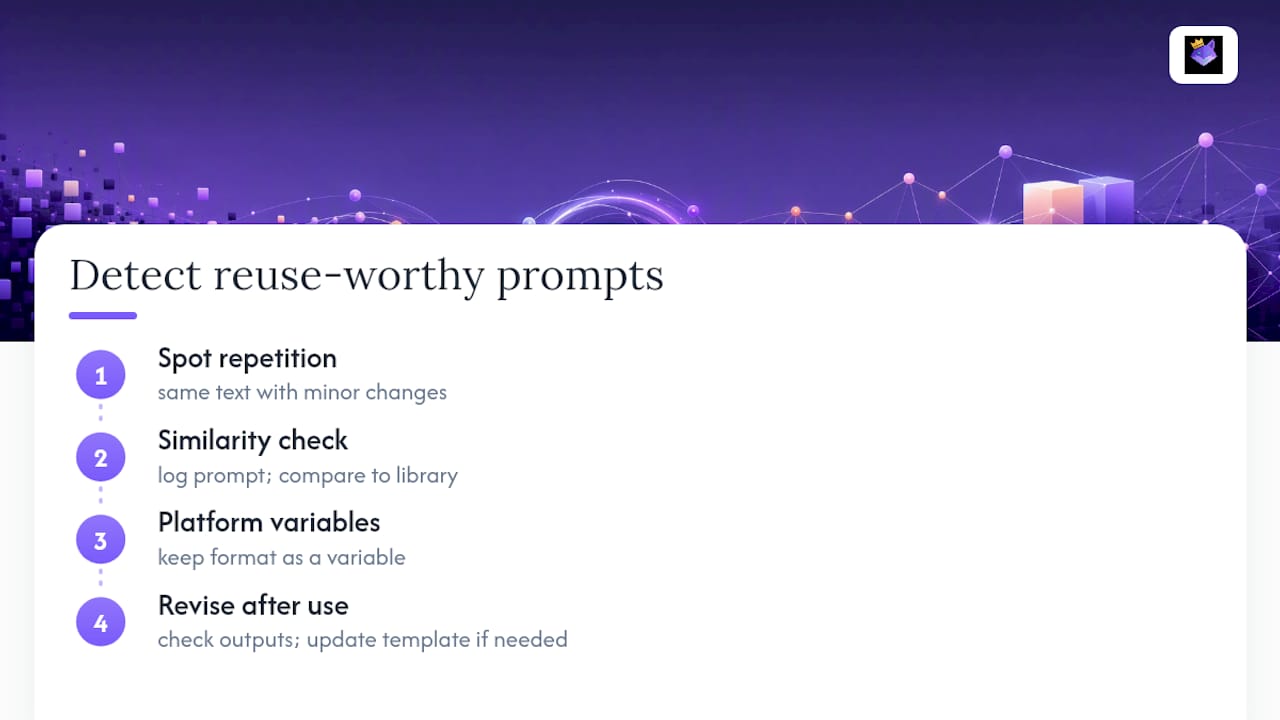
Not every prompt that worked once is worth templating. The signal to watch for is repetition with only minor variation: if you're rewriting the same 200 words with a different product name or date three times a week, that's a candidate.
A practical detection method is logging prompt text alongside a similarity check against your existing library before a new one gets saved. If a new prompt is a near-match to something already stored, that's a signal to update the existing template's variables rather than create a duplicate. Teams that skip this step tend to accumulate a library that looks comprehensive but is mostly redundant, which defeats the purpose of a curated set.
Context adaptation works the same way in reverse. A template built for one AI platform's formatting conventions often needs light adjustment for another, especially around system prompt handling and output structure. Rather than maintaining separate prompts per platform, keep the fixed instruction block identical and isolate the platform-specific formatting into its own variable. That way, adapting a reused prompt to a new tool is a one-line edit, not a rewrite.
The revise-after-use habit does double duty here. Each time a stored prompt gets used, a quick glance at whether the output still hits your acceptance criteria tells you whether the prompt has drifted out of relevance as the underlying task or model has changed. Prompts that consistently need manual correction after retrieval are telling you the template itself needs an update, not that the user is doing something wrong.
Measuring Whether Reused Prompts Are Still Working
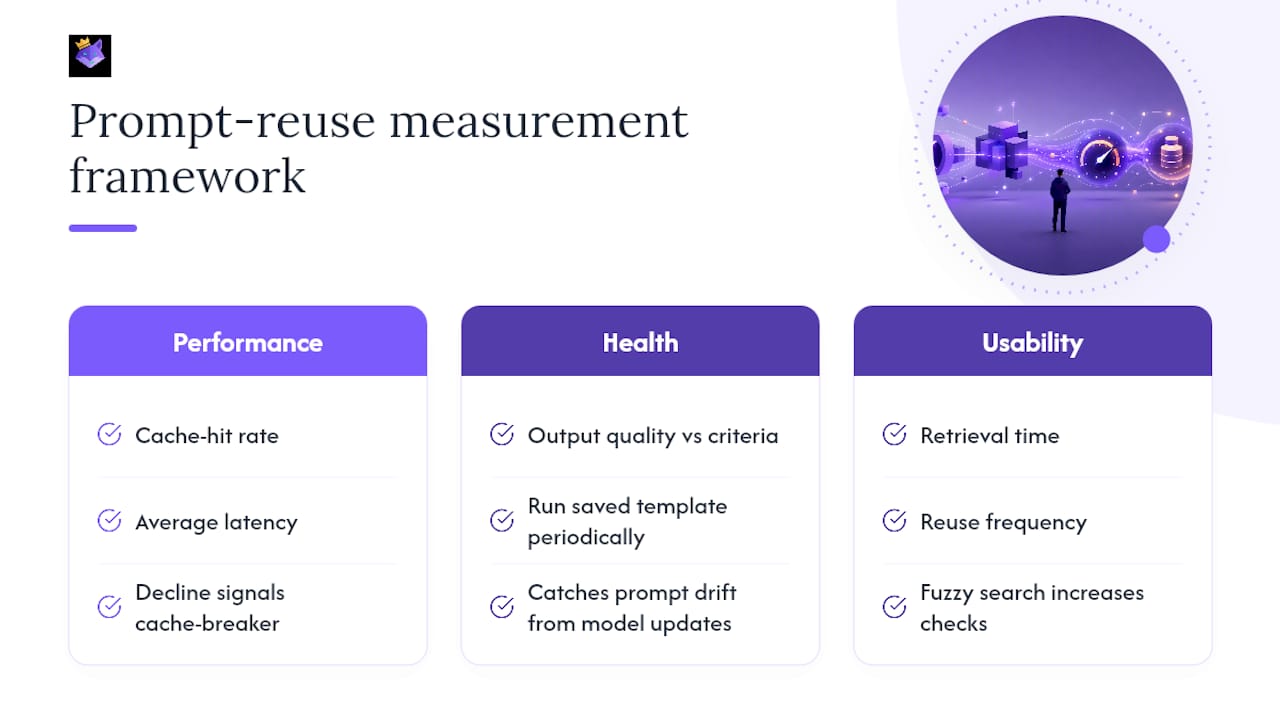
Reuse without measurement is just guessing that yesterday's prompt still fits today's task. Three metrics matter more than the rest.
Cache-hit rate and average latency tell you whether your technical caching setup is actually delivering the speed and cost benefit it's supposed to. A hit rate that drifts downward over weeks usually points to a cache-breaker that crept back in, like a timestamp or a reordered tool definition, rather than a fundamental caching failure.
Output quality against your written acceptance criteria is the metric most teams skip, and it's the one that catches prompt drift. Run a saved template periodically against a small set of representative inputs and check the output still clears the bar you set when you first saved it. Model updates on the provider side can shift a prompt's behavior without any change on your end.
Retrieval time and reuse frequency measure whether the library is actually being used. A prompt manager with fuzzy search that gets checked before every relevant task is doing its job. A folder of saved prompts nobody opens because it's faster to just retype from memory means your retrieval ergonomics failed, not your prompt content.
Track these three together, not in isolation. A template with a perfect cache-hit rate but declining output quality is a maintenance problem disguised as a performance win.
What Most Teams Get Wrong About Reuse
The mistake I see constantly isn't a bad prompt. It's treating "reusable" as a permanent state instead of a maintenance commitment. Teams template a prompt once, drop it in a shared doc, and never touch it again, which is functionally the same as not templating it at all.
The retrieval friction point deserves more attention than it gets. If pulling a saved prompt takes longer than about three seconds, from the moment you need it to the moment it's in your input field, most developers will just retype it from memory. That's not laziness. It's rational behavior when the "reusable" system is slower than the manual workaround. A prompt manager like Promptchief exists specifically to close that gap: cloud sync means the prompt you saved on your laptop is available on your work machine, and fuzzy search means you don't need to remember the exact title you gave it three weeks ago.
The caching side gets treated as pure infrastructure, but it's really a discipline about prompt structure. Teams that get the fixed-first ordering right from day one rarely think about caching again. Teams that bolt it on later spend weeks hunting invisible cache-breakers.
— John
How PromptChief Fits Into Your Reuse Workflow
Building your own retrieval layer, a browser extension, a sync backend, a variable system, works, but it's a project on top of a project. Promptchief packages that infrastructure so you can spend your engineering time on the prompt logic itself, not the plumbing around it.

Look for four things when you're deciding whether to build this yourself or adopt a tool: cloud sync so your library follows you across devices, an extension or IDE integration for direct injection instead of tab switching, variable support for genuine templating, and fuzzy search fast enough to hit that sub-three-second retrieval window. Some prompt managers cover all four, plus team workspaces for shared libraries and prompt chains for multi-step workflows that a single static prompt can't handle. If you're a solo developer with three prompts, a text file is fine. Once you're managing dozens of prompts across ChatGPT, Claude, Gemini, and other tools, or coordinating a team that keeps rewriting the same instructions, the cloud sync and Chrome extension setup removes the retrieval friction that kills most home-grown attempts. Start by importing your highest-value prompts into a prompt management workspace and see how much faster your next task starts.
Where to Go Deeper on Caching and Templating
For the mechanics behind this playbook, go straight to the source docs. OpenAI's prompt caching guide covers prefix matching and breakpoint controls in detail. The Prompt Caching Handbook catalogs cache-breakers you'll otherwise discover the hard way. IBM watsonx's prompt variables documentation walks through templating step by step, and Microsoft's prompt files guidance shows the version-controlled repo pattern in practice. For a shorter, more opinionated read, this DEV Community guide and AmmarAI's practical writing tips are both worth a bookmark.
Sources
- Prompt caching guide — OpenAI Developers
- Boost your Copilot collaboration with reusable prompt files — Microsoft DevBlogs
- Building reusable prompts | IBM watsonx
- The Prompt Caching Handbook — Vibe Engines
FAQ
What are some effective prompt reuse strategies?
The core strategies are resending prompts for prototypes, prompt caching with a stable prefix for high-volume production calls, session or agent memory for multi-turn continuity, and templating with variables for cross-tool consistency.
How do I create reusable prompts?
Separate the fixed instructions from the variable inputs, name each variable clearly with a sensible default, write down what counts as acceptable output, and save the result as a versioned template rather than a one-off message.
What are some good examples of reusable prompts?
Strong candidates are recurring tasks like code review checklists, content briefs with swappable topic and tone variables, and customer-support response templates. Promptchief's prompt template library has ready-made examples across common use cases.
What are some effective prompting techniques beyond reuse?
Ordering fixed content before variable content preserves cache hits, keeping tool definitions stable avoids breaking cached prefixes, and a revise-after-use habit keeps templates from quietly drifting out of quality over time.
How is prompt caching different from session memory?
Prompt caching reuses identical prefix text across separate requests to cut latency and cost, while session memory tracks and carries forward context within an ongoing conversation. They solve different problems and often get used together.