
The five moves that cut token bills fastest are: enable prompt caching on static prefixes, cap output with max_tokens and stop sequences, route routine tasks to cheaper models, compress repeated system-prompt prefixes, and set hard per-feature budgets with alerting. Combining these tactics typically cuts 30–70% of LLM spend for production workloads. The OpenAI API exposes all five levers today. Promptchief adds the governance layer that keeps compressed, tested prompts consistent across your team.
Your five-minute checklist:
- Enable provider prompt caching on any system prompt longer than ~1,000 tokens
- Add
max_tokensto every request; require JSON or "answer-only" output format - Route classification, extraction, and summarization tasks to a smaller model tier
- Compress static system-prompt prefixes and store the compressed version in version control
- Wire per-feature token counters and a cost-spike alert before touching anything else
Do not skip the last bullet. Every other change on this list is a guess until you have per-call data telling you where the money actually goes.
Key Takeaways
Combining prompt caching, output caps, model routing, and compression typically cuts 30–70% of LLM spend, but only when instrumentation comes first and every change is validated against a quality baseline.
| Point | Details |
|---|---|
| Instrument before optimizing | Log input tokens, output tokens, cache hits, model, and ET per call before changing anything. |
| Output tokens cost more | Output tokens are often 3–10x more expensive than input tokens; cap them first with max_tokens. |
| Caching is the fastest win | Enable provider prompt caching on static prefixes; add semantic caching in Redis for repeated queries. |
| Route by task complexity | Send classification and extraction to cheaper models; reserve frontier models for genuinely hard tasks. |
| Promptchief governs prompt versions | Store compressed, tested prompts in Promptchief to prevent filler from creeping back after optimization. |
Table of Contents
- How do you measure token usage before you optimize it?
- Where do tokens usually go? The 7 common culprits
- What are the highest-ROI changes you can ship in hours?
- How should you handle RAG context to avoid token bloat?
- Which caching patterns save the most tokens?
- How do you stop agents from burning tokens in loops?
- What prompt engineering tactics actually reduce token count?
- When does batching actually help you cut costs?
- How do you measure quality vs. token savings and deploy safely?
- Concrete implementation patterns with LangChain, Redis, and Pinecone
- How does Promptchief fit into a token-optimization workflow?
- What tools automate continuous prompt token auditing?
- The order of fixes matters more than the fixes themselves
- Promptchief gives developers a governance layer for prompt cost control
- Sources
- FAQ
How do you measure token usage before you optimize it?
Skipping instrumentation is the single most common mistake teams make. Google Cloud and GitHub engineering leads both flag it explicitly: teams guess which calls are expensive while agentic loops quietly run 10–15x over budget in the background. You cannot reduce prompt token cost you cannot see.
The core metrics to log per call
Log these fields on every LLM request, ideally through an API proxy or middleware layer:
| Field | What it captures |
|---|---|
input_tokens | Tokens sent in the prompt (system + user + history) |
output_tokens | Tokens in the model's response |
cache_read_tokens | Input tokens served from provider cache (discounted) |
cache_write_tokens | Input tokens written to provider cache |
model | Model ID (drives per-token cost multiplier) |
feature / endpoint | Which product feature triggered the call |
cost_usd | Computed: (input × input_rate) + (output × output_rate) |
ET (Effective Tokens) | Weighted score: input + (output × model_multiplier) |
The Effective Tokens (ET) metric matters because output tokens are often 3–10x more expensive than input tokens. A raw token count hides that asymmetry. ET surfaces it.
A minimal log line in token-usage.jsonl looks like this:
{"ts":"2026-03-15T10:22:01Z","model":"gpt-4o-mini","feature":"summarize","input_tokens":812,"output_tokens":143,"cache_read_tokens":640,"cost_usd":0.00031,"ET":2253}
Dashboards and alerts to add
Aggregate by feature and endpoint so you know which product surface is driving spend. Add two alerts: one for a sudden per-request token spike (e.g., input tokens > 3× the 7-day rolling average for that feature), and one for a cache-hit rate drop below your baseline. GitHub's agentic workflow instrumentation uses per-call token-usage artifacts in exactly this pattern and produced 43–62% reductions on high-frequency workflows once the data revealed where tokens were going.
Pro Tip: Wire usage analytics to your CI pipeline so every deployment surfaces a per-feature token delta. A PR that doubles token spend on a feature is a regression, not just a style choice.
Where do tokens usually go? The 7 common culprits
Before you ship any fix, run this triage. Most teams find two or three culprits account for the majority of their bill.
- System-prompt bloat. A 4,000-token system prompt sent on every call costs more than the user message on most requests. Diagnostic: check average
input_tokensagainst your system prompt length. If the system prompt is more than 40% of average input, compress it. - Repeated full-history sends. Sending the entire conversation history on every turn is the fastest way to grow costs quadratically. Diagnostic: plot
input_tokensover turn number. A linear climb means you are sending everything. - RAG/context bloat. Retrieving top-20 chunks and sending all of them regardless of relevance. Diagnostic: log retrieved chunk count and compare to actual answer citations. If the model uses 3 chunks but you send 15, you are wasting 12.
- Agentic loops and tool manifests. Each tool schema added to an agent context can add hundreds of tokens per call. Unused tools are pure overhead. Diagnostic: count tools in the manifest vs. tools actually invoked per session.
- Unbounded output. No
max_tokensset, so the model writes until it decides to stop. Diagnostic: check the 95th-percentileoutput_tokensfor each feature. Anything above your expected maximum is waste. - Routing everything to frontier models. Running classification or simple extraction on GPT-4o when GPT-4o-mini would do the job. Diagnostic: tag requests by complexity and compare model used vs. task type.
- Missing caching. Static system prompts re-sent from scratch on every call. Diagnostic:
cache_read_tokensnear zero on a feature with a large, stable system prompt means caching is off or misconfigured.
Each culprit has a fix in the sections that follow. Triage first, then pick the two with the highest estimated cost impact and fix those before anything else.
What are the highest-ROI changes you can ship in hours?
These are configuration and small code changes, not architectural rewrites. Most teams can ship all five in a single afternoon.
| Change | Effort | Typical savings |
|---|---|---|
| Enable prompt caching on static prefixes | Config only | Large reduction on repeated calls |
Add max_tokens + stop sequences | One line per request | Cuts runaway output |
| Require JSON or "answer-only" output | System prompt edit | Reduces verbose prose output |
| Remove filler from system prompts | Prompt edit | Trims 10–30% of system prompt length |
| Route routine tasks to cheaper models | Router config | Largest per-call cost drop |
Enable prompt caching first. Redis's analysis of LLM token optimization ranks prompt caching as the highest-ROI single change for workloads with stable system prompts. Providers apply meaningful discounts to cache-read tokens, but cache windows are short — typically a few minutes to a few hours depending on the provider. Structure your request so the static prefix (system prompt + few-shot examples) comes first and the dynamic user content comes last. Any reordering breaks the cache.
Cap output aggressively. Because output tokens cost 3–10x more than input tokens, setting max_tokens to a tight ceiling is often the single highest-impact line of code you can write. Pair it with a stop sequence:
response = client.chat.completions.create(
    model="gpt-4o-mini",
    messages=messages,
    max_tokens=256,
    stop=["

", "###"],
    response_format={"type": "json_object"}
)
Remove filler from system prompts. Phrases like "You are a helpful, friendly, and knowledgeable assistant who always tries to provide the most accurate and complete answer possible" add tokens without changing behavior. PromptEval's ranked technique list puts filler removal and role-definition trimming among the fastest wins with before/after examples showing meaningful token reductions.
Quality rollback plan: run any prompt change on 5–10% of traffic first. Track output_tokens, error rate, and a lightweight quality score (BLEU, exact-match, or human spot-check on a sample) before full rollout.
How should you handle RAG context to avoid token bloat?
Retrieval-augmented generation is one of the most common sources of unnecessary input tokens. The fix is not to retrieve less — it is to send less of what you retrieve.
- Narrow your top-k. Start with top-5 instead of top-20. Most answers need fewer than five chunks. Retrieve more only when a quality check shows gaps.
- Re-rank by relevance before sending. A cross-encoder re-ranker (or a lightweight cosine-similarity filter) drops low-relevance chunks before they reach the prompt. Tools like Pinecone's re-ranking layer or a local cross-encoder handle this at the retrieval step.
- Truncate or summarize chunks. Send the most relevant 200–300 tokens of a chunk, not the full 1,000-token passage. For longer documents, run a lightweight summarizer on the chunk before injection.
- Use short highlights instead of full passages. Extract the two or three sentences most likely to answer the query. This is especially effective for FAQ-style retrieval.
- Apply LLM-assisted compression on long prefixes. LLMLingua-style compression achieves large compression ratios with small quality loss on benchmarks and measurably improves RAG performance by removing low-information tokens from retrieved context. Run the compressor on the assembled context block before it enters the main prompt.
Architecture note: compression and re-ranking both sit between your vector store and your prompt assembly step. Pinecone or Redis handle vector storage and initial retrieval; re-ranking and compression run as a thin middleware layer before the final messages array is built.
Domain-specific notes: for legal or financial RAG, keep provenance (source citation, date) but summarize the body text. For code, send file diffs or function signatures rather than entire files. The model needs the reference, not the full repository.
Which caching patterns save the most tokens?
Three distinct caching layers exist, and they solve different problems. Using only one of them leaves money on the table.
-
Provider prompt caching (prefix caching). The provider caches the KV state of your static prefix. Subsequent requests that share that prefix pay a discounted rate for cache-read tokens. This is purely a provider-side feature; you enable it by structuring your prompt correctly (static content first) and, on some providers, by setting a cache flag. Short cache windows are the main pitfall: if your request rate is low, the cache expires between calls and you pay full price. Redis's guide on LLM token optimization covers the cache-window pitfalls in detail.
-
Semantic caching (application level). Cache the full response keyed on the semantic meaning of the request, not the exact string. The recipe: embed the incoming query, run a cosine similarity lookup against cached query embeddings in Redis or Pinecone, and serve the cached response if similarity exceeds your threshold (typically 0.92–0.95). Set TTLs based on how often the underlying data changes: a product FAQ cache might have a 24-hour TTL; a live news summarizer might have a 5-minute TTL. Invalidate on source-data updates.
-
Response memoization (exact-match cache). For deterministic, high-frequency queries (the same classification request sent thousands of times per day), an exact-match cache in Redis with a simple hash key is faster and cheaper than semantic lookup. Use this for batch jobs and high-volume pipelines.
Cache metrics to monitor: hit rate per feature, estimated cost saved per day (cache-read tokens × full-price rate minus cache-read rate), and cache miss rate broken down by reason (TTL expiry vs. new query vs. cache disabled).
How do you stop agents from burning tokens in loops?
Agentic systems are the highest-risk token consumers. A single misconfigured agent can spend more in one run than a well-tuned batch job spends in a week. GitHub's engineering post on agentic workflows documents how pruning unused MCP tools and pre-downloading repository metadata outside the LLM loop produced 43–62% reductions on frequent workflows.
- Set a hard turn budget per task. Define a maximum number of LLM calls per agent run (e.g., 10 turns for a code-review agent). Abort and surface an error if the budget is exceeded.
- Add a wall-clock and token budget. A turn budget alone does not stop a single very long turn. Add a per-run token ceiling (e.g., 50,000 ET) and a wall-clock timeout (e.g., 90 seconds).
- Define strict stop conditions. The agent must have an explicit success condition and an explicit failure condition. "Keep trying until it works" is not a stop condition.
- Add supervisor checkpoints. For multi-agent systems, a lightweight supervisor model checks intermediate outputs and decides whether to continue, retry, or escalate. This costs a few hundred tokens per checkpoint and prevents multi-thousand-token dead ends.
- Use event-driven wakeups instead of polling. An agent that polls a resource every 30 seconds burns tokens continuously. Wire it to an event (webhook, queue message, file-system watch) so it wakes only when there is work to do.
- Prune unused tools from the manifest. Every tool schema in the agent context adds tokens to every call. Audit which tools are actually invoked per session type and remove the rest. A manifest with 20 tools when only 3 are used is 17 tools of overhead on every turn.
Deployment checklist: circuit-breaker on token budget exceeded, per-agent cost alert, rollback to a simpler non-agentic flow if the agent exceeds 2× expected cost on a canary slice.
What prompt engineering tactics actually reduce token count?
The goal is to say the same thing in fewer tokens without changing what the model does. These moves are low-risk and fast to test.
Template structure that works:
Role: [one short line]
Task: [one sentence]
Constraints: [bullet list, 3–5 items max]
Output format: JSON with keys: {key1, key2}
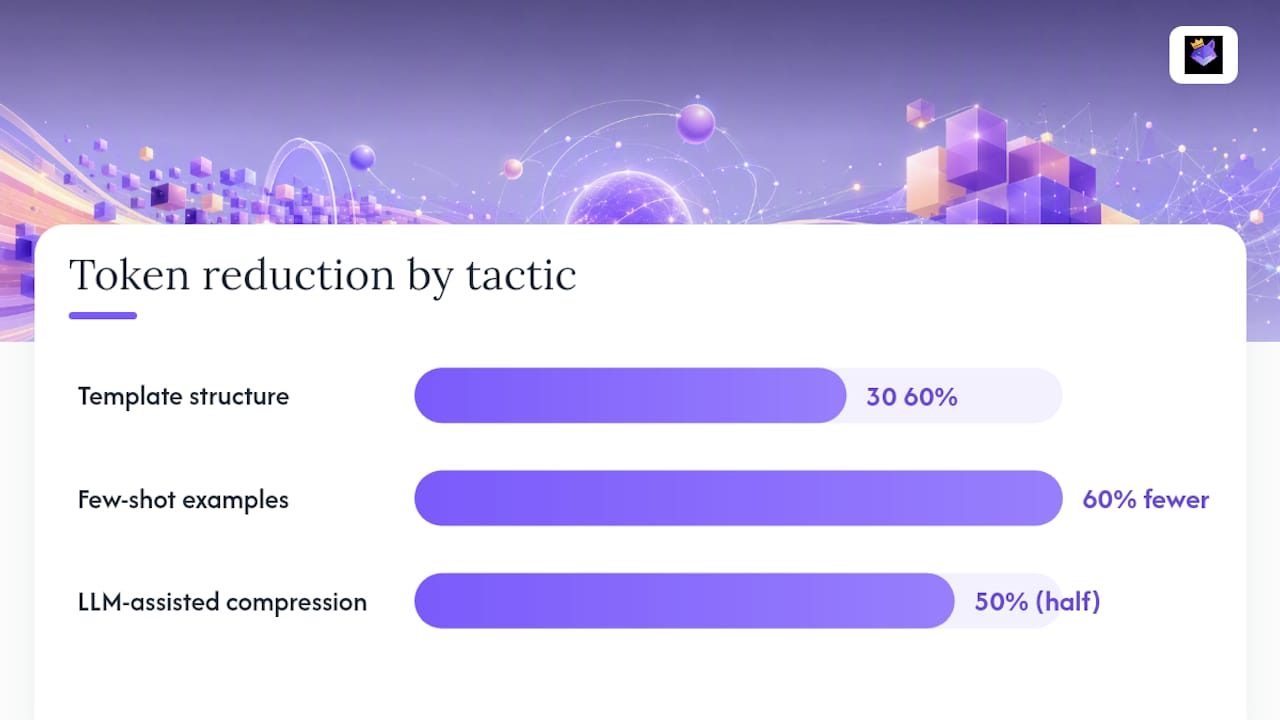
That four-line structure replaces paragraphs of prose instruction and typically cuts system prompt length by 30–50% compared to a conversational write-up of the same rules.
- Use placeholders for dynamic values. A template with
{{customer_name}}and{{order_id}}injected at runtime is shorter and more cacheable than a prompt rebuilt from scratch on every call. Promptchief's template and placeholder system handles this injection automatically across 27+ AI platforms. - Minimize few-shot examples. Two well-chosen examples outperform five mediocre ones and cost 60% fewer tokens. Pick examples that cover edge cases, not just the happy path.
- Require structured output explicitly. "Respond only with valid JSON. No explanation." removes the prose wrapper the model would otherwise generate. CloudZero's analysis supports this: constraining output format is one of the highest-leverage output-token controls.
- LLM-assisted prompt compression. Use a small, cheap model to compress a long system prompt. Feed it the full prompt and ask for a semantically equivalent version at half the token count. Validate the compressed version against 20–30 sample inputs before deploying. AWS's Well-Architected guidance recommends exactly this iterative compress-and-test loop.
- Two-pass generation for expensive tasks. Use a cheap model for a first draft, then a frontier model only for the final polish pass. This moves the bulk of generation cost to the cheaper tier.
Pro Tip: Store your compressed, tested system prompts in an AGENTS.md or global rules file and version-control it. A prompt that lives only in someone's head or a Slack message gets re-bloated every time someone edits it. The best prompt optimizer tools can help automate the compression and validation step.
When does batching actually help you cut costs?
Batching is not always the right move. It trades latency for cost, and the trade-off only makes sense in specific scenarios.
| Scenario | Batch? | Notes |
|---|---|---|
| Offline classification (millions of records) | Yes | Async batch APIs offer meaningful discounts |
| Bulk document extraction (nightly job) | Yes | 5–20 items per batch is a common sweet spot |
| Real-time user-facing chat | No | Latency impact is unacceptable |
| Streaming large outputs | Conditional | Streaming reduces time-to-first-token but does not reduce total tokens |
| High-volume duplicate detection | Yes | Deduplicate before sending; exact-match cache first |
Streaming trade-offs. Streaming lets you start rendering partial output while the model generates, which improves perceived latency. It does not reduce total token count. Where streaming increases overhead is in connection management: many short streaming requests can cost more in infrastructure than equivalent batch calls. Use streaming for user-facing interfaces; use batch for background jobs.
Request-level tips: combine similar requests into a single prompt when the model can handle multiple items in one call (e.g., "classify all of the following 10 items"). Deduplicate requests before they hit the API — a semantic cache or exact-match hash check catches duplicates before they become billable calls. Prefer structured outputs (JSON arrays) for batch responses to reduce downstream parsing cost and avoid re-query loops.
How do you measure quality vs. token savings and deploy safely?
Cutting tokens without a quality check is how you ship a regression. The experiment plan is short.
- Define success metrics before you start. Tokens per request (input + output), quality score (task-specific: BLEU, exact-match, human rating, or error rate), and cost per successful workflow completion. Write these down before touching the prompt.
- Set a canary percentage. Route 5–10% of traffic to the new prompt or model. Keep the old version live.
- Run for statistical significance. For most production workloads, 200–500 requests per variant is enough to detect a 10% quality change. For low-volume features, run for at least 48 hours to cover time-of-day variation.
- Define rollback criteria. If quality score drops more than 5% or error rate rises more than 1 percentage point, roll back automatically. Do not wait for a human to notice.
- Automate quality checks. Unit tests on model outputs (exact-match assertions for structured outputs, regex checks for format compliance) catch regressions before they reach users. AI output observability practices — logging output distributions and diffing samples between versions — make quality regressions visible at the same time as cost changes.
- Track on a dashboard. Tokens per request, cache hit rate, cost per feature, quality score, and error rate on a single view. Any deployment that moves two of these in opposite directions needs a manual review before full rollout.
Concrete implementation patterns with LangChain, Redis, and Pinecone
These pseudocode patterns are copy-paste starting points. Adapt field names to your stack.
Gateway router with model selection and cache check:
def handle_request(user_msg, feature, history):
    # 1. Check exact-match cache
    cache_key = hash(feature + user_msg)
    if redis.get(cache_key):
        return redis.get(cache_key)

    # 2. Classify complexity
    complexity = classify(user_msg)  # "simple" | "complex"
    model = "gpt-4o-mini" if complexity == "simple" else "gpt-4o"

    # 3. Retrieve and compress context (RAG path)
    chunks = pinecone.query(embed(user_msg), top_k=5)
    context = compress(chunks)  # LLMLingua-style

    # 4. Build prompt from versioned template
    prompt = template_store.get(feature, env="prod")
    messages = build_messages(prompt, context, history[-4:], user_msg)

    # 5. Call API with hard caps
    resp = openai.chat.completions.create(
        model=model, messages=messages,
        max_tokens=300, stop=["###"],
        response_format={"type": "json_object"}
    )

    # 6. Log ET and cache response
    et = resp.usage.prompt_tokens + (resp.usage.completion_tokens * model_multiplier(model))
    log_usage(feature, model, resp.usage, et)
    redis.setex(cache_key, 3600, resp.choices[0].message.content)
    return resp.choices[0].message.content
Semantic cache lookup:
def semantic_cache_lookup(query_embedding, threshold=0.93):
    results = redis.vector_search(query_embedding, top_k=1)
    if results and results[0].score >= threshold:
        return results[0].cached_response
    return None
Compression call flow:
def compress_prefix(long_system_prompt, target_ratio=0.5):
    compressed = cheap_model.complete(
        f"Compress this to {target_ratio*100:.0f}% of its tokens "
        f"while preserving all instructions:

{long_system_prompt}"
    )
    return compressed
Integration points:
- LangChain for orchestration, chain composition, and LLM routing logic
- Pinecone for vector storage, top-k retrieval, and re-ranking
- Redis for semantic cache, exact-match cache, and TTL management
- OpenAI API
max_tokens,stop,response_format, and cached-prefix endpoints
ET-aware routing example: compute ET for each candidate model before calling. If ET_frontier / ET_cheap > 3 and the task is classified as simple, route to the cheap model. Log the ET delta as "savings attributed to routing" in your dashboard.
How does Promptchief fit into a token-optimization workflow?
A prompt manager is not just a convenience tool. In a cost-optimization pipeline, it is the governance layer that keeps compressed, tested prompts from drifting back to their bloated originals.
- Store compressed system prompts with version history. When you compress a system prompt from 2,000 tokens to 900 and validate it against 30 sample inputs, that compressed version needs to live somewhere permanent and retrievable. Promptchief's cloud-synced storage keeps it there, accessible from any environment.
- Manage percentage-tested prompt variants. Promptchief lets you maintain multiple versions of a prompt (e.g.,
summarize-v2-compressedvs.summarize-v1-baseline) and inject the right one per environment. This is the governance layer for A/B prompt experiments. - Enforce "answer-only" and structured output templates. Templates with hard output constraints (
Output: JSON only. No prose.) stored in Promptchief get injected consistently. Without a central store, developers rebuild these constraints from memory and re-introduce filler. - Team-level templates and multi-step chains. For teams, Promptchief's workspace feature enforces consistent prompt standards across developers. Multi-step prompt chains let you build the two-pass generation pattern (cheap draft → frontier polish) as a reusable workflow rather than custom code.
The operational benefit is straightforward: without a prompt manager, compressed prompts get edited, filler creeps back in, and the savings you measured in your A/B test erode within weeks. Promptchief makes the optimized version the default.
What tools automate continuous prompt token auditing?
Manual audits do not scale. Once you have more than a handful of prompts in production, you need automated checks that run on every deployment.
Tokenizer-based linting. Use tiktoken (OpenAI's tokenizer library) to count tokens on every prompt template at build time. Add a CI step that fails if any system prompt exceeds a defined token budget (e.g., 1,500 tokens). This catches prompt bloat before it reaches production.
import tiktoken
enc = tiktoken.encoding_for_model("gpt-4o")
assert len(enc.encode(system_prompt)) <= 1500, "System prompt exceeds token budget"
Per-deployment token delta reports. Wire your logging pipeline to compute the average input_tokens and output_tokens per feature before and after each deployment. A deployment that increases average input tokens by more than 10% triggers a review. This is the same pattern GitHub's engineering team uses with per-call token-usage artifacts.
Automated sample diffing. Run a fixed set of 20–50 canonical inputs through both the old and new prompt after every change. Compare output length, format compliance, and a lightweight quality metric. AI output preprocessing techniques can automate the comparison step, flagging responses that are significantly longer or structurally different from the baseline.
Scheduled cost anomaly detection. Set a daily budget alert per feature. If a feature's daily spend exceeds 1.5× its 7-day rolling average, page the on-call engineer. Most runaway costs are caught within hours rather than at the end of the billing cycle.
Tools worth knowing: tiktoken for token counting, LangSmith for LangChain-based tracing and prompt versioning, and your provider's native usage dashboard (OpenAI's usage API, for example) as a secondary check. For teams managing many prompts, Promptchief's analytics layer adds the per-prompt attribution that provider dashboards do not give you.
The order of fixes matters more than the fixes themselves
Most teams I see approach token costs backwards. They reach for prompt compression first because it feels like the most "engineering" solution, then discover their compressed prompt is still being sent to GPT-4o for a task that GPT-4o-mini handles fine, and that they have no data to prove the compression actually helped.
The right order is: instrument first, then cache, then route, then compress, then add agent guardrails. Each step depends on the data the previous step produces. Caching without instrumentation means you do not know your hit rate. Routing without instrumentation means you are guessing which tasks are "simple." Compression without a quality baseline means you cannot tell if you degraded the output.
The ET metric deserves more attention than it gets. Raw token counts mislead because they treat a GPT-4o-mini output token the same as a GPT-4o output token. ET weights by model cost multiplier, so a dashboard built on ET actually reflects your bill. Teams that under-instrument and track only raw tokens often celebrate a "token reduction" that increased their cost because they moved volume to a more expensive model.
One more thing worth saying plainly: agent guardrails are not optional for production systems. The 10–15x token overruns that Google Cloud's engineering guidance describes are not edge cases. They happen regularly in systems without hard turn budgets and stop conditions. The circuit-breaker pattern is cheap to implement and the most reliable protection against a surprise invoice.
Promptchief gives developers a governance layer for prompt cost control
Every optimization in this guide produces a compressed, tested, version-controlled prompt artifact. The problem is where that artifact lives. Without a central store, it ends up in a Slack message, a developer's local file, or a comment in a PR — and within weeks, someone edits it back toward the verbose original.

Promptchief's prompt management platform is built for exactly this: store your compressed system prompts with version history, inject the right variant per environment, run A/B experiments on prompt versions, and surface usage analytics that feed your cost-attribution dashboard. It works across ChatGPT, Claude, Gemini, and 24 other platforms, syncs across devices, and gives your team a single source of truth for every prompt in production. The AI prompt optimizer for ChatGPT and Claude extension handles compression and testing directly in your browser. Start a free account and import your first system prompt today.
Sources
- Improving token efficiency in GitHub Agentic Workflows — The GitHub Blog
- Guide to AI tokenomics: Eleven principles for token-efficient software engineering — Google Cloud Blog
- Reduce prompt length best practices — AWS Well-Architected generative AI lens
- LLM Token Optimization: Cut Costs & Latency in 2026 — Redis blog
- OpenAI pricing analysis and token cost dynamics — CloudZero Blog
- LLMLingua / long-context compression research — arXiv
FAQ
What is the fastest single change to reduce prompt token cost?
Enable provider prompt caching on your static system prompt. For workloads with a stable, large system prompt sent on every call, this is a configuration-only change that takes effect immediately and produces the largest per-call savings.
How much can you realistically save by optimizing token usage?
Combining caching, model routing, output caps, and compression typically cuts 30–70% of LLM spend for production workloads. Individual tactics vary; caching and routing tend to deliver the largest share.
Why are output tokens more expensive than input tokens?
Output tokens require the model to generate each token sequentially, which is computationally heavier than processing input. Output tokens are often 3–10x more expensive than input tokens on frontier models, so capping output length with max_tokens and requiring structured formats is one of the highest-leverage cost controls available.
What is the Effective Tokens (ET) metric and why does it matter?
ET weights token counts by model cost multiplier (e.g., input_tokens + output_tokens × model_multiplier). Raw token counts mislead when you route across models with different pricing; ET reflects actual cost and makes routing decisions and dashboard comparisons accurate.
How does Promptchief help with token cost optimization?
Promptchief stores compressed, version-controlled system prompts and injects them consistently across environments, preventing filler from re-entering edited prompts. Its usage analytics attribute token spend to specific prompts and features, feeding the instrumentation layer that makes every other optimization measurable.