
A prompt library is a searchable collection of tested AI instructions, usually organized by task, model, or output type, that saves you from rewriting the same request from scratch every time. If you want to see what a good one looks like before building your own, four are worth opening today: Open Prompt Library on GitHub, prompts.chat, the Wharton Generative AI Labs prompt library, and Claude's built-in prompt library for Claude Code.
Each teaches something different. Open Prompt Library shows what scale looks like. prompts.chat shows what a clean export and self-host setup looks like. Wharton GAIL shows what an academically grounded template structure looks like. Claude's library shows how task/role/slot patterns work inside a live coding tool.
- Open Prompt Library: 2,106 community prompts across 19 categories, exportable as JSON or CSV.
- prompts.chat: curated, model-agnostic prompts with dataset exports and self-hosting instructions.
- Wharton GAIL: templates built from four documented core elements, with "why this works" notes.
- Claude prompt library: task/role/slot patterns designed for direct use inside Claude Code.
Bookmark one that matches your workflow now, then read on for the structural details worth stealing.
Key Takeaways
A reusable prompt needs four structural elements, clear goals, context, step-by-step instructions, and a sample output, plus metadata and search to stay useful past the first few uses.
| Point | Details |
|---|---|
| Start with proven public libraries | Open Prompt Library, prompts.chat, Wharton GAIL, and Claude's prompt library each demonstrate a different structural pattern worth copying. |
| Build on four core elements | Every durable prompt needs a clear goal, context, step-by-step instructions, and an example output. |
| Add metadata to prevent prompt rot | Tags, variables, model notes, and a "last tested" date keep prompts working after model updates. |
| Prioritize injection over copy-paste | Extension or IDE injection removes the context switching that causes people to abandon saved prompts. |
| Choose self-host or hosted based on scale | Small technical teams can grep a cloned repo; teams needing sync, sharing, and injection benefit from a manager like Promptchief. |
Table of Contents
- Prompt Library Examples: What Each One Actually Contains
- What Makes a Prompt Reusable Instead of Disposable
- How to Use a Prompt Library Inside Your Actual Workflow
- Self-Hosting a Prompt Repo vs. Using a Hosted Manager
- Closing the Gap Between a Prompt List and a Working System
- Why Practical Examples Beat Prompt Theory
- Get a Hosted Prompt Library Built for Daily Use
- Sources
- FAQ
Prompt Library Examples: What Each One Actually Contains
Screenshots of a library's homepage tell you nothing. What matters is the folder structure, the export format, and whether a prompt includes enough context to work without you filling in blanks by guesswork.
Open Prompt Library is the closest thing to a public dataset in this space. It holds 2,106 community-sourced prompts spread across 19 categories, from coding and copywriting to marketing and data analysis. What sets it apart is the export layer: the repo ships data/prompts.json and data/prompts.csv files, so you can pull the whole set into a spreadsheet, a script, or your own database instead of scraping a webpage by hand. If you are technical, you can also just grep the repo locally once cloned, which turns "find me a prompt about cold email subject lines" into a five-second terminal search.

prompts.chat (formerly known as Awesome ChatGPT Prompts) takes a curation-first approach instead of a volume-first one. The collection favors quality over count, and every entry is model-agnostic, meaning the same prompt works whether you paste it into ChatGPT, Claude, or Gemini. The repo includes a downloadable PROMPTS.md file plus CSV and dataset links, and its self-hosting instructions mean teams that want a private, internally branded version can fork it in an afternoon.
The Wharton Generative AI Labs library takes a teaching approach. Rather than just handing you a prompt, GAIL builds each template from four elements: a clear goal, relevant context, step-by-step instructions for the model, and a sample output showing what "good" looks like. That structure alone is worth borrowing even if you never touch a Wharton template directly.
Claude's prompt library, built into Claude Code, demonstrates task/role/slot patterns: a prompt defines a role ("you are a code reviewer"), a task, and named slots you fill in before sending, alongside brief notes on why the pattern works.
| Library | Best for | Format |
|---|---|---|
| Open Prompt Library | Bulk browsing, programmatic access | JSON, CSV |
| prompts.chat | Curated, cross-model prompts | Markdown, CSV, self-host |
| Wharton GAIL | Learning prompt structure | Web templates with rationale |
| Claude prompt library | In-editor coding tasks | Slot-based, embedded in Claude Code |
What Makes a Prompt Reusable Instead of Disposable
Most prompts fail the second time you use them because they were written for one specific moment, not as a template. The fix is structural, not stylistic.
Wharton GAIL's research points to four elements every durable prompt needs, and it is worth treating them as a checklist:
- A clear goal. State the outcome in one sentence before anything else, not buried in paragraph three.
- Context. Give the model the background it needs, audience, tone, prior decisions, so it isn't guessing.
- Step-by-step instructions. Break the task into an ordered sequence rather than one dense ask.
- An example output. Show, don't just tell, what a strong response looks like.
Beyond those four elements, a prompt worth keeping needs metadata: tags for searchability, placeholders or variables for the parts that change each time, a note on which model it was built for, and the expected input and output format. Skip this and you get what developers call prompt rot, where a prompt that worked fine in January quietly breaks after a model update and nobody notices until output quality drops. Structured metadata and basic version control are what prevent that, according to developer guidance on the libraries teams actually rely on.
Searchability matters just as much as structure. A library with full-text export and fuzzy search saves real time; one that only lets you scroll through categories does not scale past a few dozen entries.
Pro Tip: Add a one-line "last tested" date to every prompt you save. When output quality drifts after a model update, that date tells you exactly which prompts to re-check first instead of guessing.
How to Use a Prompt Library Inside Your Actual Workflow
Having a library does nothing if using it means five extra clicks every time. The goal is friction removal, not just storage.
- Copy-and-tweak works fine for occasional, low-stakes tasks: paste a template, swap a few words, send it. It breaks down once you're running the same prompt daily, because you'll eventually paste the wrong version.
- Extension or IDE injection is the better move for repeat use. Instead of switching tabs to find a saved prompt, you insert it directly where you're working, whether that's a chat window or a code editor. Developer guidance is blunt about this: libraries that reduce context switching get used; libraries that require you to leave your workflow get abandoned.
- Use placeholders, not full rewrites. A prompt with a
{topic}or{tone}variable lets you fill and send in seconds instead of retyping the whole instruction block.
A few automation patterns are worth building once you're comfortable with the basics:
- Chain prompts so the output of one feeds the input of the next (draft, then critique, then revise).
- Schedule recurring prompts for reports or content briefs that run on a weekly cadence.
- Run a quick A/B test between two phrasings of the same prompt and record which output performed better, so future edits are based on evidence, not memory.
Wharton's research is clear that templates need iteration, not permanence: what works today may need adjusting as model behavior shifts.
Self-Hosting a Prompt Repo vs. Using a Hosted Manager
The decision usually comes down to three questions: how much you value privacy, how large your library will get, and whether you need it to plug into other tools.
A minimal self-hosted repo needs surprisingly little structure: a prompts/ folder, a metadata file in JSON or YAML for tags and variables, and export files like prompts.json or prompts.csv so the data isn't trapped in one format. Cloning Open Prompt Library gives you this exact skeleton, and its full-text search works locally with a basic grep command, which is fast enough for solo use or a small technical team.
That setup starts to strain once you need cross-device sync, a visual interface non-technical teammates can use, or direct injection into a browser. That's the point where a hosted manager earns its keep. Before choosing either path, check this quick list:
- Does the data need to stay private, or is a cloud-synced tool acceptable?
- Will more than one person need to search and edit the same prompts?
- Do you need browser extension or IDE injection, not just copy-paste?
- Will you need API hooks to plug prompts into other software?
Closing the Gap Between a Prompt List and a Working System
A folder of saved prompts is not the same thing as a system you'll actually use six months from now. The gap shows up in three places: search gets slow once you pass a hundred entries, sharing with teammates means Slack messages instead of a shared source, and injecting a prompt into ChatGPT or Claude still means switching tabs and pasting by hand.
Promptchief closes each of those gaps directly. It offers fuzzy search across your saved prompts, cloud sync so the same library follows you across devices, and a Chrome extension that injects a saved prompt straight into the chat window you're already using, no tab switching required. Magic placeholders handle the fill-and-send pattern described above automatically, and team workspace features solve the sharing problem for marketing or dev teams working from the same prompt set.
| Pain point from public libraries | How a hosted manager addresses it |
|---|---|
| Slow search past a few hundred prompts | Fuzzy search across the full library |
| No sync across devices | Cloud sync built in |
| Manual copy-paste into chat tools | Browser extension injection |
| No shared source for teams | Team workspace with shared access |
Why Practical Examples Beat Prompt Theory
Most advice on this topic stops at "write clear instructions," which is true and almost useless on its own. The libraries that hold up, Wharton GAIL in particular, work because they show a finished example next to the instruction, not instead of it. Readers copy the structure faster when they can see the output it's supposed to produce.
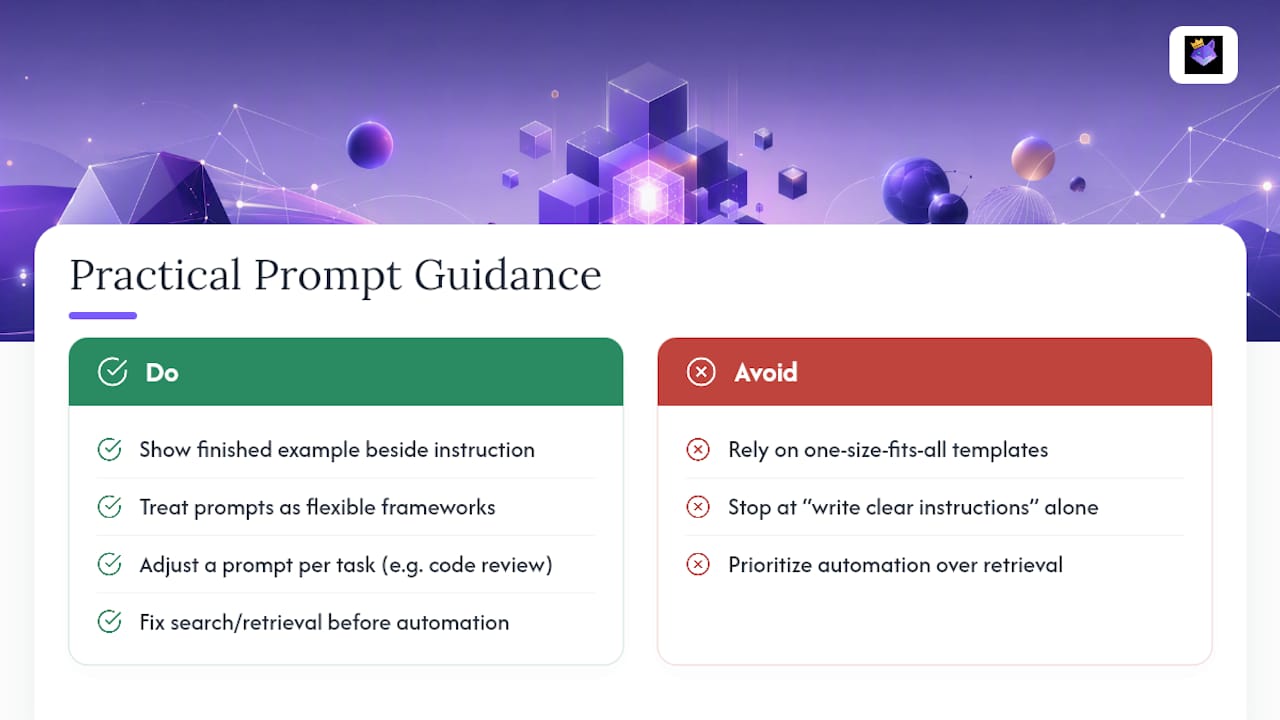
The conventional wisdom oversells the idea of the perfect universal prompt template. It doesn't exist, and Wharton's own framing of prompts as flexible frameworks rather than fixed scripts backs that up. A prompt that nails a blog outline will need real adjustment for a code review task, and pretending otherwise just sets people up to be disappointed by a "one size fits all" template.
What I'd prioritize first, before worrying about advanced automation or prompt chains, is fixing search and injection. Almost everyone I'd point to this article already has fifteen good prompts sitting somewhere. Almost none of them can find the right one in under thirty seconds when it actually matters. Solve retrieval before you solve anything fancier.
— John
Get a Hosted Prompt Library Built for Daily Use
Cloning a GitHub repo or bookmarking a curated list gets you examples. It doesn't get you a system that syncs across your laptop and phone, injects a saved prompt into ChatGPT with one click, or lets your team pull from the same library instead of texting each other snippets.

That's the specific gap Promptchief fills. It takes the structural lessons from the libraries covered above, clear metadata, tags, placeholders, version awareness, and turns them into a working product: save prompts from any of 27+ AI platforms, search them by fuzzy match instead of scrolling, and inject them directly through a Chrome extension without leaving your chat window. Magic placeholders handle variable fill-and-send automatically, and the community prompt hub gives you a starting library on day one instead of an empty dashboard. Teams get shared workspaces so nobody's best prompt lives in a single person's browser history.
Check out Promptchief's prompt management page and see whether the free plan covers your current volume, or whether the Prompt Management Software plans fit a team that needs shared workspace access.
Sources
- Open Prompt Library (open-prompt-library)
- Wharton Generative AI Labs — Prompt library
- Best Prompt Libraries Developers Actually Use in 2026 - DEV Community
FAQ
Can I Reuse the Same Prompt Across Different AI Models?
Most well-built prompts transfer across models with minor tweaks, especially those written in a model-agnostic style like the ones in prompts.chat. Tools like Promptchief make reusing prompts across tools easier by storing one version you can inject anywhere.
How Often Should I Update My Saved Prompts?
Check high-use prompts whenever a model you rely on gets a major update, since output quality can shift without warning. Wharton GAIL's guidance treats prompts as frameworks to iterate on, not fixed scripts you set once and forget.
Is a Public Library Safe to Use for Client Work?
Public libraries like Open Prompt Library are fine as starting templates, but you should still customize context and tone before sending anything client-facing. Treat them as structural examples, not finished deliverables.
What File Formats Should I Export My Prompts In?
JSON and CSV are the most portable choices, since both plug into spreadsheets, scripts, and most prompt managers without conversion. Open Prompt Library and prompts.chat both ship exports in these formats by default.
Do I Need to Self-Host to Keep My Prompts Private?
Not necessarily. Self-hosting gives you full control over storage, but a cloud-synced manager like Promptchief keeps your prompts under your account rather than posting them publicly, which covers most privacy needs without the setup work of running your own repo.