
Start with zero-shot. That's the default for most LLM tasks, and the reason is simple: it's faster to write, cheaper to run, and good enough for a wider range of tasks than most practitioners expect. The zero-shot vs few-shot decision isn't about which is "better" — it's about when the cost of adding examples is worth paying.
Three rules you can apply right now:
- Zero-shot is enough when the task is common (summarization, translation, basic classification), the model is large and instruction-tuned, and output format doesn't need to be exact.
- Add 1–3 examples when zero-shot produces inconsistent labels, format drift, or a tone that doesn't match your brand — IBM's guidance confirms that few-shot is the right move specifically for calibration failures, not as a default.
- Escalate to fine-tuning or RAG when you need persistent behavior across all calls, when the task requires domain knowledge not in the model's pretraining data, or when few-shot accuracy still misses your SLA after several iterations.
One caveat worth noting upfront: large, instruction-tuned models extend zero-shot reach considerably. A task that needed examples on a smaller model may work cleanly zero-shot on a frontier model. Always re-test your few-shot assumptions when you upgrade the underlying model.
Key Takeaways
Zero-shot is the right default for most LLM tasks; few-shot is a targeted calibration tool for specific, diagnosed failure modes — not a general upgrade.
| Point | Details |
|---|---|
| Start with zero-shot | Use it for prototyping, common tasks, and any model large enough to generalize well without examples. |
| Add 1–3 examples surgically | Switch to few-shot only when zero-shot shows format drift, label inconsistency, or tone mismatch. |
| Select boundary examples | Prioritize near-miss and edge-case examples over redundant clear-class examples for maximum information per token. |
| Escalate when few-shot plateaus | Move to fine-tuning or RAG when few-shot fails to close the accuracy gap after 3–5 iterations. |
| Promptchief for versioning | Use Promptchief to store, version, and share example sets so your few-shot library stays current and reusable. |
Table of Contents
- What do zero-shot, one-shot, and few-shot actually mean?
- How zero-shot vs few-shot compare across dimensions that matter
- When should you choose zero-shot, few-shot, or neither?
- Why few-shot examples work: the probabilistic intuition
- How to design effective few-shot prompts
- How to evaluate zero-shot and few-shot performance
- Common failure modes and how to fix them
- The escalation pathway: zero-shot to few-shot to fine-tuning or RAG
- How model size affects zero-shot and few-shot performance
- Techniques for optimizing few-shot example selection
- A practitioner's honest take on zero-shot vs few-shot
- Promptchief makes few-shot prompt management practical
- Sources
- FAQ
What do zero-shot, one-shot, and few-shot actually mean?
These terms get used loosely, so a precise definition matters before you build anything on top of them.
Zero-shot prompting means the prompt contains only an instruction — no examples. The model relies entirely on patterns learned during pretraining and instruction-tuning to interpret the task. You tell it what to do; you don't show it.
One-shot prompting adds exactly one input/output example to the prompt. That single example demonstrates the expected format or style without consuming much of the context window.
Few-shot prompting includes a small set of examples, commonly 2–5 input/output pairs, that teach the model the desired format and style at run time. The critical technical point: these examples do not change the model's weights. The model reads them as part of the prompt and uses them to condition its next-token predictions — a mechanism called in-context learning.
This is where a lot of confusion enters. "Few-shot" in the prompting context is different from few-shot learning in the classical machine learning sense, where a model is trained on a small labeled dataset to generalize to new classes. Prompting-time few-shot leaves the model completely unchanged. Fine-tuning, by contrast, alters model weights for persistent behavior — a fundamentally different operation with different cost and maintenance implications.
A quick reference:
- Zero-shot: instruction only, no examples, relies on pretraining
- One-shot: one example, useful for format demonstration with minimal token cost
- Few-shot (in-context): 2–5 examples, runtime calibration, no weight changes
- Fine-tuning: training-time update, persistent, requires labeled data and compute
How zero-shot vs few-shot compare across dimensions that matter
| Dimension | Zero-shot | Few-shot |
|---|---|---|
| Number of examples | 0 | 1–8 (commonly 2–5) |
| Prompt/token cost | Lowest | Higher per call (examples add tokens every time) |
| Accuracy/reliability | Variable; adequate for common tasks | Higher consistency; better format control |
| Prompt engineering effort | Low | Moderate; example selection and ordering matter |
| Best-for use cases | Summarization, translation, Q&A, prototyping | Classification, structured extraction, brand-tone tasks |
| Latency/repeatability | Faster; less deterministic | Slightly slower; more repeatable outputs |
| Ease of maintenance/scaling | Simple; one prompt to update | More complex; examples must stay current and representative |
The practical impact of each row:
- Token cost compounds at scale. If you run 100,000 calls per day and each few-shot prompt adds 300 tokens, that's 30 million extra tokens daily. At any non-trivial API pricing tier, that's a real budget line.
- Format control is where few-shot earns its keep. Zero-shot outputs for structured tasks like JSON extraction tend to drift — the model may omit fields, change key names, or add commentary. Two or three clean examples lock the format reliably.
- Maintenance is the hidden cost. Every time your label taxonomy or output schema changes, you need to update every example in every few-shot prompt. Zero-shot prompts are easier to keep current.
Two concrete use cases illustrate the trade-off well. For brand voice classification (e.g., "is this copy on-brand or off-brand?"), zero-shot often fails because the model has no reference for your specific brand. Two or three labeled examples of on-brand and off-brand copy fix this immediately. For summarization of news articles, zero-shot on a capable model is usually sufficient — the task is well-represented in pretraining data and format expectations are loose.
When should you choose zero-shot, few-shot, or neither?
Start with zero-shot when
- You're prototyping or exploring — zero-shot lets you test task feasibility in minutes.
- The task is common and well-represented in pretraining data: summarization, translation, sentiment, basic Q&A.
- Token cost or latency is a hard constraint.
- The model is a large, instruction-tuned frontier model (GPT-4o, Claude 3.5 Sonnet, Gemini 1.5 Pro) — these models have strong zero-shot generalization.
- Output format is flexible and doesn't need to be exact.
Switch to few-shot when you observe these failure modes
- Format drift: the model returns valid content but in the wrong structure (wrong JSON keys, missing fields, inconsistent label names).
- Inconsistent labels: across a batch of similar inputs, the model assigns different labels to what should be the same class.
- Brand-specific tone: the model defaults to a generic register that doesn't match your style guide.
- Complex output structure: multi-field extraction, nested JSON, or outputs that require a specific ordering of elements.
Applied AI Hub's analysis confirms that few-shot improves format control and consistency across batch outputs, while zero-shot remains adequate for common tasks already well-represented in pretraining data.
Escalate beyond few-shot when
- Accuracy still misses your SLA after 3–5 few-shot iterations with well-selected examples.
- The task requires knowledge not in the model's pretraining data (proprietary terminology, internal processes).
- You need the behavior to be consistent across every call without relying on prompt context — that's a fine-tuning use case.
- The input is too long to fit examples in the context window alongside the actual content — consider RAG or a chunk-and-aggregate strategy instead.
Pro Tip: Before adding examples, fix the instruction first. A vague or ambiguous instruction won't be rescued by examples — it'll just produce consistently wrong outputs. Tighten the prompt instruction before reaching for few-shot.
Why few-shot examples work: the probabilistic intuition
Understanding why examples help makes you better at selecting them.
At a high level, a language model's output is a probability distribution over possible next tokens. Zero-shot prompting shapes that distribution through the instruction alone. Few-shot examples act as additional conditioning — from a probabilistic perspective, they concentrate the model's posterior, pulling generation toward a specific region of latent space. Think of it as narrowing a wide probability cone down to a tighter beam aimed at your target output.
This framing has practical consequences. Examples that are too similar to each other don't narrow the cone much — they just reinforce the same region. Examples that cover different parts of the input space, especially near class boundaries, do the most work.
Concrete heuristics from research:
- Prefer boundary/edge cases. A borderline example that sits near the decision boundary between two classes is more informative than three clear positive examples. It tells the model where the line is, not just what the center looks like.
- Vary examples for coverage. If you're classifying customer feedback, don't use three examples of strongly negative reviews. Include one mild negative, one ambiguous, one clear negative.
- 1–3 high-quality examples often outperform 5–8 mediocre ones. Gains flatten past 5–8 examples and each additional example adds token cost to every call.
- Ordering matters. Place easier, representative examples first and harder or boundary examples last. Recency effects in attention mean the final examples carry more weight in shaping the output — so put your most instructive example closest to the actual input.
Pro Tip: The most counterintuitive selection move is to include a "near miss" — an example that looks like it belongs to class A but is actually class B. This single example does more to define the boundary than three clean class-A examples. Use it last in your example sequence for maximum influence.
How to design effective few-shot prompts
Template 1: Compact classification (sentiment)
Classify the sentiment of each customer review as Positive, Negative, or Neutral.
Return only the label, nothing else.

Review: "The onboarding was smooth and the support team responded within an hour."
Label: Positive

Review: "It works, but the interface feels dated and navigation is confusing."
Label: Neutral

Review: "{{review_text}}"
Label:
Annotation: The instruction is explicit about the label set and output format ("Return only the label"). Two examples cover different points on the sentiment spectrum. The {{review_text}} placeholder makes this a reusable template — swap the variable, not the whole prompt.
Template 2: JSON-structured extraction
Extract the following fields from the support ticket and return valid JSON only.
Fields: customer_name, issue_category, urgency (low/medium/high), product_mentioned.

Ticket: "Hi, I'm Sarah and I can't log into my Pro account after the update yesterday. This is blocking my whole team."
Output: {"customer_name": "Sarah", "issue_category": "login", "urgency": "high", "product_mentioned": "Pro account"}

Ticket: "{{ticket_text}}"
Output:
Annotation: One example is enough here because the schema is fully specified in the instruction. The example demonstrates that urgency is inferred, not stated literally. For extraction tasks, set temperature near 0 for reproducibility — you want deterministic field extraction, not creative variation. On temperature vs top-p: use temperature as your primary dial (0 for extraction, 0.3–0.5 for structured prose, 0.7–1.0 for ideation) and touch top-p only when you want to add a guardrail on vocabulary diversity.
Template 3: Style transfer / content rewrite
Rewrite the following marketing copy in a direct, conversational tone. Remove jargon. Keep it under 50 words.

Original: "Our enterprise-grade solution leverages cutting-edge AI to deliver synergistic outcomes across your organizational ecosystem."
Rewritten: "Our AI tool helps your whole team work faster. No jargon, no complexity — just results."

Original: "{{original_copy}}"
Rewritten:
Annotation: The example shows the transformation, not just the target style. The instruction sets a hard constraint (50 words) that the example also respects, reinforcing the rule.
Formatting and token-optimization notes
- Message pairs vs inline examples: In chat-based APIs (OpenAI, Anthropic), you can pass examples as alternating user/assistant messages in the
messagesarray. This is cleaner than inline text and often improves adherence, but adds API overhead. For simple tasks, inline examples in a single system or user message are more efficient. - Delimiters: Use consistent delimiters (
###,---, or XML-style tags like<example>) to separate examples from each other and from the live input. Inconsistent formatting confuses the model about where examples end. - Placeholders: Use
{{variable}}syntax to turn any prompt into a reusable template. A prompt library that stores these templates saves significant time at scale. - Long-context inputs: When the input itself is long (a full document, a long support thread), examples may consume too much of the context window. Use a two-pass strategy: first pass extracts or summarizes the relevant section; second pass runs the few-shot prompt on that condensed input.
How to evaluate zero-shot and few-shot performance
Evaluation is where most teams skip steps and end up with false confidence. A structured checklist prevents that.
Metric checklist
- Accuracy / F1: For classification, compute per-class F1, not just overall accuracy — a model that always picks the majority class can look accurate while being useless.
- Format compliance rate: For structured outputs, measure the percentage of responses that parse correctly (valid JSON, correct field names, no extra text). This is often more diagnostic than accuracy for extraction tasks.
- Exact-match rate: For extraction tasks where the answer is a specific string, exact match is a hard, unambiguous metric.
- Repeatability: Run the same prompt 5–10 times with identical inputs. High variance in outputs signals that temperature is too high or the instruction is underspecified.
A/B testing checklist
- Fix a sample size before you start — at least 50–100 labeled examples for classification, more for rare classes.
- Run zero-shot and few-shot on the same inputs in the same session to control for model-version drift.
- Measure token cost per call for each variant, not just accuracy. A few-shot prompt that's 5% more accurate but 40% more expensive may not be worth it at scale.
- Randomize the order in which you evaluate outputs to avoid anchoring bias in human review.
Cost-per-success calculation
The formula is straightforward: multiply tokens per call by call volume to get total token consumption, then divide by the number of successful outputs to get cost per correct result.
Zero-shot produces 780 compliant outputs at 200,000 total tokens. Few-shot produces 940 compliant outputs at 450,000 total tokens. Few-shot uses 2.25× the tokens for 1.2× the compliant outputs. Whether that trade-off is worth it depends on your token pricing and the downstream cost of a non-compliant output. For tasks where a bad output triggers a human review or a retry, the few-shot premium often pays for itself.
Tracking prompt performance across versions — including token costs and hit rates — makes this math visible and repeatable rather than a one-time estimate.
Common failure modes and how to fix them
Zero-shot and few-shot prompting each have characteristic failure patterns. Knowing them in advance saves debugging time.
Zero-shot failure modes:
- Instruction ambiguity: The model interprets the task differently than intended. Fix: rewrite the instruction with explicit constraints (output format, label set, word limit) before adding examples.
- Format drift at scale: Across a large batch, the model's output format varies — sometimes JSON, sometimes prose, sometimes a mix. Fix: add explicit format instructions and, if that fails, one example.
- Task unfamiliarity: The task involves domain-specific knowledge or a format the model rarely saw in pretraining. Zero-shot will underperform here regardless of instruction quality. Move to few-shot or fine-tuning.
Few-shot failure modes:
- Over-mimicking: The model copies surface features of the examples (specific phrases, sentence structures) rather than generalizing the pattern. Fix: use more diverse examples that share the pattern but differ in surface form.
- Recency-induced bias: If all your examples belong to one class or share a common feature, the model skews toward that class. Fix: balance examples across classes and include boundary cases.
- Context-window exhaustion: Long inputs combined with multiple examples push the total prompt past the model's context limit, truncating the actual input. Fix: compress examples (shorter, more abstract), use one-shot instead of few-shot, or switch to a two-pass strategy.
- Label inconsistency: Examples use slightly different label names ("Negative" vs "negative" vs "neg"). Models are sensitive to this. Fix: standardize labels in every example and in the instruction.
The deeper limit: when no prompting strategy reaches your accuracy target, the problem is usually one of two things — the model lacks the knowledge (RAG is the fix) or the behavior needs to be baked in permanently (fine-tuning is the fix). Few-shot is a runtime calibration method; fine-tuning changes model weights for persistent behavior. Knowing which problem you have before investing in more prompt engineering saves weeks.
The escalation pathway: zero-shot to few-shot to fine-tuning or RAG
Think of this as a three-step ladder. You climb only as high as you need to.
Step 1: Baseline with zero-shot
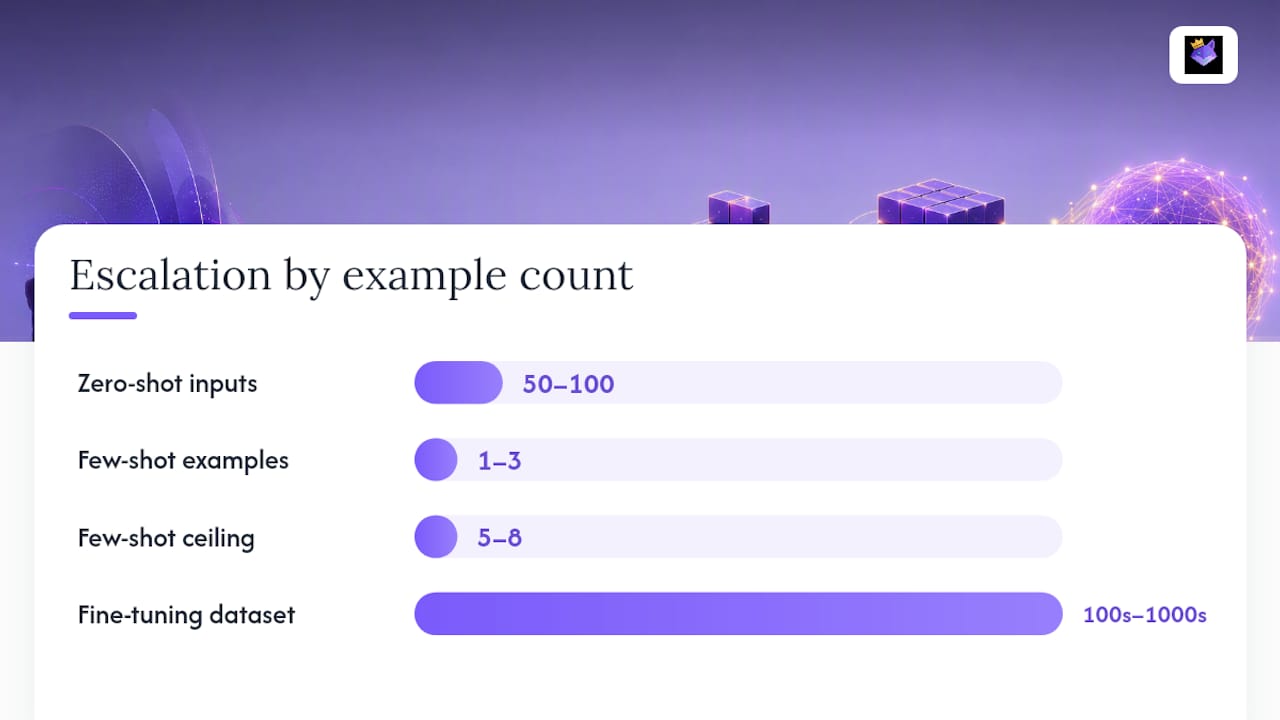
Write a clear instruction, run it on 50–100 representative inputs, and measure accuracy, format compliance, and repeatability. This is your baseline. If it meets your SLA, stop here. Zero-shot is the right default for professional workflows — it minimizes token spend and maintenance overhead.
Step 2: Targeted few-shot interventions
Identify the specific failure mode from Step 1 (format drift, label inconsistency, tone mismatch). Add 1–3 examples that directly address that failure. Re-measure. If accuracy improves to within SLA, stop. If you need more than 5–8 examples to see meaningful gains, you've likely hit the few-shot ceiling for this task.
Step 3: Escalate to fine-tuning or RAG
- Fine-tune when: you need persistent behavior across all calls, the task is highly specialized, or you're running at a volume where the token cost of few-shot examples is prohibitive.
- RAG when: the task requires up-to-date or proprietary knowledge the model doesn't have, and the relevant information can be retrieved and injected at runtime.
Operational notes before fine-tuning:
- You need a clean, labeled dataset — typically hundreds to thousands of examples, not the 3–5 used in prompting.
- Fine-tuned models require retraining when the task definition changes, adding maintenance overhead.
- Dataset hygiene matters: noisy or inconsistent labels in fine-tuning data produce a model that's confidently wrong.
Configurable thresholds to guide escalation: if few-shot fails to improve accuracy by a meaningful margin over zero-shot after 3–5 prompt iterations with well-selected examples, treat that as the signal to escalate. The exact target depends on your SLA, but the principle is consistent — don't keep adding examples past the point of diminishing returns.
How model size affects zero-shot and few-shot performance
Model capability is the variable that most practitioners underweight when choosing between zero-shot and few-shot.
Larger, instruction-tuned models have seen more diverse tasks during pretraining and RLHF alignment. This directly extends their zero-shot reach. A task that requires 3–5 examples on a 7B parameter model may work cleanly zero-shot on GPT-4o or Claude 3.5 Sonnet. The practical implication: your few-shot strategy from six months ago may be over-engineered if you've since upgraded your model.
Smaller models benefit more from few-shot examples because they have less implicit task knowledge to draw on. The examples do more of the heavy lifting — they're not just calibrating format, they're teaching the task itself. This is why few-shot was so central to early GPT-3 benchmarks: the model was capable but needed examples to activate the right behavior.
The relationship also holds for task specialization. A general-purpose model doing a highly specialized task (medical coding, legal clause extraction, financial entity recognition) will underperform zero-shot even at large scale. Few-shot helps, but the ceiling is lower than for general tasks. For specialized domains, fine-tuning on domain data typically outperforms any prompting strategy.
One practical test: run your zero-shot prompt on the model you're actually deploying, not the most capable model available. Developers often prototype on frontier models and deploy on smaller, cheaper ones — the zero-shot performance gap between those two can be significant.
Techniques for optimizing few-shot example selection
Example selection is where most of the leverage in few-shot prompting lives, and most practitioners treat it as an afterthought.

The goal is to maximize information per token. Each example should teach the model something the instruction alone doesn't convey and something the other examples don't already cover.
Diversity over redundancy. Three examples of the same pattern add less than three examples of different patterns. If you're building a sentiment classifier, don't use three clearly negative reviews. Use one clearly negative, one ambiguous, one that looks negative but is actually neutral (a "near miss"). The near-miss example is the most informative of the three.
Representativeness across the input distribution. Your examples should reflect the actual distribution of inputs your system will see, not just the easy cases.
Automated selection. For high-volume tasks, manual example selection doesn't scale. Automated prompt engineering approaches use embedding similarity to retrieve the most relevant examples for each input at runtime — a retrieval-augmented few-shot pattern. This is more expensive than static examples but often outperforms them on diverse input distributions.
Versioning and tracking. The examples that work today may not work after a model update or a shift in your input distribution. Treat your example sets as versioned artifacts, not static text. Track which example sets produce which accuracy numbers, and update them when performance degrades. A prompt management system that versions and stores example sets makes this practical rather than aspirational.
Negative examples. Including one example of what not to do — a clearly wrong output labeled as such — can sharpen the model's understanding of the boundary. Use this sparingly; one negative example is usually enough, and more can confuse the model about whether it should produce that output type.
A practitioner's honest take on zero-shot vs few-shot
The framing of "zero-shot vs few-shot" implies a choice you make once. In practice, it's a dial you adjust per task, per model, and per performance measurement cycle.
What actually works in day-to-day workflows: zero-shot as the starting point for everything, few-shot as a surgical tool for specific, diagnosed failure modes. The mistake most practitioners make is reaching for examples too early — before they've written a clear instruction, before they've tested zero-shot on a real sample, before they know what's actually failing. Examples added to a bad instruction don't fix the instruction; they just produce consistently bad outputs faster.
The other underappreciated point: few-shot examples are a liability as well as an asset. Every example you add is a token cost on every call, a maintenance burden when your schema changes, and a potential source of bias if it's not representative. The discipline is to add the minimum number of examples needed to fix a specific, observed failure — not to add examples because it feels more thorough.
The one workflow recommendation worth repeating: keep a versioned examples library. Not in a doc, not in a Slack thread — in a system that lets you search, compare, and reuse example sets across prompts and models. That's the difference between a prompt engineering practice and a prompt engineering habit.
Promptchief makes few-shot prompt management practical
Designing a few-shot prompt is one problem. Keeping it organized, versioned, and accessible across your team and tools is a different one — and it's where most practitioners lose time.

Promptchief's prompt management platform is built for exactly this workflow. Store your zero-shot baselines and few-shot example sets in a cloud-synced library, inject them into ChatGPT, Claude, Gemini, and 24+ other platforms with one click via the Chrome extension, and track which prompt versions produce the best results with built-in analytics. Multi-step prompt chains let you wire together the two-pass strategies described above without rebuilding them from scratch each time. Team workspaces mean your best-performing example sets are shared, not siloed.
If you're running zero-shot baselines and few-shot experiments across multiple models, the free plan is a practical starting point. Try Promptchief and store your first example set in under two minutes.
Sources
- Zero-Shot vs Few-Shot Prompting | IBM
- Zero-shot vs few-shot prompting: A comprehensive comparison - Applied AI Hub
- Zero-Shot vs Few-Shot Prompting: Complete Guide - MachineLearningPlus
- Zero-shot and few-shot learning - .NET (Microsoft Docs)
- Dev
FAQ
What is zero-shot vs few-shot prompting?
Zero-shot prompting gives the model only an instruction with no examples; few-shot prompting adds 1–8 input/output examples to the prompt to calibrate format, tone, or label behavior at runtime without changing model weights.
When should you use zero-shot learning over few-shot?
Use zero-shot for common tasks (summarization, translation, basic Q&A) and when working with large instruction-tuned models — IBM recommends zero-shot for exploratory work and speed-sensitive tasks, reserving few-shot for calibration failures.
What is the difference between zero-shot and one-shot in LLMs?
Zero-shot uses no examples; one-shot adds exactly one example to demonstrate the expected format or output style, making it a lightweight middle ground when format compliance matters but token budget is tight.
How does few-shot differ from fine-tuning?
Few-shot prompting conditions the model's output at runtime using in-context examples and leaves model weights unchanged; fine-tuning trains the model on a labeled dataset and permanently alters its weights for persistent behavior across all calls.
How do temperature and top-p affect zero-shot and few-shot outputs?
For structured or extraction tasks in either mode, set temperature near 0 for reproducibility and treat top-p as a secondary guardrail — use temperature as your primary sampling dial and adjust top-p only when you need to constrain vocabulary diversity for creative tasks.