
A student prompt library is a searchable collection of ready-made AI prompts built for tasks like note-taking, studying, and essay writing. The fastest way to use one: copy a prompt that matches your task, swap in your own details, and run it in ChatGPT, Claude, or Gemini. Once you're using more than a handful, a tool like Promptchief keeps them organized instead of buried in old chat threads.
TL;DR:
- Most prompt libraries contain between 1,000 and 5,000 prompts, organized by task to suit students, educators, and tutors across various subjects.
- Successful use involves selecting the most relevant prompt, copying it exactly, customizing placeholders, and evaluating the output against assignment criteria.
- Prompts should be kept organized with clear naming conventions, variable placeholders, and regular backups to prevent loss during exams or tool changes.
- Using AI prompts ethically requires fact-checking, citing assistance if necessary, and viewing outputs as drafts rather than final answers.
- Starting with five to ten prompts per course and modifying them teaches flexible thinking and adaptation over memorizing templates.
Table of Contents
- What a student prompt library actually contains
- How to use a prompt: copy, adapt, test, repeat
- Copy-ready prompts for six common study tasks
- Organizing your own prompt collection as it grows
- Using AI prompts without crossing into academic dishonesty
- Why prompt literacy matters more than the prompts themselves
- Get your prompts out of scattered chat logs
- A few more places to find prompts
- Sources
- FAQ
What a student prompt library actually contains
Most public and institutional libraries hold somewhere between 1,000 and 5,000 prompts, and a few education-focused collections exceed 5,000, often without requiring an account to copy them. They're typically sorted by task rather than subject, since a biology student and a history student both need help outlining an essay or building flashcards.
Three groups use these libraries the most:
- Students looking for study guides, practice quizzes, and writing help
- Educators building lesson plans, rubrics, or differentiated assignments
- Tutors who need consistent prompts across multiple students and subjects
Good libraries flag which prompts work across ChatGPT, Claude, and Gemini, since wording that produces a clean outline in one model can produce a rambling list in another. Some libraries require signup for saving favorites; the strongest ones let you browse and copy without one.
How to use a prompt: copy, adapt, test, repeat
Grabbing a prompt and pasting it in blind is how you end up with a generic, forgettable answer. A short four-step loop fixes that.
- Pick the closest match. Don't force a general "summarize this" prompt onto an essay-outline task. Find the one built for what you're actually doing.
- Copy it exactly first. Run it once unmodified so you have a baseline to compare against.
- Replace the placeholders. Swap in your course name, reading, word count, and grade level. Vague inputs produce vague outputs.
- Run it and evaluate. Check the response against your assignment sheet, not just against whether it "sounds smart."
Model behavior isn't identical across platforms. Claude tends to follow long system-style instructions more literally, while ChatGPT and Gemini sometimes need you to restate constraints partway through a long conversation. If a response feels shallow, add a line asking the model to explain its reasoning step by step rather than just handing you a final answer. Academic librarians who curate these collections describe prompts as a starting point to get you unstuck, not a finished product.
Watch your token budget on long readings. Paste the full text only if the assignment requires close analysis; for general comprehension, a summary or key excerpt gets you a faster, cheaper response. And always tell the model your grade level and course requirements. A prompt tuned for a graduate seminar will bury a ninth grader in jargon.
Pro Tip: Ask the model to output its answer in a numbered outline before writing full paragraphs. It's easier to catch a weak argument at the outline stage than after 500 words are already written.
Copy-ready prompts for six common study tasks
Here are templates built around the tasks students actually do, with the parts you replace shown in brackets. Fastweb's list of high-value student prompts covers similar ground if you want more variety.
- Organized notes: "Turn these lecture notes into a structured outline with headers, key terms bolded, and a 3-sentence summary at the end: [paste notes]." Works well in any model.
- Study guide: "Create a study guide for [topic] covering [list subtopics], with a definition, example, and one practice question for each." Claude handles long study guides with more consistent formatting.
- Quiz/flashcards: "Generate 15 flashcard-style Q&A pairs on [topic] at a [grade level] difficulty." Pairs well with active recall techniques, which research on language learning shows improve retention over passive rereading.
- Explain a concept: "Explain [concept] like I'm a [grade level] student, then explain it again assuming I already understand [related concept]."
- Essay outline: "Build a five-paragraph outline arguing [thesis] for a [word count]-word essay, citing possible counterarguments."
- Exam planner: "Create a 7-day study schedule for my [subject] exam covering [topics], assuming 1 hour of study per day." A structured exam prep approach can sharpen this further if the exam covers a lot of material fast.
Organizing your own prompt collection as it grows
Five saved prompts fit fine in a notes app. Fifty prompts scattered across chat histories and sticky notes become unusable fast, so the switch to a real system usually happens sooner than students expect.
A simple two-level taxonomy works for most people: broad folders by task type (Notes, Writing, Exam Prep, Explain) and tags by course or semester. Naming conventions matter more than people assume. "Essay Outline v2" tells you nothing six months later. "Essay Outline: Argumentative, 5 Para, HS Level" tells you exactly what to expect before you even open it.
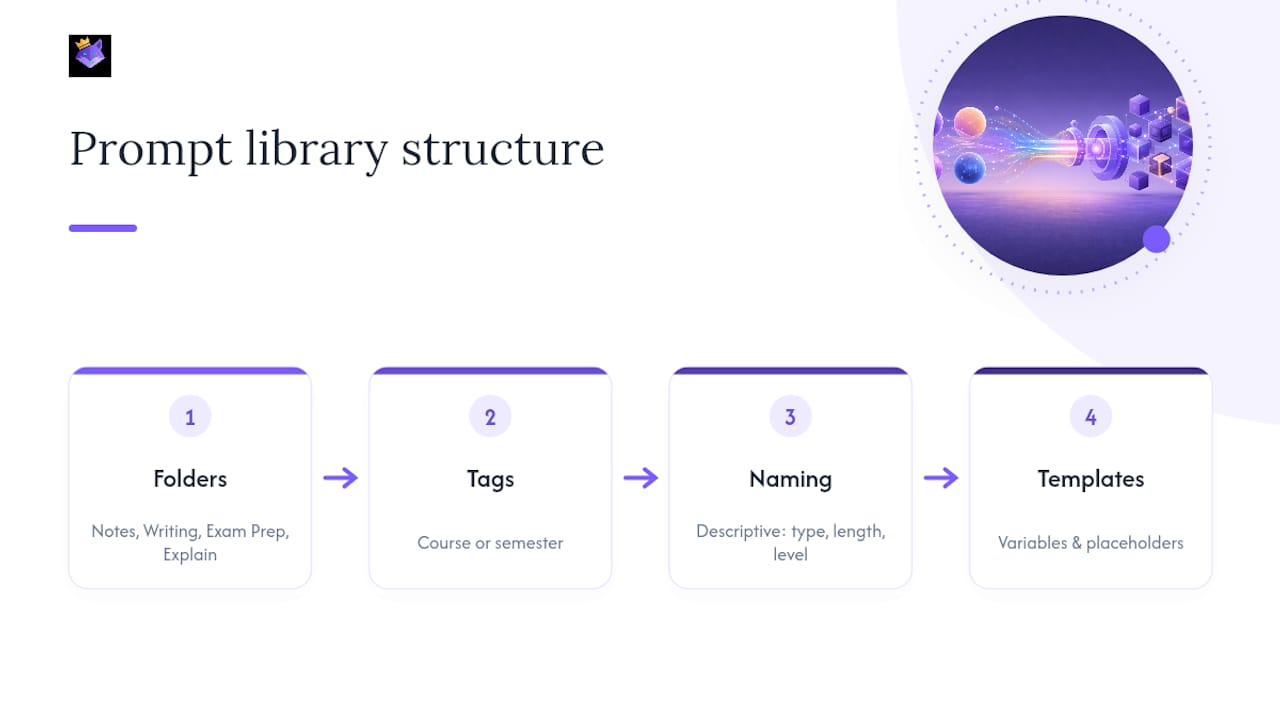
Building prompts as reusable templates with clear variables (like [TOPIC] or [WORD COUNT]) saves the most time long term, a pattern echoed by Polar Notes AI's approach of showing placeholder examples so students spend less time guessing at phrasing. Promptchief's variable-based templates apply the same logic across 27+ AI platforms, so one saved prompt adapts to a dozen different assignments.
Back up your work regularly, especially before finals season when a lost prompt library means starting from scratch. If you tutor others or work in a study group, shared folders beat forwarding text messages of half-remembered prompt wording.
Pro Tip: Export your top 10 prompts to a plain text file once a semester. If your account ever gets locked out or a tool changes hands, you're not starting from zero.
Using AI prompts without crossing into academic dishonesty
The line between "drafting tool" and "cheating" comes down to whether you can explain and defend the work afterward. Treat AI output as a first draft, not a final answer, and always fact-check names, dates, and citations before submitting anything.
- Cite AI assistance when your institution's policy requires it, and check that policy before the assignment is due, not after.
- Ask the model to "show your reasoning step by step" rather than just giving a final answer. It's easier to catch a shaky argument in an outline than in finished prose.
- Cross-check any factual claim against a real source. Models generate plausible-sounding citations that don't always exist.
Instructors adopting prompt libraries for coursework often pair them with explicit rubrics and attribution rules, an approach Columbia's Center for Teaching and Learning uses to lower resistance from faculty who worry AI use will replace student thinking rather than support it. A rubric that asks students to submit both their prompt and the model's output makes the process visible instead of hidden.
Why prompt literacy matters more than the prompts themselves
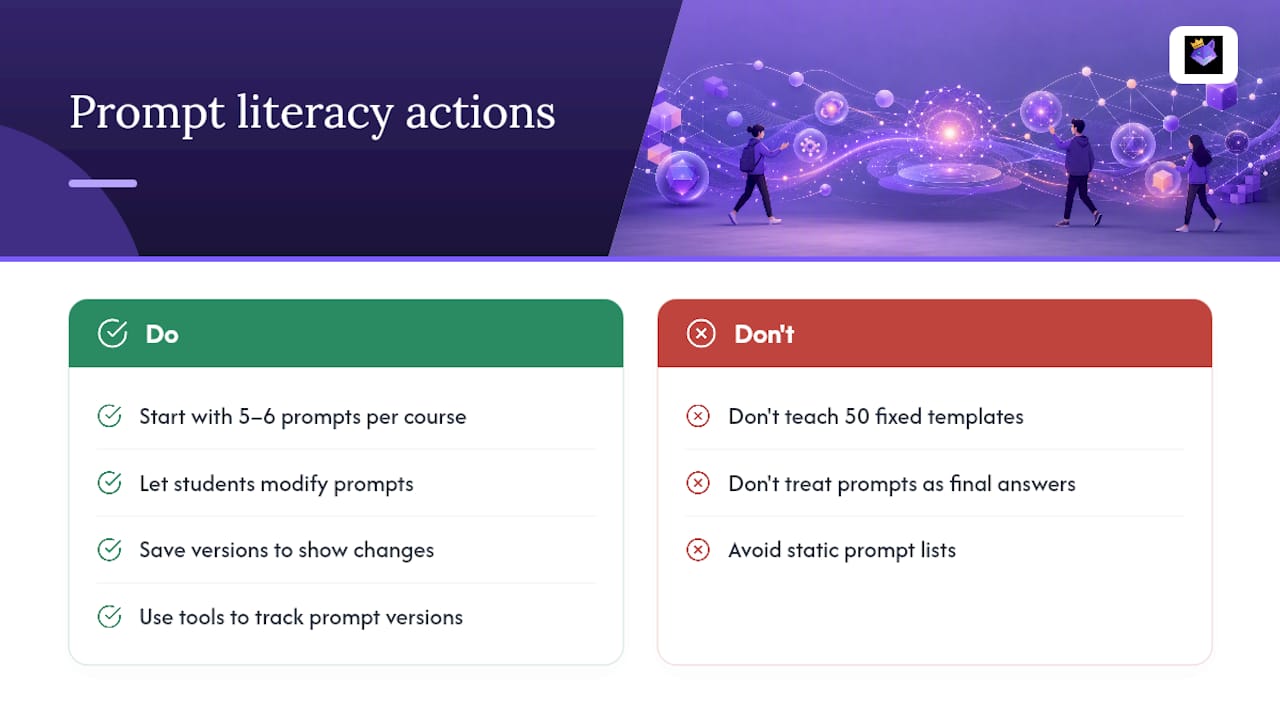
A prompt is scaffolding, not a substitute for thinking. The real skill worth teaching students isn't memorizing 50 templates. It's learning how a small wording change shifts a model's output, so they can adapt on the fly when the assignment doesn't match anything in the library.
Start with five or six prompts per course and let students modify them before adding more. Tools like Promptchief work best here as a teaching aid: watching a prompt evolve across saved versions shows students exactly what changed and why the output improved. That's a better lesson than any static list.
— John
Get your prompts out of scattered chat logs
Copy-pasting from old ChatGPT threads works until you're juggling five courses and can't remember which version of your essay-outline prompt actually worked. Promptchief fixes that by syncing every saved prompt across your devices, so a prompt you built on your laptop shows up instantly on your phone before class.

The free tier covers fuzzy search, cloud sync, and a Chrome extension that injects saved prompts directly into ChatGPT, Claude, or Gemini without retyping anything. Students and educators can start with the free prompt templates library, then move into variable-based prompt management once they're saving enough prompts to need real organization. Upgrade paths exist on the pricing page if a class or department wants shared team workspaces later. Start by saving your first three prompts and building from there.
A few more places to find prompts
For deeper collections, check Columbia's teaching-focused prompt library for instructor-oriented sets with rubric guidance, and Polar Notes AI for a large, categorized public library aimed at students and teachers. Both let you browse by task before committing to any single format.
Sources
- AI prompt library (Maastricht University) — news
- Prompt Library - Teaching and Learning in The Age of AI (Columbia CTL)
- 20 Essential AI Prompts for Students: Master Studying & Writing in 2026 | Fastweb
- AI Prompts Library: 5,000+ For Students & Teachers (Polar Notes AI)
FAQ
Do prompt libraries work the same across ChatGPT, Claude, and Gemini?
Mostly, but wording that works well in one model sometimes needs adjustment in another. Claude tends to follow detailed formatting instructions more consistently, while ChatGPT and Gemini may need reminders mid-conversation.
How many prompts do I actually need to get started?
Five to ten prompts per course is enough for most students to start, since starting small and iterating works better than importing an entire library at once.
Is using AI prompts for homework considered cheating?
It depends entirely on your institution's policy and whether you disclose AI assistance when required. Treat AI output as a draft to verify and revise, not a final answer to submit unchanged.
Can I organize my own prompts instead of relying on public libraries?
Yes, and most students eventually need to once they're saving more than a handful. A tool like Promptchief lets you tag, search, and sync prompts across devices instead of scrolling through old chat history.
Do I need to cite AI-generated content in my assignments?
Many institutions now require disclosure when AI assisted with drafting, research, or brainstorming, so check your specific course syllabus or institutional policy before submitting work.