
Temperature, top-p, and top-k are the three sampling parameters that decide how random or predictable an LLM's output is, and the practical rule almost every practitioner converges on is: tune temperature first, then reach for top-p or top-k truncation, and only touch repetition penalties if you see a specific problem. This article walks through what each knob does, gives numeric starting points by task, and shows exact config snippets so you can test them yourself.
TL;DR:
- Using top-p sampling is preferred over top-k because it adapts the candidate pool size based on model confidence, especially useful in uncertain moments.
- Starting with a temperature around 0.7 and top-p 0.9 offers a reliable baseline for most tasks, with lower temperatures increasing determinism and higher temperatures encouraging creativity.
- Testing multiple samples at different settings and choosing the best output is more effective than obsessing over exact parameter fine-tuning for consistent results.
- Fixing a sampling preset and logging the configuration helps maintain consistent output quality across sessions and simplifies reusing effective settings.
- Adjustments to repetition penalties, seed values, and output length caps should be secondary to sampling parameter tuning unless specific issues like looping or overly long outputs occur.
Table of Contents
- What Are Prompt Sampling Settings and Why Do They Matter?
- Temperature: The Dial That Controls Sharpness and Creativity
- Top-P and Top-K: How Truncation Shapes the Candidate Pool
- Beyond the Basics: Min-P, Penalties, Seed, and Output Limits
- How These Settings Interact and a Tuning Workflow That Works
- Concrete API Examples and Quick Config Snippets
- Practitioner Notes on Modern Sampling Advances
- What Actually Moves the Needle in Practice
- Save Your Sampling Presets Instead of Rebuilding Them
- Sources
- FAQ
What Are Prompt Sampling Settings and Why Do They Matter?
A language model doesn't pick words. It predicts a probability distribution over thousands of possible next tokens, then a decoding strategy decides which one actually gets used. Greedy decoding always grabs the single highest-probability token, which produces flat, repetitive text. Sampling, by contrast, draws from the distribution probabilistically, which is what lets a model sound varied and creative instead of robotic.
Here's the actual pipeline, in order:
- The model outputs raw scores (logits) for every token in its vocabulary.
- Logit adjustments apply first, such as repetition or presence penalties.
- Truncation narrows the candidate pool, using top-k, top-p, or min-p.
- Temperature rescales what remains, then the model samples from that final distribution.
This order matters because each setting reshapes the field before the next one acts. Get it wrong and you either strangle the model into dull, repetitive answers or let it wander into hallucinated nonsense. IBM's watsonx documentation frames these as decoding and stopping criteria for exactly this reason: they control the boundary between reproducible answers and creative risk.
Temperature: The Dial That Controls Sharpness and Creativity
Temperature rescales the logits before sampling. Low temperature sharpens the distribution so the model's favorite tokens dominate even harder; high temperature flattens it, giving weaker candidates a real shot at being picked. At T=1, the distribution is used roughly as the model produced it. Below 1, output gets more focused and repeatable. Above 1, it gets looser and more prone to odd word choices.
Google's Vertex AI docs recommend 1.0 as a sensible starting point before you adjust for your task, with a usable range typically running from 0.0 up toward 2.0 depending on the provider.
| Temperature range | What you get | Best for |
|---|---|---|
| 0 (greedy) | Fully deterministic, same output every run | Unit tests, exact extraction |
| 0.1–0.3 | Near-deterministic, minor variation | Code generation, structured JSON, factual Q&A |
| 0.5–0.8 | Balanced, coherent but not stiff | Chat, summarization, RAG answers |
| 1.0+ | Noticeably looser, more surprising phrasing | Brainstorming, creative writing, poetry |
The tradeoff is simple: push temperature down and you cut variety along with the risk of factual drift; push it up and you gain range but also raise the odds of a confidently wrong sentence.
Pro Tip: If two runs of the same prompt at temperature 0.7 give wildly different quality, don't blame temperature. Check your truncation settings first. A wide-open top-p with high temperature is often the real culprit.
Top-P and Top-K: How Truncation Shapes the Candidate Pool
Temperature decides how sharp the odds are. Top-p and top-k decide which tokens are even allowed to compete. Top-k keeps a fixed count, say the 40 most likely tokens, and discards everything else regardless of how the probability mass is spread. Top-p, also called nucleus sampling, instead keeps adding tokens until their combined probability crosses a threshold like 0.9, so the pool size flexes with how confident the model is at that particular step.
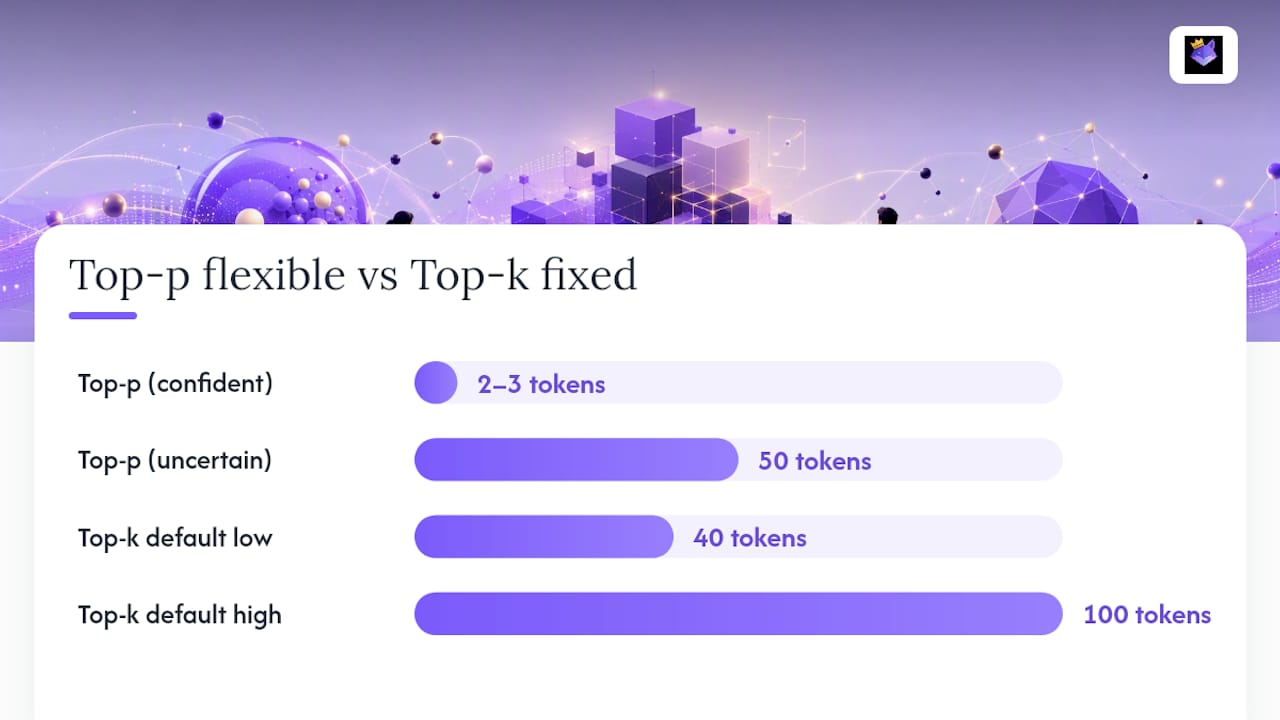
That flexibility is the main argument for preferring top-p over top-k in most everyday use. When the model is very confident, top-p might keep just two or three tokens. When it's uncertain, it might keep fifty. Top-k can't adapt that way. It either throws away good options in an uncertain moment or leaves junk tokens in when the model was actually sure.
Top-k still earns its place in specific situations:
- You want a hard, predictable ceiling on vocabulary diversity regardless of context.
- You're debugging a model and need a fixed, easy-to-reason-about candidate count.
- You're running an older model or framework where top-p support is inconsistent.
IBM's watsonx parameter guide shows both filters can be layered: apply top-k first to cap the raw candidate list, then apply top-p on what's left to trim by probability mass. In practice, most people leave top-k at a generous default (40 to 100) and do their real tuning with top-p somewhere between 0.9 and 0.95. If your outputs already look reasonable, resist the urge to touch either. Defaults exist because they work for the majority of tasks.
Beyond the Basics: Min-P, Penalties, Seed, and Output Limits
Top-p and top-k aren't the only levers, and several of the newer ones solve problems those two never quite fixed.
- Min-p sets a probability floor relative to the top token instead of a fixed count or cumulative mass, so it tightens automatically when the model is confident and loosens when it isn't.
- Repetition, presence, and frequency penalties reduce the odds of the model reusing tokens or phrases it has already produced, useful when you see looping or stuck phrasing.
- Seed fixes the random number generator so the same prompt and settings produce the same output every run, which matters for debugging and A/B comparisons.
- Stop sequences end generation the moment a specific string appears, useful for structured outputs where you need clean boundaries.
- Max_tokens caps output length outright, protecting both cost and runaway generations.
A common modern default pairs min-p around 0.05 with temperature in the 0.7 to 1.0 range, which keeps meaningful truncation whether the model's distribution is peaked or flat. That adaptiveness is the main reason min-p has been gaining ground over fixed top-p in newer setups.
For penalties, start near zero and raise frequency penalty only after observing repetition issues. Applying penalties preemptively tends to make prose stiffer without fixing anything.
How These Settings Interact and a Tuning Workflow That Works
Change two knobs at once and you'll never know which one caused the shift you're seeing. Truncation (top-p, top-k, min-p) decides the field of candidates; temperature decides how sharply you pick from that field. Change both simultaneously and a good result might be luck, not a repeatable setting.
A workflow that holds up across tasks is detailed in the guide to Effortless AI Content Creation for SEO Success, which explains practical tuning and content-generation workflows.
- Define what "good" means for this task. Exact match for extraction, a rubric score for creative writing, pass/fail for code.
- Set a baseline: temperature 0.7, top-p 0.9, top-k 40, no penalties. Run it.
- Adjust one parameter at a time, in small steps, and re-run the same prompt multiple times with different seeds to see if quality holds or if you just got a lucky draw.
- Generate multiple samples per setting (N=3 to 5) and compare, rather than trusting a single output. Mistral's sampling docs note that requesting multiple candidate completions is often cheaper than repeated separate calls, and it directly supports self-consistency checks.
- Lock in the winning combination as a named preset before moving to the next task.
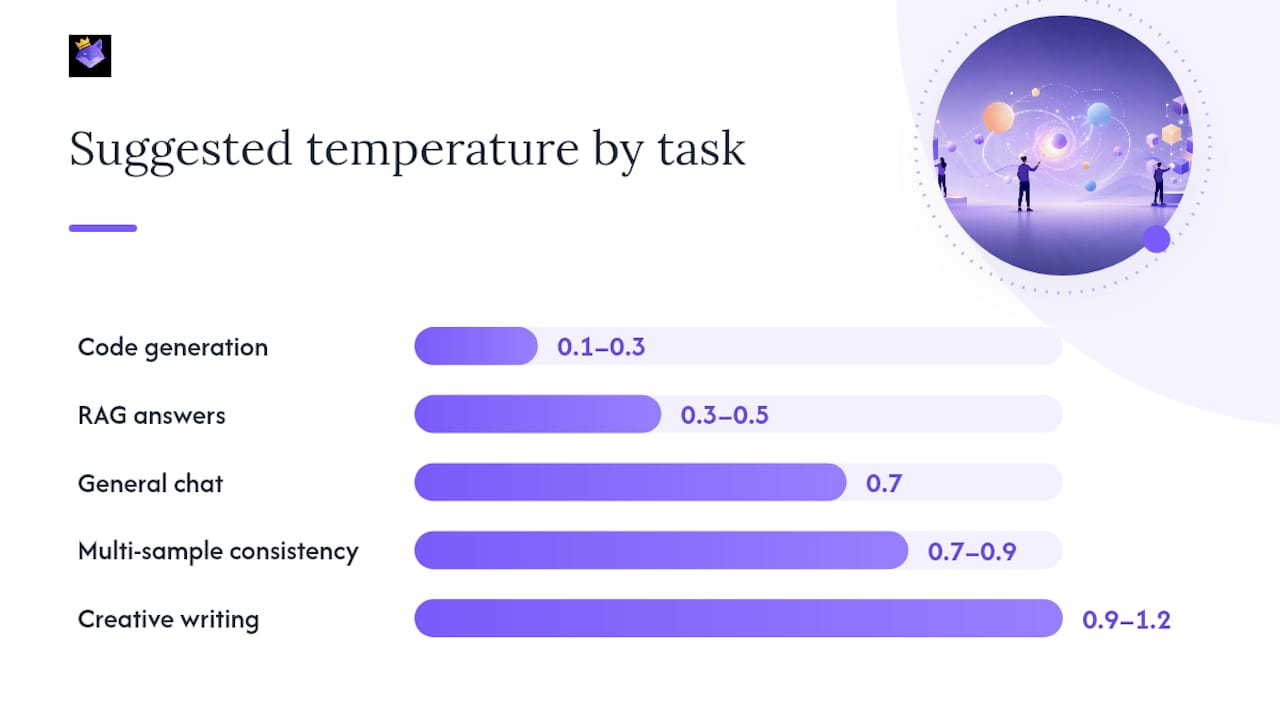
Rough starting presets by task:
- Deterministic extraction / classification: temperature 0, top-p 1.0 (irrelevant at T=0)
- Code generation: temperature 0.1–0.3, top-p 0.9
- Structured JSON output: temperature 0.2, top-p 0.9, strict stop sequences
- RAG answers: temperature 0.3–0.5, top-p 0.9
- General chat: temperature 0.7, top-p 0.9
- Creative writing: temperature 0.9–1.2, top-p 0.95
- Multi-sample self-consistency: temperature 0.7–0.9, N=5, pick majority or highest-scoring answer
Pro Tip: Keep a running log of which preset you used for which task and why. Six months later you will not remember whether "the good version" ran at 0.7 or 0.8, and re-discovering it by trial and error wastes real time.
Concrete API Examples and Quick Config Snippets
Seeing the actual fields helps more than any description. Here's the same intent expressed across three common setups.
Google Vertex AI (Python):
response = model.generate_content(
    prompt,
    generation_config={
        "temperature": 0.7,
        "top_p": 0.9,
        "top_k": 40,
        "max_output_tokens": 512,
        "seed": 42
    }
)
vLLM (Python, via SamplingParams):
from vllm import SamplingParams
params = SamplingParams(
    temperature=0.7,
    top_p=0.9,
    top_k=40,
    seed=42,
    max_tokens=512
)
Generic JSON config (many hosted APIs follow this shape):
{
  "temperature": 0.7,
  "top_p": 0.9,
  "top_k": 40,
  "seed": 42,
  "stop": ["

"],
  "max_tokens": 512
}
- Parameter names shift between providers. What Vertex AI calls
max_output_tokens, vLLM's SamplingParams callsmax_tokens, and some APIs still usenfor candidate count instead of a separate sampling call. - Provider defaults differ too. Don't assume temperature 1.0 means the same thing across two different APIs; check the docs for that specific model family.
- Fix the seed and log every parameter value alongside the output when you're running comparisons. Without a logged seed, you can't tell whether a difference came from your setting change or from random variance.
Practitioner Notes on Modern Sampling Advances
Sampling defaults have shifted noticeably. Where top-p 0.9 with top-k 40 used to be the safe universal setting, more practitioners now reach for min-p paired with moderate temperature, because it adapts to how confident the model actually is at each step rather than applying a fixed cutoff regardless of context.
- Min-p around 0.05 combined with temperature between 0.7 and 1.0 is a common modern default for open-ended tasks.
- Controller-style samplers like Mirostat target a specific level of output "surprise" directly, rather than truncating a fixed pool. When you use one, disable top-p, top-k, and min-p entirely (set top-p to 1.0, top-k to 0), or the controller and the truncation fight each other.
- Version your prompts and sampling presets together, not separately. A prompt that worked well at temperature 0.3 can behave very differently at 0.8. A tool like PromptChief can store both side by side so you're never guessing which combination produced a given result.
What Actually Moves the Needle in Practice
Most guides oversell precision tuning, telling you to hunt for the exact optimal top-p to three decimal places. That's not where the real gains are. What consistently works better: generate three to five samples at a modest, sane temperature (0.6 to 0.8) and pick the best one, rather than obsessing over a single perfect configuration run once.
The other pattern worth trusting is boring but true: once you find a combination that performs well on a given task, write it down and stop touching it. Teams lose more quality re-tuning a setting that already worked than they gain from marginal optimization.
Try this in the next ten minutes: take a prompt you use regularly, run it five times at temperature 0.7 with top-p 0.9, then five times at temperature 1.1 with the same top-p. Read both batches side by side. You'll see the tradeoff directly instead of reading about it.
— John
Save Your Sampling Presets Instead of Rebuilding Them
Testing sampling settings only pays off if you can actually reproduce the winning combination next week, not just remember it vaguely. PromptChief gives you a place to save the exact prompt and its sampling notes together, tag them by task, and pull them back up across ChatGPT, Claude, Gemini, and other platforms without retyping anything from memory.

The practical benefit for anyone running the workflow above: every preset you land on, whether it's temperature 0.2 for code or 1.0 for brainstorming, gets stored once and injected wherever you need it, instead of living in a scattered notes file you'll lose track of after a few weeks. Cloud sync features can let the same presets follow you from one device to another. Team workspace features may allow groups to share tested configurations instead of rediscovering them independently.
If you want a head start, browse the prompt management features to see how saved presets and prompt variables work together, or start from the free prompt library to test sampling changes against prompts that are already written for you.
Sources
For exact parameter behavior and provider-specific defaults, go to the source rather than a summary:
- Foundation model parameters: decoding and stopping criteria | IBM watsonx
- Content generation parameters | Google Cloud Vertex AI
- SamplingParams | vLLM docs
FAQ
What Are the Best Starting Prompt Sampling Settings?
For most general tasks, start with temperature 0.7, top-p 0.9, and top-k around 40, then adjust one setting at a time based on the results you actually see.
What Is the Difference Between Top-P and Top-K?
Top-k keeps a fixed number of candidate tokens regardless of confidence, while top-p keeps adding tokens until their combined probability crosses a threshold, so its pool size adapts to how certain the model is at that step.
What Are Good Examples of Sampling Configurations for Different Tasks?
Code generation typically uses temperature 0.1 to 0.3 with top-p 0.9, chat uses temperature 0.7 with top-p 0.9, and creative writing pushes temperature up to 0.9 or higher with top-p near 0.95.
What Are the Basic Steps for Tuning Sampling Parameters?
Define a success metric, set a neutral baseline, change one parameter at a time, run multiple samples with different seeds to confirm the change actually helped, then save the winning configuration as a named preset using a tool like PromptChief's prompt management software.
Does Changing Temperature Affect Factual Accuracy?
Lower temperature generally produces more consistent, focused answers and reduces the chance of the model wandering into an invented detail, though it does not guarantee factual correctness on its own.