
Prompt collaboration means treating prompts like production assets, not personal notes: a shared, versioned workspace where roles are defined and changes are tracked. The first move for any team is simple: set up that shared library today, assign an owner, editor, and reviewer, and you'll see faster iteration and outputs you can actually reproduce within days.
TL;DR:
- Implementing structured version control for prompts ensures consistency, trackability, and protection against prompt drift over time.
- Cross-model testing and multi-step prompt chains help teams compare accuracy and hallucination rates, improving output reliability.
- Clear roles, review processes, and lockable versions are essential for safe deployment and maintaining prompt quality in collaborative workflows.
- Using a shared library with standardized naming and tagging simplifies onboarding, reduces chaos, and fosters better prompt reuse and discovery.
- Enforcing security practices, such as role-based access and encryption, safeguards sensitive prompt content and maintains compliance.
Table of Contents
- Why Prompt Collaboration Matters for AI Teams
- Core Practices for Collaborative Prompt Workflows
- Platform Features and Tooling Checklist for Teams
- Operational Workflows: Review, Testing, and Release for Prompts
- How to Set Up a Team Prompt Workspace (Step-by-Step Checklist)
- Applied Example: How PromptChief Maps to the Checklist
- Training New Team Members on Prompt Collaboration
- Security and Privacy When Sharing Prompts Within Teams
- Metrics and KPIs for Prompt Collaboration Effectiveness
- Author Perspective: Three Common Mistakes Teams Make
- PromptChief: How It Supports Team Prompt Collaboration
- Sources
- FAQ
Why Prompt Collaboration Matters for AI Teams
Most teams lose prompt quality the same way they lose code quality without version control: silently, one Slack message and one copy-paste at a time. A prompt that worked in March gets tweaked by someone in April, nobody records why, and by June three people are running three different versions of the "same" customer support script.
Structured, human-in-the-loop prompt workflows measurably improve productivity compared to ad hoc editing, according to recent research on human-AI collaboration. That tracks with what happens on the ground:
- Reproducible outputs across team members, instead of each person's private variant.
- Fewer bottlenecks between engineers who build systems and the subject-matter experts who know what "good" looks like.
- An audit trail that shows who changed what, and why, when something breaks.
- Protection against prompt drift, where small unrecorded edits quietly degrade output quality over months.
The AI Index Report tracks the rapid growth in LLM adoption across industries, and with that growth comes a rising operational demand for the kind of tooling and governance that ad hoc prompt management simply can't provide.
Core Practices for Collaborative Prompt Workflows
Good prompt collaboration workflow design starts with one decision: prompts are not code comments, and they don't live inside a Python file where only the person who wrote them can find them.
- Decouple prompts from code. Store prompts in a managed library, separate from your application logic, so a prompt-wording fix doesn't require a full deployment cycle. This is the single biggest unlock for non-engineers who need to edit prompt text without touching a repository.
- Build modular, template-driven prompts. Use placeholders for variables (customer name, product category, tone) rather than hardcoding full text for every variant. Open source tools like promptArq apply Git-style thinking to prompts specifically because modular templates make comparison and testing tractable.
- Apply a real versioning policy. Branches for experiments, semantic tags for stable releases, and commit-style messages explaining why a change was made, not just what changed.
- Standardize naming, tagging, and folders. A prompt called
v3_final_REALtells nobody anything six months from now. A prompt taggedcustomer-support / tone:formal / v2.1tells a new hire everything.
The instinct to skip formal versioning is understandable when a team is three people. It becomes expensive fast, because the same instinct that skips versioning also skips documentation of why a prompt was written that way, which is exactly the knowledge a new teammate needs.
Pro Tip: Before you write a single naming rule, run an audit of every prompt currently in production. You'll usually find three or four "final" versions of the same prompt scattered across docs, Slack threads, and someone's local notes. Consolidate those first. Building conventions on top of chaos just documents the chaos.
Platform Features and Tooling Checklist for Teams
Not every feature marketed as "collaboration" actually reduces friction. Some are checkbox features nobody uses after week one. Here's what actually earns its place in a team prompt workspace:
- Cross-model injection and multi-LLM testing. The ability to run one prompt against several models without rebuilding it each time, so you can compare accuracy and hallucination rate side by side.
- Cloud sync and editor or browser extension integration. This is what eliminates copy-pasting prompts between a doc, a chat window, and a codebase.
- Role-based permissions, approval workflows, and audit logs. Someone needs the ability to lock a production prompt so a well-meaning edit doesn't ship untested.
- Support for prompt chains, reusable templates, and usage analytics. Multi-step workflows, like a code review chain that runs three prompts in sequence, need chaining support baked in rather than stitched together with scripts.
Platform documentation from tools built around shared libraries consistently shows that department-level collections with granular permissions cut down on repetition and inconsistent outputs between teams working on similar tasks.
Operational Workflows: Review, Testing, and Release for Prompts
A prompt shouldn't reach production the same way a Slack message reaches a channel. It needs a path:
- Draft, written by whoever identifies the need.
- Peer review, a quick pass from a second person familiar with the use case.
- Review queue, where it waits for formal sign-off rather than getting deployed on the spot.
- Approved and locked, meaning the version is frozen and tagged.
- Deployed, with the exact version recorded against the release.
A lightweight draft-to-review-to-approve workflow with an audit trail is often enough for early-stage teams, and it scales cleanly by adding more granular roles later, according to Taskade's collaboration tooling documentation.
Testing matters as much as review. Running the same prompt across two or more models to compare hallucination rates and task utility catches problems a single-model test misses entirely. Track latency, accuracy against a known-good answer set, and hallucination rate as your baseline metrics.
For rollback, keep it boring: a locked previous version, one click to revert, and a log entry explaining why. Involve engineers for implementation, PMs for priority calls, QA for testing, and legal for anything touching compliance or customer data.
How to Set Up a Team Prompt Workspace (Step-by-Step Checklist)
You can get a working system running in one afternoon. Here's the order that actually works:
- Create a shared library and seed it with a small number of vetted prompts covering your highest-frequency tasks, whether that's code review, customer summaries, or QA test generation.
- Define three roles: an owner who approves changes, editors who propose them, and reviewers who check them before they ship.
- Apply a simple naming and tagging convention, plus one version rule (a number that increments on every approved change).
- Run one quick test across two different LLMs on your seed prompts, compare results, and lock the version that performs best.
Pro Tip: Start with the seed library approach of three to five prompts before you expand. Teams that try to migrate their entire prompt history on day one usually stall out reorganizing instead of shipping.
Applied Example: How PromptChief Maps to the Checklist
A Chrome extension and cloud sync setup, like the one PromptChief runs, is a direct answer to the copy-paste problem: a prompt saved on a desktop shows up instantly on a laptop or a teammate's browser, no file sharing required.
Mapped against the checklist above, a platform built for this use case needs to show up in a few concrete places:
- Team workspaces that separate who can edit a prompt from who can only use it.
- Version history so a locked "approved" prompt can be rolled back if a new edit underperforms.
- Multi-step prompt chains for workflows like code review, where three prompts fire in sequence rather than one.
- An audit trail showing who changed what and when, satisfying the governance need raised earlier.
The mechanics matter more than the marketing copy. A workspace either shows you who edited a prompt last week, or it doesn't.
Training New Team Members on Prompt Collaboration
Onboarding a new hire into a prompt workflow fails most often for one reason: nobody hands them the seed library; they start writing prompts from scratch instead of learning the conventions already in place.
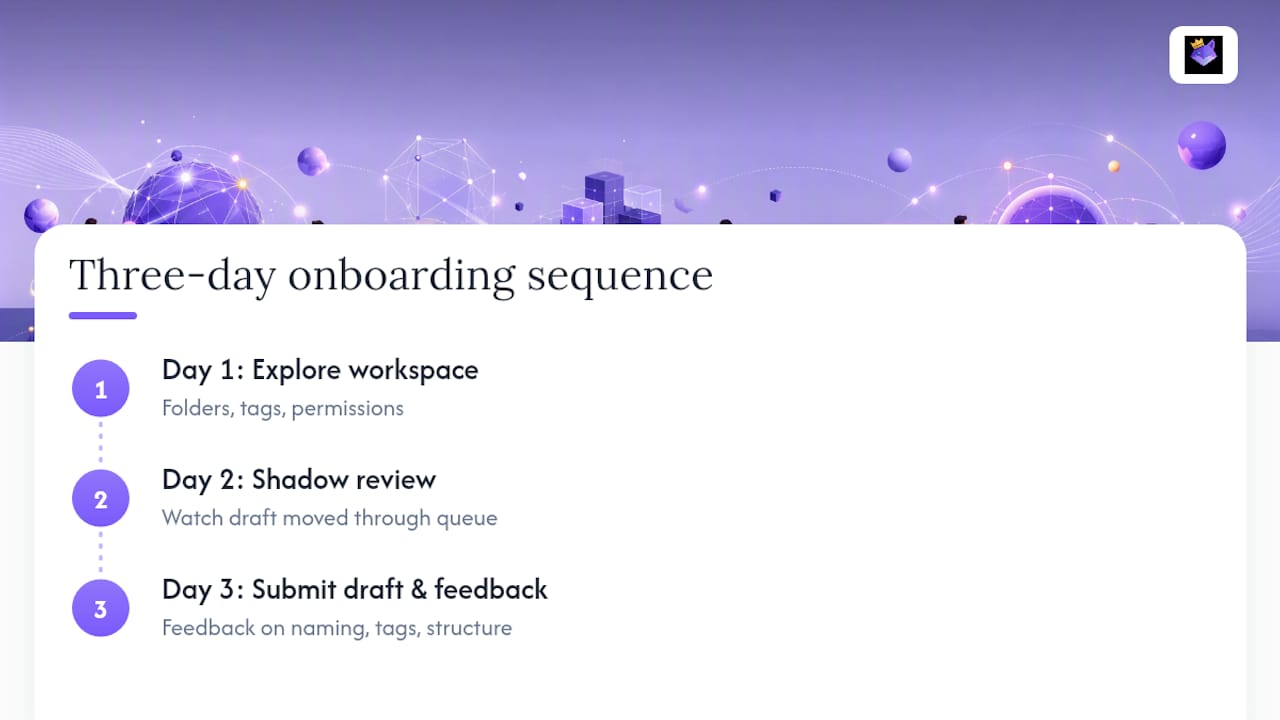
The fix is a short, structured first week. Day one, walk the new team member through the shared workspace itself: where the folders live, what the tags mean, and which prompts are locked versus editable. Day two, have them shadow a review, watching how an existing team member moves a draft through the review queue rather than reading a policy document about it. By day three, they should submit their own first draft prompt, small and low stakes, and get direct feedback on naming, tagging, and structure before it ever reaches production.
Pair this with a living reference document, not a static onboarding PDF that goes stale after the first platform update. The naming conventions, versioning rules, and role definitions covered earlier in this guide belong in a single page the new hire can bookmark, updated whenever the team changes its own rules.
One overlooked point: onboarding is also where bad habits get inherited. If the existing team skips review queues under deadline pressure, the new hire learns that skipping is normal within their first two weeks. Enforce the workflow strictly during onboarding specifically because that's when norms get set for good.
Security and Privacy When Sharing Prompts Within Teams
Prompts often contain more sensitive information than teams realize. A customer support prompt might embed real customer names as examples. A sales prompt might reference actual deal terms. Treat prompt content with the same scrutiny you'd apply to any internal document, because functionally, it is one.
Role-based access is the first line of defense: not every team member needs edit rights on every prompt, and prompts touching customer or financial data should be restricted to a smaller group with a clear approval requirement. Audit trails matter here too. If a prompt containing sensitive placeholder data gets shared outside the intended group, you need a log showing exactly when and by whom.
Public sharing introduces a separate risk. If your team contributes prompts to a public library or community hub, check the licensing terms before you publish. Community and open licensing frameworks, such as Creative Commons, define what others can and can't do with a shared prompt, and that distinction matters if your prompt includes internal terminology or proprietary phrasing you don't want copied into a competitor's workflow.
Cloud sync introduces convenience and a small trade-off: your prompts now live on a vendor's infrastructure. Ask any platform you evaluate how prompt data is encrypted at rest and in transit, and whether team-level data can be exported or deleted on request. Those two questions filter out a surprising number of vendors quickly.
Metrics and KPIs for Prompt Collaboration Effectiveness
You can't improve what you don't measure, and prompt collaboration is no exception. Teams that skip metrics tend to rely on gut feeling about whether a prompt "feels better," which breaks down the moment two people disagree.
Track a small, specific set of numbers rather than a sprawling dashboard nobody checks. Iteration velocity, how many approved prompt versions ship per week, tells you whether your review process is a genuine bottleneck or working as intended. Output quality metrics, like task accuracy against a known-good answer set and hallucination rate across multi-model tests, tell you whether changes are actually improvements rather than just different.
Reuse rate matters more than most teams expect. If the same three people keep rewriting similar prompts instead of pulling from the shared library, that's a signal the library isn't discoverable, not that people don't want to collaborate. Time-to-onboard is another underused metric: how long it takes a new hire to submit their first approved prompt tells you a lot about whether your conventions are actually documented or just living in someone's head.
Finally, track rollback frequency. A locked version that gets reverted often points to a gap in your review or testing stage, not a mistake to just quietly fix.
Author Perspective: Three Common Mistakes Teams Make
The teams that struggle almost never lack talent. They skip versioning and then wonder why nobody trusts the "current" prompt. Enforce branching and version locks from day one. They exclude the people who actually know the domain from review, so prompts drift from what the business needs. Add lightweight review roles instead of gatekeeping everything through engineering. And they skip metrics entirely, mistaking activity for progress. Collect simple accuracy and hallucination data before you scale anything.
— John
PromptChief: How It Supports Team Prompt Collaboration
Every practice in this guide, decoupling prompts from code, versioning, role-based review, cloud access, maps directly to what a prompt management platform needs to deliver day one. PromptChief's cloud sync means a prompt saved on one device shows up instantly on another, closing the copy-paste gap that breaks most informal team workflows. Multi-step prompt chains handle sequential tasks like code review without stitching together separate tools, and the Chrome extension puts your library one click away inside whatever app your team already uses.

Getting started takes minutes, not a procurement cycle. Create a free account, seed your workspace with three to five prompts your team already relies on, and invite your first editor and reviewer to test the approval flow. Check the pricing page for team seat options once you're ready to scale past the free tier, and see exactly what fits your team's size and workflow.
Sources
- PromptPilot: Improving Human-AI Collaboration Through ...
- AI Index Report
- AI Prompt Collaboration Agent | Taskade
FAQ
What Is an Example of a Prompt?
A well-built prompt for customer support might read: "Summarize this customer complaint in two sentences, identify the core issue, and suggest a resolution tone." The best team prompts use placeholders, like {customer_name} or {product_category}, so the same template works across many cases without rewriting it each time.
What Is Collaboration in AI?
Collaboration in AI generally refers to humans and AI systems working together, where structured workflows and clear roles improve output quality over unstructured, one-off interactions. In a team context, it also means multiple people jointly building, reviewing, and refining the prompts that drive an AI system's behavior.
What Are the Four Components of a Prompt?
Definitions vary across teams and tools, but a common structure includes context (background information), instruction (the specific task), input data (the variable content), and output format (how the response should be structured). Not every prompt needs all four, but complex production prompts usually benefit from defining each explicitly.
What Does Prompt Work Mean?
Prompt work refers to the ongoing process of drafting, testing, reviewing, and refining prompts to get reliable, high-quality outputs from an AI model. It's iterative by nature, which is exactly why version control and review workflows, rather than one-time writing, define effective prompt collaboration workflows.