
An orchestration-first prompt manager that saves, injects, and chains prompts across platforms is the fastest path to reliable AI workflow automation for prompt-heavy teams. Instead of copy-pasting into ChatGPT, Claude, or Gemini one by one, you build a system where prompts fire automatically, carry structured context, and hand off cleanly between steps. Atlassian describes this shift as freeing teams from routine triage and summarization so they can focus on higher-value work.
The core payoff, in plain terms:
- Fewer manual steps: prompts inject directly into any AI platform without copy-paste
- Consistent outputs: chained, versioned prompts reduce hallucination and context loss
- Built-in governance: approval gates and audit logs keep sensitive actions from running unchecked
Table of Contents
- What does AI workflow automation actually mean for prompt managers?
- What core components does every prompt automation system need?
- How do you implement a prompt automation workflow step by step?
- What governance and security controls do automated prompt workflows need?
- Which features matter most in a prompt management and automation tool?
- Why Promptchief fits prompt-driven AI workflow automation
- Three copy-ready workflow templates for prompt managers
- Onboarding checklist for teams adopting prompt automation
- Key Takeaways
- Why orchestration-first thinking changes everything
- Promptchief puts your prompt workflows into production faster
- Useful sources and further reading
What does AI workflow automation actually mean for prompt managers?
A prompt library stores your prompts. That's useful but passive. AI workflow automation for prompt managers means connecting those saved prompts to triggers, injectors, and monitoring so outputs are consistent and repeatable across every platform you use.
Three tiers to understand:
- Prompt library only: you save prompts and manually paste them. No automation, no chaining.
- Prompt manager with orchestration: prompts fire on triggers, inject into platforms via a browser extension or API, and chain together so step two uses the output of step one.
- Agentic workflows: multi-step tasks run across tools with minimal human input, accessing calendars, docs, and connectors end-to-end.
Most teams need the middle tier first. Cross-platform injection, magic placeholders, and prompt chaining eliminate the copy-paste loop and prevent context from fragmenting when you switch between ChatGPT, Claude, and Gemini in the same workflow.
What core components does every prompt automation system need?
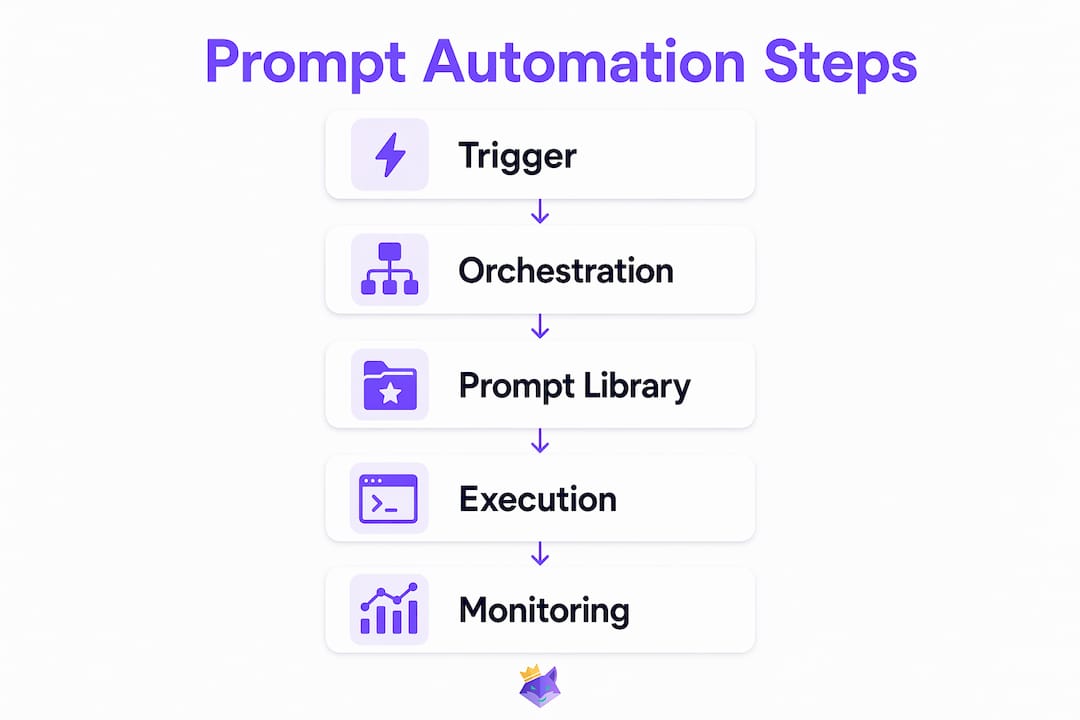
IBM identifies orchestration as the critical missing piece in most AI strategies. Without it, you have disconnected prompts, not a workflow. Here's what a complete system looks like:
| Component | What it does |
|---|---|
| Orchestration layer | Sequences tasks, manages API calls, routes outputs between steps |
| Prompt library (versioned) | Single source of truth for all prompt assets |
| Connectors / injectors | Deliver prompts into specific platforms (browser extension or API) |
| Trigger engine | Fires workflows on schedule, event, or webhook |
| Monitoring / audit logs | Records every execution for review and debugging |
| Approval gates | Pauses sensitive writes for human sign-off |
| Secrets management | Stores API keys and credentials outside prompt text |
The flow looks like this: a trigger fires the orchestrator, which pulls the right prompt from the library, passes it through a connector to the target platform, and logs the result. Approval gates sit between the connector and any write action that touches a customer or external system.

Pro Tip: Treat every prompt as a modular asset. Break long prompts into small, testable chains with named placeholders (like {{customer_name}} or {{ticket_summary}}). Smaller units are easier to debug, cheaper to maintain, and far less likely to hallucinate when the underlying model updates.
How do you implement a prompt automation workflow step by step?
OpenAI's agent-building guidance recommends starting in plain language, then adding connectors and guardrails before scaling. That sequence works for prompt managers too.
- Audit existing prompts and actions. Catalog every prompt your team uses manually. Note which platforms they target, how often they run, and where errors happen.
- Pick an orchestration-first prompt manager. You need a tool with a built-in library, multi-platform injection, and chaining. Promptchief covers all three.
- Design minimal prompt chains. Map one high-value workflow (meeting prep, email triage, content review) as a three-to-five step chain. Keep each step to a single task.
- Add connectors and secrets. Configure platform connectors and store API keys in a secrets vault, never inside prompt text.
- Test with approval gates. Run the chain in a sandbox. Add an approval gate before any step that writes to a customer-facing system.
- Deploy and monitor. Go live on a narrow scope. Review logs daily for the first two weeks, then weekly.
Timeline: a first production workflow takes roughly 2–4 weeks for a solo pilot. A full squad rollout, with RBAC, versioning, and multiple chains, typically runs 6–12 weeks. Cost factors include engineering time, tooling subscription, and per-seat pricing for team workspaces.
Atlassian and IBM both recommend starting with a single measurable workflow rather than a broad transformation. Pick one workflow, measure time saved and error rate, then expand.
What governance and security controls do automated prompt workflows need?
As teams build more agents, governance must scale with them. OpenAI's workspace agent guidance is direct: approval gates, audit logs, and clear permissions are non-negotiable before any automated prompt touches a production system.
Governance checklist before you deploy:
- Approval gates on every prompt chain that writes to external systems or customer records
- Role-based access control (RBAC) so only authorized users can edit or trigger specific chains
- Audit logs capturing user, timestamp, prompt version, platform, and output for every execution
- Connector permission scoping so each connector only accesses the endpoints it needs
- Secrets management with keys stored in a vault, rotated on a schedule, and never embedded in prompts
- Retention policies defining how long logs and outputs are stored before deletion
Follow your organization's data-handling policies. For workflows that affect customers or external systems, maintain immutable audit trails. Zapier's governance framework shows how endpoint-level restrictions and managed connections prevent shadow IT while still letting teams build freely.
Which features matter most in a prompt management and automation tool?
82% of cross-industry operations executives expect process automation to be more effective because of AI agents by 2027, per IBM Institute for Business Value research. That adoption curve means the tools you pick now will carry significant workflow debt if they lack governance and injection depth.
Evaluation checklist:
- Cloud sync across devices
- Multi-platform injection via browser extension AND API
- Fuzzy search across your prompt library
- Placeholders and parameterization for reusable prompt templates
- Multi-step prompt chains with branching logic
- Scheduled triggers and webhook support
- Team workspaces with RBAC
- Versioning for prompt assets
- Audit logs and a testing sandbox
Questions to ask during a trial: Can you inject into the specific platforms your team uses? How are API secrets scoped per connector? Does the tool support an approval gate before a write action fires?
Why Promptchief fits prompt-driven AI workflow automation
Promptchief maps directly to the requirements above. Here's how its features align:
- Prompt library + fuzzy search creates a single source of truth. No more hunting through Notion docs or Slack threads for the right prompt.
- Chrome extension + 27+ platform connectors handle multi-platform injection into ChatGPT, Claude, Gemini, and more without switching tabs.
- Prompt chains and magic placeholders turn one-off prompts into modular, reusable workflows with dynamic variables.
- Team workspaces + audit logs satisfy governance requirements for squads sharing prompt assets.
- AI prompt rewriting in 9 styles lets you refine prompts without leaving the platform.
- Community prompt hub gives teams a starting library rather than building from zero.
Promptchief centralizes prompt chains and versioning in one place, which cuts the maintenance overhead that kills most automation efforts. When a model updates or a connector changes, you fix one prompt in the library rather than hunting down ten scattered copies across tools.
Promptchief's freemium model means you can validate a pilot workflow before committing to a paid seat, which aligns with the "start small" implementation advice above.
Three copy-ready workflow templates for prompt managers
Workflow A: meeting prep
- Trigger: calendar event fires 30 minutes before a meeting
- Step 1: pull meeting notes and attendee context from connected docs
- Step 2: run a summarization prompt chain (agenda summary + open action items)
- Step 3: save output to a shared doc
- Approval gate: human reviews summary before it's shared with attendees
Workflow B: support ticket triage
- Trigger: new support ticket created
- Step 1: classify ticket by category and urgency using a classification prompt
- Step 2: assign to the correct queue based on output
- Step 3: draft a first-response message using a reply prompt with
{{ticket_summary}}placeholder - Approval gate: human approves before the draft sends to the customer
Workflow C: content review chain
- Trigger: draft saved to content workspace
- Step 1: quality-check prompt flags tone, factual gaps, and formatting issues
- Step 2: rewrite pass prompt applies corrections
- Step 3: output held in a publish queue
- Approval gate: editor signs off before the piece goes live
Each template works with productivity prompts from Promptchief's public library as starting points.
Onboarding checklist for teams adopting prompt automation
Getting a team live safely takes more than flipping a switch. Work through this before your first production run:
- Pick one pilot workflow with a clear owner and measurable KPI (time saved, error rate)
- Create a prompt naming convention (e.g.,
[team]-[use-case]-[version]) and enforce it from day one - Set RBAC before anyone outside the pilot team touches the system
- Run shadow tests: let the automation run in parallel with the manual process for one week
- Measure baseline vs. automated performance before scaling
- Schedule quarterly prompt audits to retire stale chains and update placeholders
Do: start small, centralize all prompt edits in one library, and document every chain.
Don't: automate sensitive writes without approval gates, let individuals maintain private prompt variants outside the shared library, or skip versioning because it feels like overhead.
A single source of truth for prompt updates is what separates a maintainable system from automation bloat. When prompts scatter across tools, one model update breaks everything at once.
Key Takeaways
Orchestration-first prompt automation, with a versioned library and multi-platform injection, is the most reliable path to consistent AI outputs at team scale.
| Point | Details |
|---|---|
| Orchestration is the foundation | Without an orchestration layer, you have disconnected prompts, not a workflow. |
| Treat prompts as modular assets | Use placeholders and small chains to reduce hallucination and cut maintenance cost. |
| Start with one pilot workflow | A 2–4 week pilot on a single high-value workflow beats a broad rollout every time. |
| Governance before you scale | Add approval gates, RBAC, and audit logs before any chain touches a production system. |
| Promptchief covers the checklist | Multi-platform injection, prompt chains, team workspaces, and versioning in one platform. |
Why orchestration-first thinking changes everything
Most teams treat prompt automation as a storage problem. They build a library, feel organized for a week, and then watch outputs drift as the team grows and prompts multiply across tools. The real problem is orchestration, not storage.
The teams that get durable results are the ones who treat prompts the way engineers treat code: versioned, modular, tested before deployment, and owned by a single source of truth. Approval gates feel like friction until the first time they catch a bad draft before it reaches a customer. Audit logs feel like overhead until someone asks why the automation behaved differently last Tuesday.
The governance controls and the modular prompt design are not separate concerns. They are the same discipline applied at different layers of the stack.
Promptchief puts your prompt workflows into production faster
Stop rebuilding the same prompts from scratch every time you switch platforms. Promptchief gives you a cloud-synced prompt library, a Chrome extension that injects directly into 27+ AI platforms, and a chain editor for building multi-step workflows your whole team can run and trust.
The team workspace keeps everyone on the same versioned prompts, and the audit log gives you the visibility your governance checklist requires. Whether you're running a solo pilot or rolling out to a full squad, Promptchief's free plan lets you validate the workflow before you spend a dollar. Start building your first prompt workflow today.
Useful sources and further reading
Industry research
- AI Workflow Automation: Impacts on Business Processes — Moveworks
- AI Workflow — IBM
- What Is AI Workflow Automation? — Atlassian
Implementation cookbooks
- Building Workspace Agents in ChatGPT — OpenAI Developer Cookbook
- Scheduled Tasks — ChatGPT Learn
- Build and Govern AI Workflows — Zapier
Product documentation
- Workspace Agents — OpenAI
- AI Prompt Chains: Multi-Step Workflows — Promptchief
- Automated Prompt Engineering Explained — Promptchief
- AI Prompt Manager for ChatGPT, Claude & More — Promptchief