
Multi-step prompting, also called prompt chaining, breaks a complex AI task into a sequence of smaller, focused prompts, each passing structured output to the next. Use it when a task has separable verbs (extract, then classify, then respond) or needs branching logic and per-step validation. The minimal recipe: decompose the task, give each step exactly one job, pass typed payloads instead of raw text, validate the output before moving on, and orchestrate the whole thing as a stateful pipeline rather than a single stateless call.
TL;DR:
- Multi-step prompting improves reliability and debuggability by isolating each task component and validating outputs before passing them forward.
- Use chaining for tasks with multiple verbs, branching logic, or when handling long documents that exceed context window limits to maintain focus and control.
- Effective patterns include router-classify-response and extract-classify-respond, and it is crucial to pass only typed, structured data between steps for clarity and noise reduction.
- Managing chain versions, validations, and logs with dedicated tools enhances reproducibility, reduces errors, and speeds up iteration through A/B testing and version control.
- Technical research shows that adding residual links and repeating exact facts improves multi-hop reasoning, but most production chains benefit more from precise validation and clear step boundaries.
Table of Contents
- What Is Multi-Step Prompting and Why Does It Work?
- When Should You Use Multi-Step Prompting?
- What Design Patterns Work Best for Prompt Chains?
- How Do You Handle State, Models, and Orchestration?
- How Do You Validate and Test Each Step?
- What Does Advanced Multi-Step Reasoning Research Show?
- What Are the Most Common Mistakes in Prompt Chains?
- How Granular Should Each Prompt Step Be?
- How Do You Debug a Multi-Step Prompt Chain?
- What Do Multi-Step Prompts Look Like Across Different AI Tasks?
- How Should You Version and Iterate Prompt Chains?
- How Do You Measure Whether a Multi-Step Prompt Chain Works?
- What Do I Wish More People Understood About Prompt Chains?
- How Can PromptChief Help You Manage Multi-Step Prompt Chains?
- Sources
- FAQ
What Is Multi-Step Prompting and Why Does It Work?
Multi-step prompting decomposes a task that would overload a single prompt into a chain of smaller prompts, where the output of one step becomes the input to the next. You'll also see it called prompt chaining or stepwise prompting. All three describe the same underlying mechanic: sequencing, not parallelizing.
The practical case for chaining comes down to control. A single mega-prompt asking a model to read a contract, flag risky clauses, summarize them, and draft a response mixes four different jobs into one inference call. If the model stumbles on step two, you can't isolate the failure. Chaining fixes that by giving each step a narrow scope, which improves reliability and debuggability compared with single-shot prompts.
The concrete benefits stack up fast:
- Reliability: a bad output at step 2 gets caught before it poisons step 5.
- Debugability: you can inspect, log, and replay each step in isolation.
- Modular tuning: you can swap the prompt for one step without touching the rest of the chain.
- Mixed-model pipelines: a fast, cheap model can handle extraction while a slower reasoning model handles judgment calls.
That modularity is the real payoff. You're not just making outputs better. You're making the whole system testable.
When Should You Use Multi-Step Prompting?
Not every task needs a chain. A single well-written prompt still handles most one-shot requests fine. Chaining earns its complexity when you notice specific signals in the task itself.
- Multiple distinct verbs in the task. If your instruction reads like "extract, then classify, then respond," that's three jobs pretending to be one prompt.
- Branching logic. When the right next action depends on what the model just produced (a support ticket that's a refund request goes one way, a bug report goes another), you need a router step, not a longer prompt.
- Differing reliability needs per step. Extracting a date needs near-perfect accuracy; drafting a friendly reply tolerates more variance. Splitting lets you apply stricter validation only where it matters.
- Long or growing context. When feeding the full document plus instructions plus examples blows past a useful context window, breaking the task into stages that each see a smaller slice keeps the model focused.
Common high-value use cases include document question-answering, contract analysis, code review pipelines, and multi-document summarization. Tasks with separable stages and deterministic control flow are exactly where chains outperform single prompts, because smaller, focused prompts are easier to optimize and evaluate than one giant instruction block.
The tradeoff is latency. Every added step is another network round trip. For a chat interface where users expect a reply in under two seconds, a five-step chain will feel sluggish unless you stream intermediate progress or parallelize independent branches.
What Design Patterns Work Best for Prompt Chains?
Two patterns cover most real-world chains, and both are worth memorizing because you'll reuse them constantly.
Router → branch → execute. A lightweight first prompt classifies the input and routes it to the right specialized chain. The router's only job is classification. Keep it thin. If your router prompt starts trying to also solve the task, you've merged two jobs back into one and lost the benefit of splitting them.
Extract → classify → respond. Pull structured facts out of raw text, categorize them, then generate a response grounded in that structured data. This is the backbone of most support-ticket and document-processing chains. A close cousin is query → retrieve → ground → answer, used heavily in retrieval-augmented setups where the model needs to fetch external facts before it answers.
What makes these patterns copyable is the I/O contract between steps. Instead of passing a wall of prose forward, pass typed fields:
- Step 1 output:
{"intent": "refund_request", "confidence": 0.91, "order_id": "A1029"} - Step 2 input: reads only
order_idandintent, ignores everything else - Step 3 output:
{"draft_reply": "...", "escalate": false}
This is where trimming aggressively pays off: pass only the machine-readable slice a step actually needs, and keep the full raw output in a separate log for debugging. Shoveling the entire previous response forward "just in case" adds noise and measurably hurts the next step's focus.
Pro Tip: Design your JSON schema before you write a single prompt. If you can't describe step 2's required input as three or four fields, step 1 is probably still doing too much.
Orchestration guidance from LLM Best Practices recommends treating the chain itself as the system's state, with each step reading and writing to that shared structure rather than reinventing context from scratch.
How Do You Handle State, Models, and Orchestration?
Here's the mental model that trips up most people building their first chain: the model is stateless. It has no memory between calls. Your orchestrator is what holds state.
That distinction changes how you build. The orchestrator's responsibilities include: use tools like Otto — Your AI chief of staff to effectively handle orchestration and human-in-the-loop patterns.
- Persisting outputs from each step in a database or in-memory object.
- Deciding which model handles which step (a fast chat model for formatting, a slower reasoning model for judgment).
- Retrying a step when validation fails, without re-running the entire chain.
- Inserting a human-in-the-loop checkpoint before a high-stakes action (sending an email, issuing a refund, deleting a record).
Model selection matters more than people expect. Not every step deserves your most expensive model. A step that reformats a JSON object into a bulleted summary doesn't need heavyweight reasoning. A step that has to weigh contradictory contract clauses does. Mixed-model pipelines, cheap model for extraction, capable model for judgment, cost less and often run faster than routing every step through the same large model.
Logging deserves its own discipline. Keep two separate trails: the trimmed payload that actually moves between steps, and the full raw output kept in a debug log. When something breaks in production, you want the full trace available without having to re-run the chain to reproduce it.
For retries, don't restart from step one. A well-designed chain lets you retry the single failed step with a slightly adjusted prompt or fallback logic, which saves both latency and API cost. Manual prototyping, pasting outputs by hand between prompts before writing any orchestration code, remains one of the fastest ways to catch interface mismatches before you automate anything.
How Do You Validate and Test Each Step?
A chain without validation gates is a chain that fails silently. The fix is straightforward: check each step's output against a defined contract before it moves forward.
- JSON schema validation. If a step is supposed to return
{"category": string, "confidence": float}, validate that shape immediately. Reject and retry if a required field is missing. - Regex checks for format-sensitive fields. Dates, order IDs, and email addresses are cheap to validate with a pattern match before they hit the next model call.
- Classifier gates. For subjective outputs (tone, sentiment, policy compliance), a small classifier model can flag outputs that need human review instead of passing them straight through.
Designing per-step success criteria with automatic checks is standard practice for production-grade chains, and it's the single biggest difference between a demo and a system you can trust.
Fallback policy matters as much as the gate itself. When validation fails, don't just error out. Define what happens next: retry with a stricter prompt, fall back to a simpler rule-based response, or escalate to a human reviewer. Prompt chaining patterns documented by AWS Labs treat these gates and their fallback paths as core architecture, not an afterthought bolted on later.
Testing before production means running your chain against a fixed set of representative inputs and checking that each intermediate output matches expectations, not just the final answer. Evaluating and optimizing each step independently isolates failures fast and shortens the iteration loop considerably compared with debugging the chain end to end every time.
What Does Advanced Multi-Step Reasoning Research Show?
Standard chain-of-thought prompting is linear: step three only sees step two's output, not step one's. That works fine for simple sequences but breaks down on genuinely graph-like problems, ones where a later step depends on an intermediate result from several steps back.
RESPROMPT (Residual Connection Prompting) addresses exactly that gap. The technique adds explicit links back to earlier intermediate results, effectively reconstructing a reasoning graph instead of a straight line. RESPROMPT shows measurable accuracy improvements over standard chain-of-thought on multi-step reasoning benchmarks by selectively placing these residual connections rather than linking every step to every other step.

One detail from that research is worth stealing directly: when a later step needs to reference an earlier intermediate result, repeating the exact same tokens verbatim works better than swapping in a symbolic variable name. If step one calculates "the discount is $42.50," step four should reference "$42.50" again, not "the previously calculated discount."
Practical takeaways for your own chains:
- Add residual links selectively, only where a step genuinely depends on a distant earlier result, not on every hop.
- Repeat exact tokens for critical intermediate values instead of abstracting them into variables.
- Avoid over-engineering simple linear tasks with residual connections; they add complexity that pays off mainly on genuinely multi-hop reasoning problems.
Pro Tip: Before reaching for residual connections, ask whether your chain is actually a graph or just a line pretending to need extra complexity. Most production chains are lines.
What Are the Most Common Mistakes in Prompt Chains?
Four failure patterns show up again and again once chains move past the prototype stage.
- Over-chaining. Splitting a task into ten steps when four would do adds latency and failure points without adding accuracy. Prune ruthlessly and measure whether each added step actually improves the outcome.
- Format-coupling. When step two's prompt hardcodes assumptions about step one's exact wording, a small change upstream breaks everything downstream. Strict I/O contracts, JSON schemas instead of prose, fix this.
- Error propagation. One wrong classification early in the chain cascades into a confidently wrong final answer. Validation gates and selective retries at the point of failure stop the cascade before it spreads.
- Shoveling full outputs forward. Passing an entire previous response into the next prompt "to be safe" buries the signal the next step actually needs. Trim to the relevant fields and keep full outputs in a separate debug log instead.
Each of these is fixable in isolation, which is the whole point of chaining in the first place.
How Granular Should Each Prompt Step Be?
The right granularity for a step is "one job, one output contract." That sounds simple, but the failure mode runs in both directions.
Too coarse, and you're back to a mega-prompt wearing a chain's clothing. If step one is supposed to "extract and classify," you've hidden two jobs inside one step, and when it fails, you won't know which half broke. Too fine, and you're adding round trips and validation overhead for splits that don't buy you anything. Splitting "extract the date" and "extract the amount" into two separate model calls almost never earns its latency cost. Do both in one step, then classify in the next.
A useful test: can you describe the step's job in one verb? "Extract," "classify," "summarize," "route," "draft." If your description needs "and," you likely have two steps disguised as one.
Step boundaries should also align with where reliability requirements change. Extraction usually needs near-perfect precision because everything downstream depends on it. Drafting a reply tolerates more creative variance. Put the boundary at that shift, not at an arbitrary word count.
One more rule worth following: match step granularity to where you actually need a validation gate. If you don't plan to check an intermediate output independently, it probably doesn't need to be its own step. The value of a smaller step is that it's checkable in isolation. If it isn't, you're paying the latency cost of a split without collecting the reliability benefit that justifies it.
How Do You Debug a Multi-Step Prompt Chain?
Debugging a chain is fundamentally different from debugging a single prompt, because the bug could be anywhere along the sequence, and the symptom (a bad final answer) often shows up several steps away from its actual cause.
Start by isolating steps. Run each prompt individually with a fixed test input and inspect its raw output before touching the orchestration layer. This is the same manual, paste-outputs-by-hand approach practitioners use to validate chain logic before writing any automation code, and it remains the fastest way to catch a broken interface between two steps.
Keep separate logs for the trimmed payload that moves between steps and the full raw model output at each stage. When a chain fails in production, you need the full trace to reconstruct what actually happened, not just the final trimmed field that got passed forward.
A few debugging habits worth building into your workflow:
- Log the input and output of every step with a timestamp and a version tag for the prompt that produced it.
- When a chain fails, replay from the last known-good step instead of re-running the whole sequence from scratch.
- Use validation gate failures as your first diagnostic signal. A schema mismatch tells you exactly which step broke its contract.
- Compare failing runs against a small library of known-good example runs to spot where behavior diverged.
A tool built for organizing and testing prompt variants makes this loop faster. Storing versioned steps somewhere searchable, PromptChief's prompt chains feature, for instance, beats digging through chat history to find which version of a step prompt you were running when a bug appeared.
What Do Multi-Step Prompts Look Like Across Different AI Tasks?
The core pattern stays the same across models and tasks: decompose, pass typed outputs forward, validate. What changes is the shape of each step.
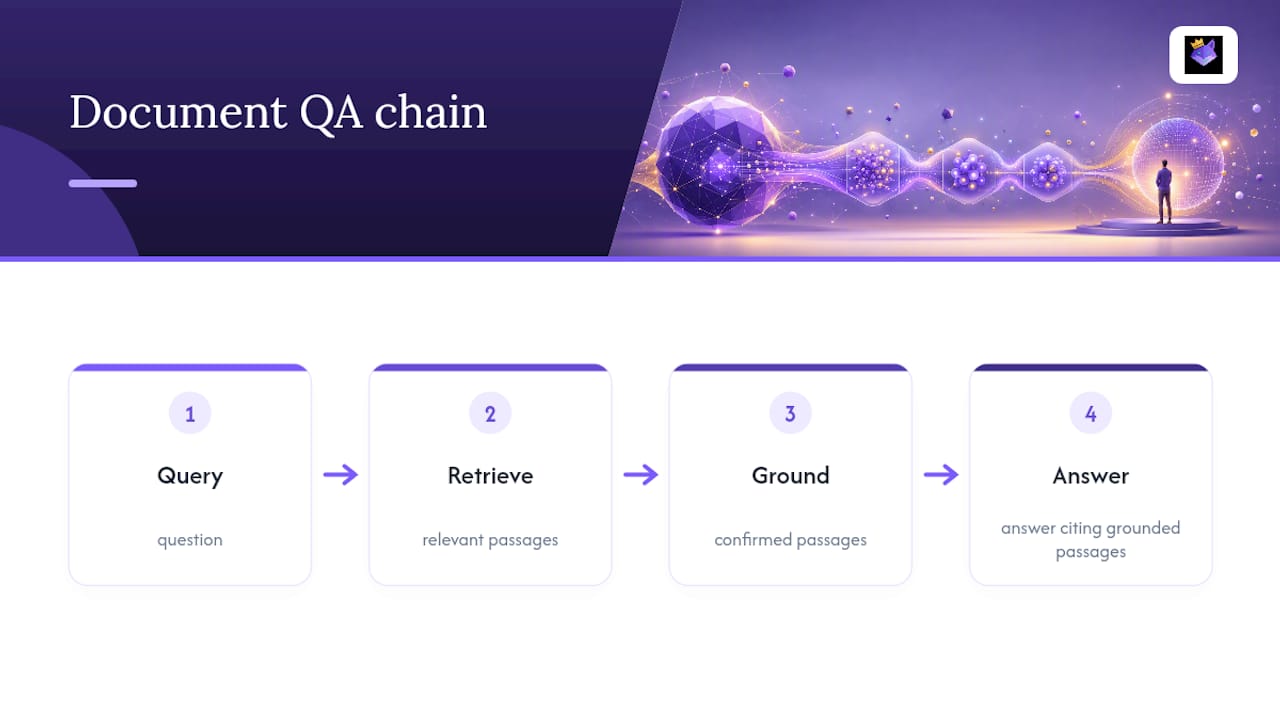
For document question-answering, a common chain runs retrieve, then ground, then answer. The first step pulls relevant passages from a knowledge base, the second step confirms which passages actually address the question, and the third generates an answer citing only the grounded passages. This query → retrieve → ground → answer pattern is standard in retrieval-augmented setups.
For code review, a chain might extract the diff, classify the type of change (bug fix, feature, refactor), then generate targeted review comments specific to that change type. A refactor gets checked for behavior preservation; a bug fix gets checked against the reported symptom. Splitting classification from commentary means the same chain adapts its review depth automatically.
For contract analysis, extraction pulls clauses into structured fields, classification flags each clause by risk category, and a final step drafts a plain-language summary of just the flagged clauses. This mirrors the extract → classify → respond template almost exactly.
For customer support triage, a router step classifies intent (billing, technical, refund), branches to a specialized prompt for that category, and a final step drafts a response in the appropriate tone.
Across chat models and reasoning-focused models alike, the pattern holds: narrow the job at each step, and pass the model only what it needs to do that job, not everything that came before it.
How Should You Version and Iterate Prompt Chains?
Treat your chain templates the way you'd treat application code, not throwaway text. Versioning chain templates and keeping per-step traces in source control or observability tooling is what makes rollbacks and audits possible when a change to one step quietly breaks something three steps downstream.
In practice, that means tagging each prompt with a version number, logging which version produced which output, and never silently overwriting a step's prompt in place. If step two's prompt changes from v3 to v4, you want to be able to answer, days later, which version was live when a specific bad output happened.
A/B testing individual steps, rather than the whole chain, is where iteration actually pays off. Change one step's prompt, hold the rest constant, and compare outputs against your validation gates. This isolates whether the change helped or hurt without the noise of also changing three other steps at once.
Keep a small library of known-good example runs for each step. When you tweak a prompt, run it against that library before deploying, the same way you'd run a test suite against a code change. This catches regressions before they hit production traffic.
A prompt management tool that supports storing, tagging, and searching versioned prompts turns this from a manual spreadsheet exercise into something you can actually maintain over time as a chain grows past four or five steps.
How Do You Measure Whether a Multi-Step Prompt Chain Works?
Evaluating a chain by its final output alone hides where problems actually happen. The more useful approach is per-step measurement: define a success metric for each individual step, not just for the end result.
For extraction steps, measure precision and recall against a labeled test set: did it correctly pull the order ID, the date, the amount. For generation steps (drafting a reply, summarizing a document), human review or a rubric-based scoring pass usually beats an automated metric, since quality here is subjective.
Evaluating and optimizing each step independently shortens the iteration loop, because you can tell exactly which step's metric moved when you changed its prompt, instead of guessing from a shift in the final output alone.
Beyond per-step accuracy, track operational metrics across the whole chain: end-to-end latency, cost per completed run, and validation-gate failure rate per step. A step with a consistently high failure rate is your prime candidate for a prompt rewrite or a model swap, before you touch anything else in the chain.
What Do I Wish More People Understood About Prompt Chains?
Most guides treat chaining as a prompt-writing exercise. It isn't. It's a systems design exercise that happens to use prompts as the unit of work. The people who get good results treat each step like a function with a contract, not like a paragraph they're trying to phrase more cleverly.
The most underrated skill here isn't writing better prompts. It's writing better JSON schemas. Once you can describe exactly what a step needs and exactly what it must return, the actual prompt wording becomes almost secondary, because a well-defined contract catches most failures before they ever reach the model. I'd also push back gently on the instinct to add more steps whenever something goes wrong. Nine times out of ten, the fix is a tighter validation gate on the step you already have, not a new step bolted on top of it.
If there's one habit worth adopting from the research side, it's borrowing RESPROMPT's smallest, most practical idea: when a later step needs an earlier fact, repeat the exact words. Don't paraphrase your own intermediate results. Models handle verbatim recall far better than they handle inferring what you meant by a variable name.
— John
How Can PromptChief Help You Manage Multi-Step Prompt Chains?
Building the chains in this guide is one problem. Keeping track of every step's prompt version, across a growing library of chains, is a different problem entirely, and it's the one that quietly wastes the most time.

A platform built specifically around that gap: a place to save, search, and inject prompts across various AI platforms, instead of hunting through old chat threads for the version of a step prompt that actually worked. The prompt chains feature lets you store a full multi-step workflow, extraction, classification, response, as a single reusable unit, with cloud sync so the same chain is available whether you're working from your laptop or a different machine entirely. You can import a chain, run a manual step-by-step check the way you would during prototyping, then sync the finalized version across every device you use.
The Free plan costs $0 and gets you started with the core prompt-saving workflow. If you're managing multiple chains across projects, Plus runs $8.11 per month and Pro adds higher limits for heavier use. Start on the free plan, build your first chain, and see whether the workflow fits before upgrading.
Sources
- Building generative AI prompt-chaining workflows with human-in-the-loop — AWS Machine Learning Blog
- RESPROMPT: Residual Connection Prompting Advances Multi-Step Reasoning in Large Language Models — NAACL 2024 long paper
- Prompt chaining — LLM Best Practices
- Prompt chaining — Generative AI Atlas (AWS Labs)
FAQ
What Are the Three Main Types of Prompting?
The three commonly discussed types are zero-shot prompting (no examples given), few-shot prompting (a handful of examples included), and multi-step prompting or chaining (the task broken into sequenced steps). Each suits a different level of task complexity, and chaining is the right fit when a task has multiple separable stages.
What Is Three-Step Prompting?
Three-step prompting typically refers to a chain with exactly three stages, commonly extract, classify, and respond, or query, ground, and answer. It's one of the most common chain lengths because it balances thoroughness against added latency and cost.
What Defines Multimodal Prompting?
Multimodal prompting means feeding a model more than one type of input, such as text plus an image, or text plus audio, in a single prompt or across steps in a chain. In a multi-step context, an early step might extract text from an image before later steps process that text with standard language reasoning.
What Does Multi-Shot Prompting Mean?
Multi-shot prompting, more commonly called few-shot prompting, means including several examples of the desired input-output pattern directly in the prompt to guide the model's response. It differs from multi-step prompting: multi-shot is about how many examples you give within one prompt, while multi-step is about how many sequential prompts make up the task.