
A ChatGPT system prompt is the persistent instruction layer that tells the assistant who it is, what rules to follow, and how to format every reply for the rest of the conversation. The fastest path to a working one is copying a structured template that covers role, context, constraints, and output format, then testing it against a handful of edge cases before you trust it. Set it through Custom Instructions for personal use or the system role for anything you're building into an app.
TL;DR:
- Most effective system prompts follow a six-block structure: role, context, objectives, constraints, output format, and examples, which must be tested with edge cases.
- Custom Instructions (settings) are the most practical way for individuals to apply and manage persistent prompts across all chats, with templates available for common roles like support or tutoring.
- Testing prompts involves defining clear pass/fail criteria, running multiple stress tests, and refining language to prevent prompt injection and conversation drift.
- Leaked or online versions of OpenAI's default prompts are outdated, incomplete, and should not be relied on for security or accuracy.
- Secrets such as passwords and API keys should never be embedded in system prompts; they must be stored securely in environment variables.
Table of Contents
- What Is a ChatGPT System Prompt, Exactly?
- Where Do You Actually Set a System Prompt?
- What Goes Into an Effective System Prompt?
- Copy-Paste System Prompt Templates for Common Jobs
- How Do You Test a System Prompt Before Trusting It?
- What PromptChief System Prompt Tools Won't Fix
- Turning Templates Into a Repeatable Workflow With PromptChief
- The Real Limits of System Prompts Nobody Mentions
- Get Production-Ready System Prompts Without Rebuilding Them From Scratch
- Sources
- FAQ
What Is a ChatGPT System Prompt, Exactly?
A system prompt applies to every single reply in a session, not just the message you just typed. Think of it as the standing orders you give an employee on day one versus the specific task you hand them Tuesday afternoon. That specific task is your user prompt: one-off, contextual, gone once the answer lands. The system prompt is the persistent instruction layer that shapes tone, role, and formatting across the whole exchange, while user messages carry the actual asks.
Here's the part most guides skip: ChatGPT already ships with a hidden default system prompt you never wrote and can't fully see. Researcher Simon Willison documented that GPT-5 receives an internal prompt containing details like the current date, which users cannot edit or remove. Leaked versions of these prompts circulate online periodically, but treat them as a curiosity, not documentation. They're partial snapshots that go stale the moment OpenAI ships an update.
Where Do You Actually Set a System Prompt?
You have four real options, and picking the wrong one is the most common beginner mistake.
- Custom Instructions (Settings > Personalization): persists across every chat tied to your account. Best for personal defaults, like "always answer in bullet points" or "assume I'm a beginner coder."
- Custom GPT / Assistant Instructions: attached to a named, shareable assistant. Best when you want a specific persona, like a resume reviewer or a Socratic tutor, that others can use too.
- Project-level instructions: scoped to a folder of chats. Useful when a team or a specific workstream needs its own rules without touching your global defaults.
- API system/developer role: the field you set when calling the API directly. This is where production apps live, and it's the only option with real version control.
For most individuals, Custom Instructions are the highest-leverage box you'll ever fill in, because it touches every conversation automatically. Reach for a Custom GPT the moment you want to hand the assistant to someone else.
What Goes Into an Effective System Prompt?
Production-grade system prompts share a recognizable skeleton. Six blocks show up consistently in prompts that hold up under real use, and skipping any one of them is usually why a prompt falls apart after the third message.
- Role — who the assistant is and what expertise it's allowed to claim. "You are a senior tax advisor" behaves very differently than "You are a helpful assistant."
- Context — stable background facts it should treat as true: company name, audience, product details that won't change mid-conversation.
- Objectives — the actual job. Answer support tickets, tutor a student, extract data from a document.
- Constraints and guardrails — what it must refuse, what tone to avoid, and explicit refusal language for edge cases.
- Output format — the exact shape of the answer: JSON keys, a three-section markdown reply, a hard word cap.
- Examples — one or two few-shot samples that show, rather than tell, the model what "good" looks like.
Pro Tip: Keep few-shot examples minimal and aimed at cases the model has actually failed on before. Stacking in five generic examples dilutes the role signal instead of reinforcing it.
Copy-Paste System Prompt Templates for Common Jobs
Three templates cover most of what individuals and small teams need. Adapt the bracketed sections, then run your own tests before shipping anything.
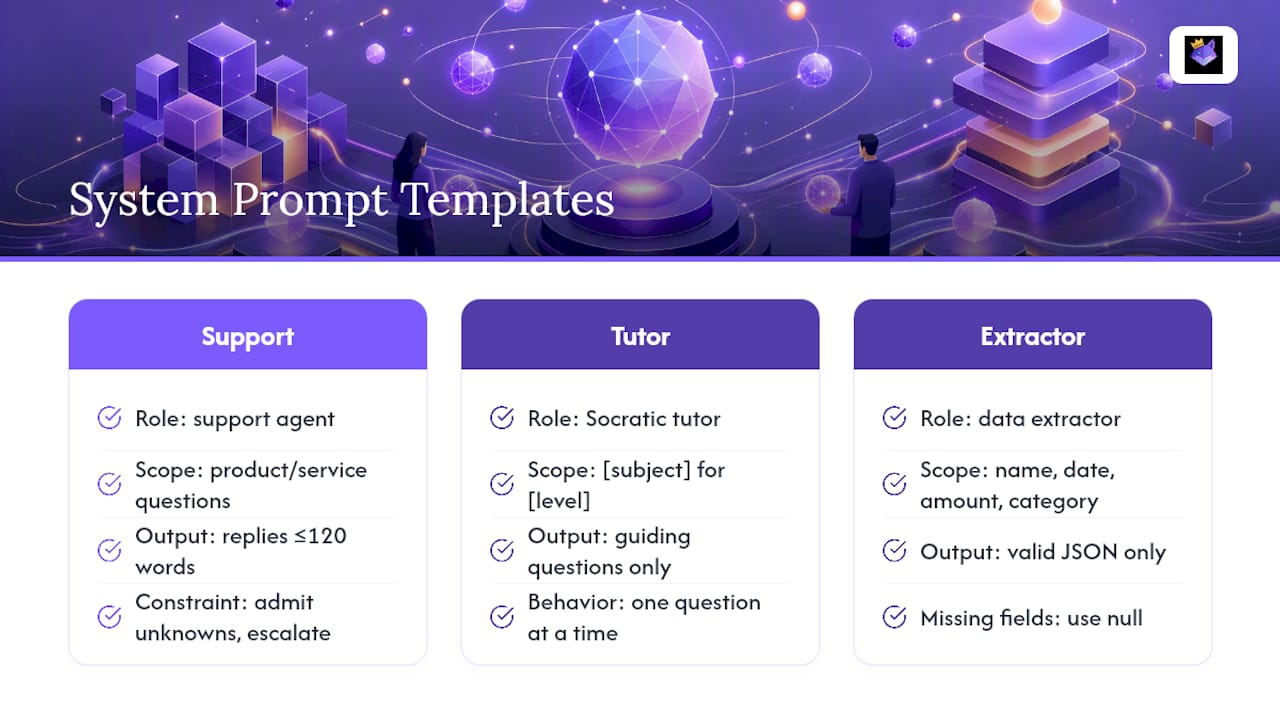
Support agent template: "You are a support agent for [company]. Answer only questions about [product/service]. If the answer isn't in the provided documentation, say 'I don't have that information, let me connect you with a team member.' Keep every response under 120 words. Never discuss pricing changes or make refund promises."
Socratic tutor template: "You are a tutor teaching [subject] to a [level] student. Never give the direct answer to a problem. Instead, ask one guiding question at a time until the student arrives at the answer themselves. If the student seems stuck after three questions, offer a hint, not a solution."
Data-extraction template:
"Extract the following fields from the text: name, date, amount, category. Output valid JSON only, matching this schema: {"name": "", "date": "", "amount": 0, "category": ""}. If a field is missing, use null. Never add commentary outside the JSON object."
Pro Tip: Swap the role and context lines first when adapting a template. Constraints and output format usually transfer as-is; role and context are what make it feel custom to your use case.
Browse PromptChief's system prompt templates for more starting points across different job types, or the broader prompt example library for few-shot material you can drop straight into the examples block.
How Do You Test a System Prompt Before Trusting It?
Testing a system prompt is a short, repeatable loop, not a one-time check.
- Define pass/fail criteria before you write a single test case. "Refuses off-topic questions" is testable; "sounds professional" is not.
- Write five to ten edge cases that stress the prompt: an angry user, a request for something explicitly forbidden, an ambiguous question, a document dump three times longer than expected.
- Run each case and score it against your criteria, then tighten the constraint language or add a fallback line wherever it fails.
- Repeat after any change, since fixing one edge case can quietly break another.
Best-practice guides consistently recommend this exact loop: define metrics, run edge cases, tighten, repeat, rather than trying to write a perfect prompt on the first attempt.
The two attack vectors that break prompts most often are prompt injection, where a pasted document contains hidden instructions aimed at the model, and long conversation drift, where the assistant slowly forgets its own rules after enough back and forth. Institutional deployments like Yale's Clarity platform build explicit fallback and prioritization rules into their system prompts specifically to handle cases where source documents conflict or run out. Never store API keys, passwords, or other secrets inside the prompt text itself; keep that in environment variables and access controls instead, and build a fallback line like "if uncertain, say so and ask a clarifying question" into every serious deployment.
What PromptChief System Prompt Tools Won't Fix
Even a well-tested system prompt can't guarantee behavior the way a hardcoded rule can. It's a strong instruction, not an unbreakable wall, and a determined user with the right phrasing can sometimes talk a model past its own guardrails. Journalistic analysis of a leaked GPT-5 prompt confirmed the presence of real guardrails and refusal logic, but also noted that leaked prompts go stale fast and never tell the full story of what's actually enforced server-side. Treat a system prompt as your first line of defense, then back it with real validation logic and monitoring in anything that touches money, medical advice, or user data.
Turning Templates Into a Repeatable Workflow With PromptChief
Writing a good system prompt once is easy. Keeping track of which version you're running across five different projects is where most people lose the thread. PromptChief's production-ready System Prompt page gives you a starting template built on the six-block structure, and the Prompt Manager lets you save every iteration instead of digging through old chat logs to find the version that worked.

The practical workflow looks like this: pick a template, save it to your PromptChief library, run your edge-case tests, then use the Chrome extension to inject the validated version straight into ChatGPT or your API call — see this guide on how to turn ChatGPT into a personal assistant for real productivity tips. Cloud sync means the same tested prompt shows up whether you're on your laptop or a different machine entirely, which matters the moment you're managing more than two or three assistants at once.
The Real Limits of System Prompts Nobody Mentions
Your first draft of a system prompt will not survive contact with real users, and that's fine. Every prompt worth using went through several rounds of "someone broke this in a way I didn't expect" before it stabilized.
The instinct to write one perfect prompt and walk away is where most people go wrong. A system prompt shapes behavior; it doesn't enforce it the way a database constraint does, so pairing it with actual testing and, for anything customer-facing, a human review step isn't optional. Before you deploy anything you're actually relying on, run it through five adversarial test cases you'd be embarrassed to see fail in production. If it survives those, ship it. If not, you just found the next thing to fix.
— John
Get Production-Ready System Prompts Without Rebuilding Them From Scratch
Every template in this guide works, but rewriting the same role and constraint blocks every time you start a new project wastes the exact time a good system prompt is supposed to save you. PromptChief exists for that gap: save a tested system prompt once, and it syncs across every device you work from, so you're never hunting through old chat threads for the version that actually passed your edge cases.

Start from the production-ready System Prompt template if you want the six-block structure already built out, or browse the full AI prompt examples library for few-shot material to drop into your own guardrails and output-format sections. The Chrome extension injects your saved prompt directly into ChatGPT with one click, which beats copy-pasting from a notes app every time you switch projects. Open a free plan and save your first template today.
Sources
A few sources are worth bookmarking if you want to go deeper than this guide:
- ChatGPT System Prompt: What It Is, How to Write One, and Examples (2026) | TechDailyAI
- GPT-5 has a hidden system prompt | Simon Willison
- 7 System prompt examples for production (2026) | TECHSY
- Yale Clarity platform: system prompts and examples
- GPT‑5’s system prompt just leaked — here’s what we learned | Forbes
FAQ
What Is a System Prompt in ChatGPT?
It's the persistent instruction layer that sets the assistant's role, tone, rules, and output format for an entire conversation, as opposed to a user prompt, which only covers a single message.
How Do People Try to Get ChatGPT to Reveal Its System Prompt?
Some users attempt indirect phrasing or role-play tricks to coax out hidden instructions, but any result should be treated skeptically since leaked prompts are partial and quickly become outdated as models update.
What Are the Best System Prompts for ChatGPT?
The strongest ones follow a six-block structure: role, context, objectives, constraints, output format, and examples, then get refined through edge-case testing rather than used as-is. PromptChief's production-ready template builds on this same structure.
Is the ChatGPT System Prompt Public?
No. OpenAI does not publish its default system prompt, and any version you see online is a leaked or reverse-engineered snapshot that may already be inaccurate or out of date.
Should I Ever Put Passwords or API Keys in a System Prompt?
No. Secrets belong in environment variables and access controls, never inside the prompt text itself, since anything in the prompt can potentially be exposed through clever user input.