
An AI prompt style guide is a short, reusable set of rules and templates that make an AI produce consistent, on-brand output every time someone on your team writes a prompt. The single biggest rule inside it: state the desired outcome and format before anything else. Everything else, examples, tone notes, revision checklists, exists to protect that first instruction.
TL;DR:
- Explicitly placing the instruction at the top of the prompt and separating it from background context improves the model's output consistency.
- Clearly defining the target audience, format, tone, and success criteria ensures answers meet specific needs across different tasks.
- Including at least one high-quality example within the prompt often yields better results than multiple mediocre ones, especially for subtle formats.
- Prompt templates should follow a structured skeleton: role, goal, constraints, format, then an example, to facilitate quick creation and reuse.
- Variations exist in delimiter handling, verbosity defaults, and context window limits across platforms, requiring testing and adjustments for each AI model.
Table of Contents
- What Is a Prompt, and How Does It Actually Work?
- The Core Principles Every Prompt Should Follow
- Build a Checklist for Your AI Prompt Style Guide
- Ready-to-Use Templates You Can Copy Right Now
- When Should You Use Chaining, Prefilling, or Structured Outputs?
- How Do You Test and Fix a Prompt That Isn't Working?
- How Prompt Managers Help You Enforce a Style Guide
- What Prompt Management Tools Actually Do (Vendor-Neutral)
- Does One Prompt Work the Same Across ChatGPT, Claude, and Gemini?
- Common Prompt Mistakes and the Fastest Fixes
- Where to Put Your Style Guide So People Actually Use It
- Sources
- FAQ
What Is a Prompt, and How Does It Actually Work?
A prompt is the instruction you give a model. A style guide is the document that governs how people write those instructions so the outputs stay consistent across a team, a brand, or a product. Large language models don't "understand" intent the way a colleague would; they map your instruction to a probable output based on patterns in training data. That means vague instructions produce vague, generic answers, while explicit context and constraints reliably shift results in a predictable direction.
A few things consistently move the needle:
- Placing the instruction first, before background context
- Naming the audience and the exact format you want
- Giving the model at least one example of "good"
- Stating what a successful answer must include or avoid
The Core Principles Every Prompt Should Follow
Most bad AI output traces back to one of four missing pieces: instruction placement, specificity, examples, or success criteria. Fix those four and quality jumps regardless of which model you're using.
- Instruction first, context second. Put the ask at the top of the prompt and separate it from background material with a clear delimiter, like
###or triple quotes. This mirrors OpenAI's own guidance, which treats instruction/context separation as a baseline habit, not an advanced trick. - Be explicit about audience, length, tone, and format. "Write a summary" is not a prompt. "Write a 150-word summary for a busy operations manager, plain language, no jargon" is.
- Show, don't just tell, for subtle formats. When the shape of the output is hard to describe in words, a one-shot or few-shot example usually beats a paragraph of instructions, a pattern MIT's guidance on effective AI prompts calls out directly.
- Define success criteria. Tell the model what a good answer must contain, not just what topic to cover.
Anthropic frames the whole discipline as a communication problem: be explicit, state the goal, provide context, and scale your technique to the complexity of the task, per its prompt engineering best practices. Simple requests need one or two of these principles. A multi-step research task needs all four, plus structure.
Pro Tip: Start with one example, not five. Anthropic's own guidance notes that a single high-quality example often outperforms a stack of mediocre ones, and it keeps your prompt short enough to actually reuse.
Build a Checklist for Your AI Prompt Style Guide
A usable style guide reads like a checklist, not an essay. Borrow the structure that Every's guide to AI style guides recommends: voice rules, structural templates, sentence-level preferences, and a list of things never to do.
- Voice: Do write in active voice with concrete nouns. Don't let the model default to "as an AI language model" hedging or corporate throat-clearing.
- Structure: Prefer templates that open with role and goal, then constraints, then format. Avoid open-ended prompts that bury the ask in the third paragraph.
- Sentence-level rules: Cap sentence length, ban em dashes if your brand voice does, specify Oxford comma or no Oxford comma.
- Anti-patterns: Ban vague adjectives ("innovative," "seamless"), banned words specific to your brand, and any instruction that contradicts an earlier one and the same prompt.
- Revision checklist: Before you save a prompt to your library, confirm it states format, length, tone, and one success criterion.
Print this list once, then reuse it as a gate every time someone drafts a new prompt for the team.
Ready-to-Use Templates You Can Copy Right Now
Every reliable prompt follows the same skeleton: role, goal, constraints, format, then an example. Fill in the brackets and you have a working prompt in under a minute.
- Summary template: "You are a [role]. Summarize the following in [length] for [audience]. Use [tone]. Format as [bullets/paragraph]. Example of the style I want: [paste one sample]."
- Rewrite template: "Rewrite this text to sound [tone] for [audience], keeping the meaning intact and staying under [word count]. Do not add new claims."
- Structured-output template: "Extract [fields] from the text below and return them as a JSON object with keys [list keys]. If a field is missing, use null."
- Analysis template: "Given [data/context], identify [specific question]. State your answer in one sentence, then support it with three bullet points."
The pattern that makes all four work: format comes before content. Tell the model how to answer before you hand it the material to answer with. Promptchief's ready-to-use prompt templates follow this same skeleton if you want a bigger library to start from, and the 30+ prompt examples page shows the annotated versions in full.
When Should You Use Chaining, Prefilling, or Structured Outputs?
Chaining, breaking one big task into a sequence of smaller prompts, earns its complexity when a task has distinct stages that each need their own quality check. Draft, then critique, then revise works better as three prompts than one, because the model can't reliably self-correct mid-generation.
- Chain when the task has clear sequential stages (research, then draft, then edit).
- Prefill and enforce structured outputs (JSON, tables) when a downstream system needs to parse the result. Microsoft's prompt engineering guidance recommends this specifically for production applications where a malformed response breaks something.
- Skip manual chain-of-thought on newer reasoning-capable models. Older workflows asked the model to "think step by step" out loud; current models often handle that internally, and OpenAI's prompt guidance now recommends shorter, outcome-first instructions instead of the long scaffolded prompts earlier models needed.
- Watch for over-specification. Piling on constraints past the point of necessity tends to increase hallucination risk, not reduce it, because the model starts inventing details to satisfy contradictory instructions.
How Do You Test and Fix a Prompt That Isn't Working?
Treat every prompt like a small experiment. Change one variable, run it, compare, keep or discard.
- Change one variable at a time. Swap only the tone instruction, or only the example, never both in the same test.
- Define measurable success criteria before you run the test, covering factuality, coverage, and tone, the same evaluation lens Google's prompting guidance uses when it recommends checking outputs for accuracy, bias, relevancy, and consistency.
- Spot-check for hallucination and bias on a small sample before you scale a prompt to production use.
- Apply quick fixes for common failures: if the model ignores your format, restate it at the very end of the prompt as a final reminder; if tone drifts, add a one-line example of the tone you want.
Pro Tip: Keep a "known bad" output alongside every saved prompt. When you revise the prompt later, you'll have a fast way to check you actually fixed the problem instead of just moving it.
How Prompt Managers Help You Enforce a Style Guide
A style guide only works if people actually use it, and that's where most teams lose the thread. Rules living in a shared document get ignored the moment someone is in a rush; rules living inside the tool you already use get followed.
- A searchable prompt library keeps your approved templates one search away instead of buried in a chat history.
- Template injection drops your standard structure straight into the AI platform you're working in, so nobody retypes the skeleton from memory.
- Cloud sync means the version your teammate edited yesterday is the version you see today, not a stale copy pasted into a doc three months ago.
- Team workspaces and version history let you track who changed a template and roll back a bad edit.
- Store your test cases and "known bad" examples next to the template itself, so revision history includes proof of what actually improved.
What Prompt Management Tools Actually Do (Vendor-Neutral)
Most prompt management tools solve the same three problems in different combinations: where prompts live, how you find them again, and how you get them into the AI platform you're actually using. Worth understanding before you pick one.
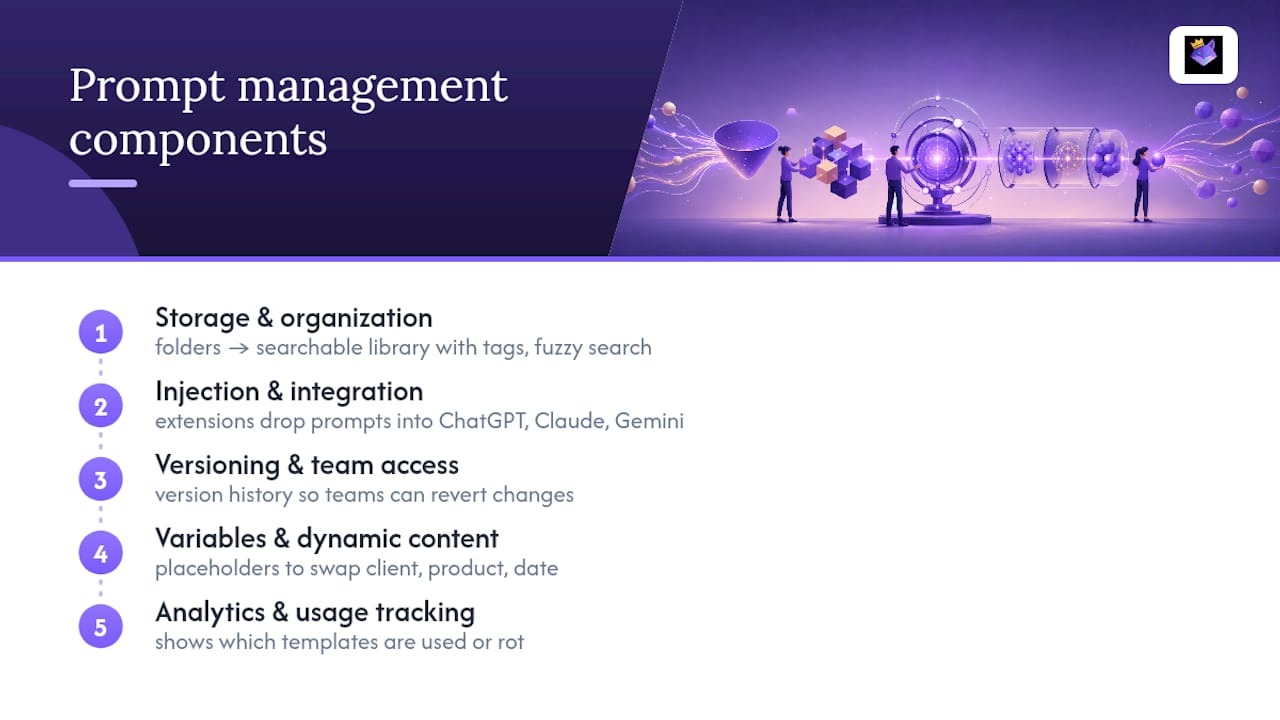
Storage and organization is the baseline layer. This ranges from a simple folder of text files to a searchable library with tags, categories, and fuzzy search that forgives a misremembered phrase. Teams outgrow the folder approach fast, usually the moment two people start editing the same prompt without knowing the other touched it.
Injection and browser integration is the layer that actually saves time day to day. A Chrome extension or similar integration that drops a saved prompt directly into ChatGPT, Claude, or Gemini beats copying and pasting from a separate window every single time. This is the feature that determines whether a style guide gets followed or ignored under deadline pressure.
Versioning and team access matters once more than one person touches the same prompt library. Solo users can get away without it. Teams can't, because someone will "fix" a prompt in a way that breaks it for everyone else without version history to fall back on.
Variables and dynamic content show up in more advanced tools as placeholder systems, letting you swap a client name, a product, or a date into a template without rewriting the whole prompt. This matters most for teams running the same prompt structure across dozens of variations.
Analytics and usage tracking are newer additions that show which templates actually get used and which ones quietly rot in the library. Cutting the dead weight keeps a shared prompt hub from turning into digital clutter nobody trusts.
None of these features matter in isolation. The tools worth using combine storage, injection, and version control into one workflow instead of forcing you to stitch three separate apps together.
Does One Prompt Work the Same Across ChatGPT, Claude, and Gemini?
Not always, and this is where a lot of style guides quietly fail. A prompt tuned for one model's quirks can underperform on another, even when the instruction text is identical.
Delimiter handling varies. OpenAI's own documentation recommends ### or triple quotes to separate instructions from context, but not every model parses those markers the same way. If you're writing prompts for multiple platforms, test your delimiter choice on each one rather than assuming it transfers.
Model verbosity defaults differ. Some models default to long, hedged answers unless you explicitly cap length; others default to terse output unless you ask for elaboration. A style guide should state length requirements explicitly every time, since "be concise" means something different to each model.
Few-shot example limits differ by context window and by how each model weighs early versus late tokens. A template with three examples that works well in one platform might need trimming to one example in another simply because of how that model prioritizes recent context.
System prompt versus user prompt behavior isn't identical. Some platforms give you a dedicated system-level instruction field that persists across a conversation; others treat every message as equally weighted user input. A style guide written for one architecture needs a translation note for the other.
The practical fix is to write your core template once, then keep a one-line "platform notes" field next to each saved prompt: what changed for Claude, what changed for Gemini, what stayed the same. That small habit is the difference between a style guide that works everywhere and one that only worked in the platform where you first tested it.
Common Prompt Mistakes and the Fastest Fixes
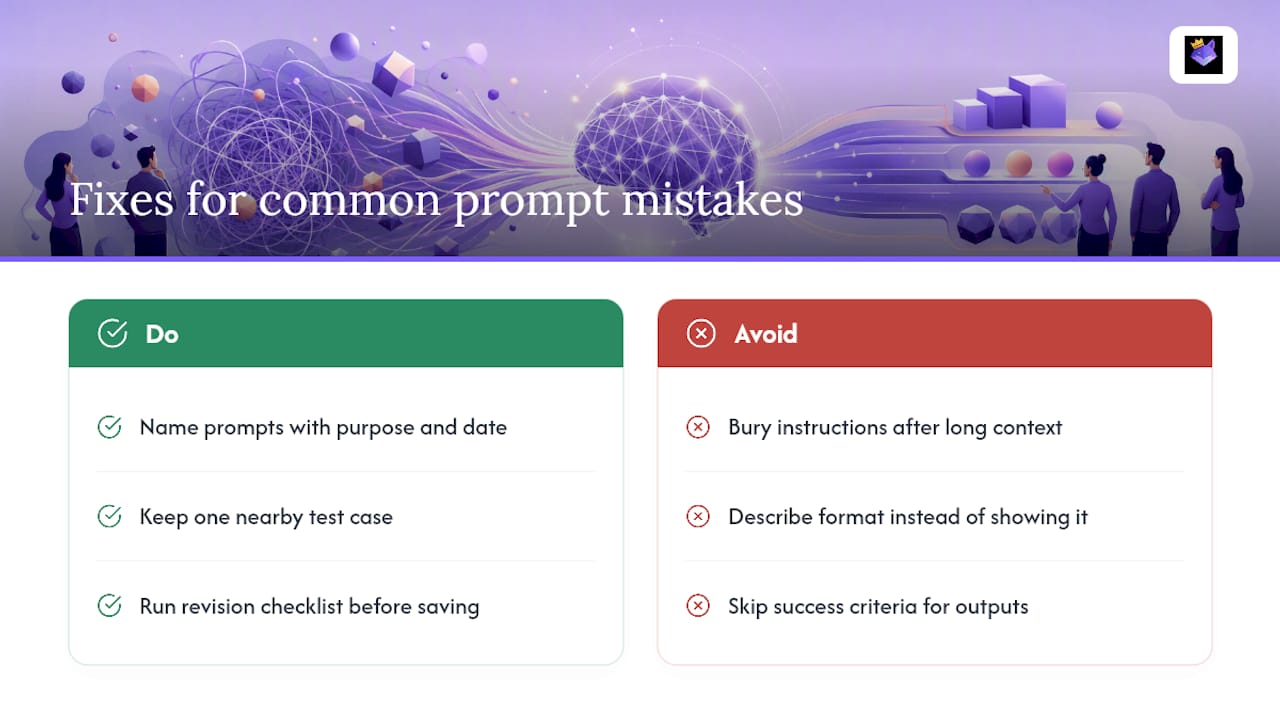
The same three mistakes show up constantly: burying the instruction after three paragraphs of context, describing a format instead of showing one, and skipping success criteria entirely, then wondering why output quality is inconsistent.
The fix is boring but effective. Name every prompt with its purpose and date, keep one test case next to it, and run through the revision checklist before saving anything to a shared library. Five extra minutes per template saves hours of re-explaining the same thing to the model next month.
— John
Where to Put Your Style Guide So People Actually Use It
Writing the rules down is half the job; keeping them in front of your team when they're actually prompting is the other half. Some prompt management tools offer a searchable prompt library plus a browser extension that injects approved templates directly into multiple AI platforms, so the style guide travels with the prompt instead of sitting in a forgotten doc.

Cloud sync and team workspaces allow versioning and access management within a central platform instead of scattered across shared drives. If you're ready to stop rebuilding the same prompt from memory every time you open a new tab, set up your first templates on the prompt management page and start saving the ones you already know work.
Sources
For deeper reference, see OpenAI's prompt engineering guide, Anthropic's best practices, Microsoft Learn's guidance, and Harvard's AI basics primer.
- Best practices for prompt engineering with the OpenAI API
- Effective Prompts for AI: The Essentials
- Prompt engineering best practices for 2026 | Claude by Anthropic
- Prompt guidance | OpenAI API
FAQ
What Is the Best Format for an AI Prompt?
The most reliable format states the instruction first, separates it from background context with a delimiter like ###, and ends with the exact output format you want, including length and tone.
What Are Some Good Prompt Ideas for AI?
Strong starting points include summarizing a document for a specific audience, rewriting text in a target tone, extracting structured data into JSON, and analyzing a dataset with a stated question. Promptchief's prompt examples library has dozens of annotated versions of each.
How Do You Structure a Prompt for AI?
Follow role, then goal, then constraints, then format, then an optional example. That order keeps the model focused on the actual task instead of guessing at intent from scattered context.
What Is an Example of a Good AI Prompt?
"You are an editor. Summarize the attached report in 150 words for a non-technical executive. Use plain language and end with one recommended next step." It states the role, the goal, the length, the audience, and the required ending, all in one short instruction.
Do I Need a Different Prompt for Every AI Platform?
Not from scratch, but you should note platform-specific quirks, like delimiter handling and default verbosity, since the same instruction text can behave differently on ChatGPT versus Claude or Gemini.