
Prompt testing is the systematic, automated evaluation of AI prompts against defined pass/fail criteria — the same discipline as unit testing, applied to the text you send a model. Start now by writing one small test case, running it locally with a tool like promptfoo or prompttest, and gating it in CI so any future prompt edit must pass before it merges.
This guide covers:
- The core test types and when to use each
- Which metrics and scorers to combine for reliable verdicts
- Five concrete tools with quick-start examples
- How to wire tests into CI/CD and fail PRs on regressions
- The PEEM 9-axis rubric for structured prompt evaluation
- A copy-paste YAML example and troubleshooting checklist
Key Takeaways
Reliable prompt testing starts with deterministic checks, gates every change in CI, and treats prompts as versioned code artifacts with attached golden cases.
| Point | Details |
|---|---|
| Start deterministic | Use schema, exact-match, and regex checks first; add semantic or judge scorers only when needed. |
| Gate in CI | Configure fail-on-threshold flags so any prompt regression blocks the PR before it merges. |
| Version prompts | Store prompts as files, attach golden cases, and use a tool like prompt-lab to track accuracy and cost across versions. |
| Use PEEM for diagnosis | Score prompts on 9 axes to pinpoint whether Clarity, Specificity, or a response-level axis is causing failures. |
| Manage with Promptchief | Store and deploy CI-validated prompts across 27+ AI platforms using Promptchief's cloud-synced prompt management platform. |
Table of Contents
- What does prompt testing actually cover?
- What types of prompt tests should you run?
- Which metrics and scorers give you reliable pass/fail decisions?
- Which tools should you use for prompt testing?
- How do you integrate prompt tests into CI/CD?
- What are the best practices for reliable prompt testing?
- How does the PEEM rubric give you structured prompt scores?
- A minimal YAML test file you can run today
- How do you fix the most common prompt testing failures?
- Why prompt testing changes how engineering teams work
- Promptchief fits naturally into a CI-first prompt workflow
- Sources
- FAQ
What does prompt testing actually cover?
Prompt testing sits between model training and human QA. It does not change model weights, and it does not replace a human reviewer for high-stakes edge cases. What it does is give you a repeatable, automated contract for every prompt in your codebase.
The scope breaks into four layers:
- Unit-like deterministic checks — schema validation, exact string matching, regex assertions, must-contain rules. These run in milliseconds and never need a live model call.
- Semantic checks — embedding-based similarity or LLM-as-judge scoring for outputs where exact wording varies but meaning must stay consistent.
- Integration and multi-run tests — end-to-end calls against a real provider, repeated across N runs to account for nondeterminism.
- Red-team and adversarial tests — structured attempts to break the prompt with hostile inputs, jailbreaks, or edge cases.
Prompt testing applies test-driven development principles to AI prompts, replacing subjective "eyeball tests" with quantifiable metrics that run on every commit. That shift is what makes production-grade prompt engineering repeatable rather than artisanal.
What types of prompt tests should you run?
Each test type serves a different purpose. Using only one is like testing a web app with only unit tests.
- Schema / exact-match tests — assert the output matches a fixed string or validates against a JSON schema. Deterministic, cheap, and the right first line of defense for structured outputs.
- Contains / regex tests — check that the output includes a required phrase or matches a pattern. Good for outputs that must include a citation, a disclaimer, or a specific format.
- Semantic similarity tests — compare the output to a reference using embeddings. Use when wording varies but meaning must stay close to a golden answer.
- Multi-run / regression tests — run the same prompt N times and require at least K passes. Handles nondeterminism without pretending the model is deterministic.
- A/B tests — compare two prompt variants on the same input corpus. Use McNemar's exact test for binary accuracy outcomes and paired t-tests for continuous metrics like latency.
- Integration tests — call the full pipeline end-to-end, including retrieval, tool calls, or downstream APIs. Slower and more expensive, but the only way to catch pipeline-level failures.
- Stress / load tests — send high volumes or unusually long inputs to surface token-limit failures and latency regressions.
- Red-team / adversarial tests — probe the prompt with hostile inputs, prompt injections, and jailbreak attempts. Run these before any public deployment.
Pro Tip: For multi-run tests, a pass_threshold of 0.8 with runs=5 (requiring 4 of 5 passes) is a practical starting point. It filters out random noise without demanding perfect determinism from a probabilistic model.
Which metrics and scorers give you reliable pass/fail decisions?
Start with deterministic checks. Reserve LLM-as-judge for properties that schema and regex cannot express — judges are slower, costlier, and more prone to drift than a simple string assertion.
The scorer toolkit, in order of preference:
- Exact match — output equals expected string. Zero ambiguity, zero cost.
- Contains / must-include — output contains a required substring. Catches missing disclaimers, required fields, or format markers.
- Regex — output matches a pattern. Useful for date formats, phone numbers, structured codes.
- Fuzzy match — Levenshtein or token-overlap similarity above a threshold. Handles minor paraphrasing in short outputs.
- Semantic similarity — cosine distance between output and reference embeddings. Calibrate thresholds empirically from golden cases rather than guessing; a threshold of 0.85 is a common starting point, but your domain may need higher or lower.
- LLM-as-judge — a second model scores the output on a rubric. Powerful for tone, helpfulness, and nuanced correctness, but pin the judge model version to avoid drift between runs.
- Token count / cost / latency — assert the output stays within a token budget or cost ceiling. PromptCheck gates PRs on cost thresholds out of the box.
Combining scorers gives you a composite verdict. A common pattern: require exact schema validation AND semantic similarity above 0.85 AND token count below 500. Any single failure blocks the PR.
Which tools should you use for prompt testing?
The ecosystem splits into four rough classes: config-first eval harnesses, pytest-native integration testers, lightweight scorer libraries, and lifecycle/versioning tools. You will likely use one from each class.
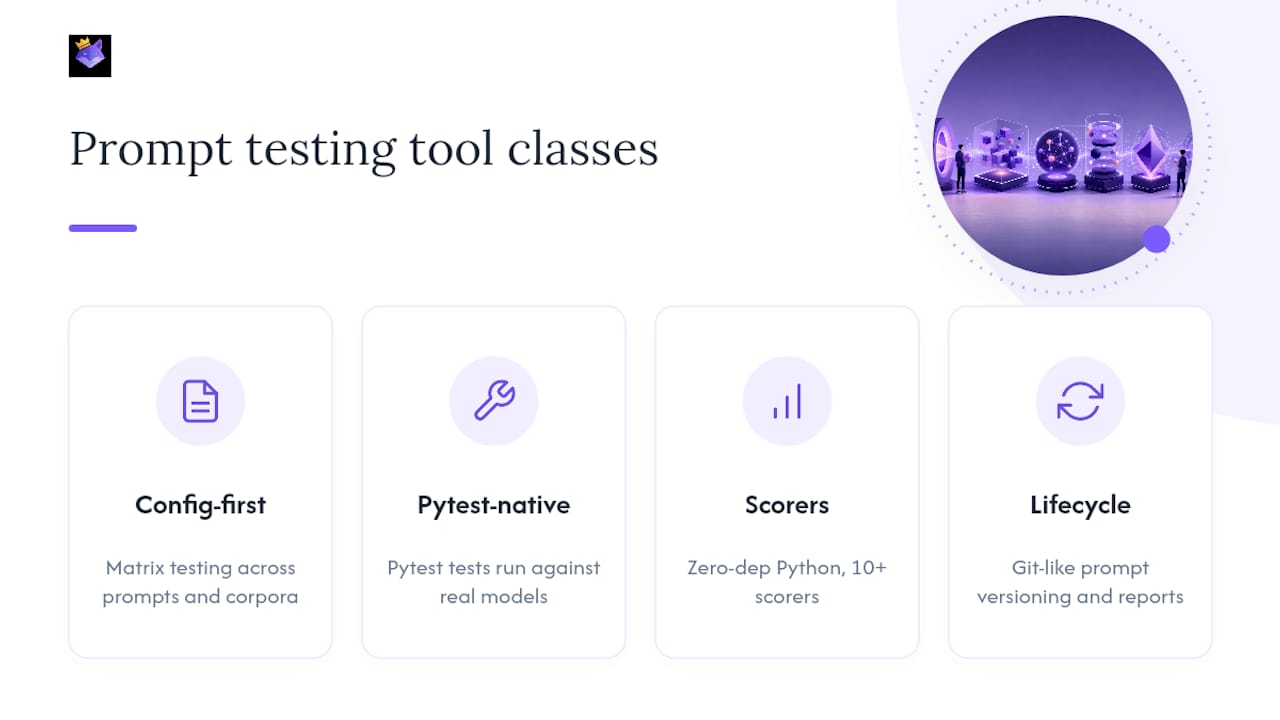
promptfoo is the most widely adopted config-first harness. It supports matrix testing across prompt variants and input corpora, built-in red-team workflows, and a local web UI for comparing outputs. Best for large-scale evals and adversarial testing where you need to sweep many combinations at once.
PromptCheck is purpose-built for CI. Write tests in YAML, configure quality and cost thresholds, and it fails the PR when either is exceeded. It generates readable reports alongside the standard exit code, so reviewers see exactly which assertion broke. The tightest fit for teams that want a drop-in CI gate with minimal setup.
prompttest takes a similar YAML-first approach but extends assertions to token counts and cost limits alongside content checks. It runs in CI to catch prompt regressions and is a natural fit for teams already comfortable with YAML-based test configs.
prompt-tester takes a pytest-native approach: decorate test functions, run against real models, and configure multi-run pass thresholds and judge-based verdicts. Caching keeps repeat runs affordable. Best for integration tests where you need Python's full assertion power and fixture system.
prompteval is a zero-dependency Python library with 10+ built-in scorers covering exact match, regex, JSON validation, semantic similarity, and fluency. No server, no config file required. Best for offline evaluation, quick scripted comparisons, and embedding into existing Python test suites.
prompt-lab handles the lifecycle layer: Git-like prompt versioning, evaluation reporting across accuracy, hallucination rate, cost, and latency, plus statistical A/B testing with McNemar's test and paired t-tests. Use it when you need to trace which prompt edit caused a regression or prove that variant B is statistically better than variant A.
For teams that want a single place to store, search, and deploy tested prompts across 27+ AI platforms, Promptchief's prompt management platform complements these testing tools by acting as the central repository where winning prompt versions live after they pass CI.
Pro Tip: Check out AI design tool roundups for broader context on how prompt testing fits into the AI development toolchain.
How do you integrate prompt tests into CI/CD?
The goal is simple: any prompt change that breaks a test should block the merge, the same way a failing unit test does.
- Commit prompts as files — store every prompt in version-controlled text or YAML files alongside the code that calls them. Never hardcode prompts in application logic.
- Build a baseline dataset — collect 20–50 representative inputs with expected outputs. These are your golden cases. Attach them to the prompt file in the same repo.
- Configure secrets and model access — pass API keys as CI environment variables, never in the config file. Use a mock runner or cached responses for fast local iteration.
- Set fail-on-threshold flags — every tool above supports an exit code of 1 on failure. Wire that exit code to your CI step's failure condition.
- Store artifacts — output JSON, JUnit XML, or HTML reports as CI artifacts so reviewers can inspect which assertions failed and by how much.
- Control cost — run deterministic and semantic tests on every commit. Reserve LLM-judge and integration tests for PRs targeting main. Use sample-size gating (e.g., 20 inputs per run instead of 200) for fast feedback loops.
A minimal GitHub Actions step looks like this:
- name: Run prompt tests
  env:
    OPENAI_API_KEY: ${{ secrets.OPENAI_API_KEY }}
  run: |
    pip install prompttest-ai
    prompttest run tests/prompts/ --fail-on-regression
- name: Upload test report
  uses: actions/upload-artifact@v4
  with:
    name: prompt-test-report
    path: prompttest-report.json
Pro Tip: Cache judge responses between runs using prompt-tester's built-in caching. On a suite of 50 integration tests, cached runs can cut execution time and API cost significantly compared to live calls on every commit.
Practitioners are moving from manual "vibes-based" testing to automated instrumentation. CI-first tools let teams fail PRs on regressions and track costs and latency alongside correctness — a shift that makes prompt quality a first-class engineering concern rather than a pre-release scramble.
What are the best practices for reliable prompt testing?
Version everything. Treat prompts as code: every edit gets a commit, every version gets a tag. prompt-lab provides Git-like versioning with evaluation metrics attached, so you can trace exactly which change caused a score to drop.
Attach golden cases to each prompt version. A prompt without test cases is untestable. Keep a small set of representative inputs and expected outputs in the same directory as the prompt file. When you update the prompt, update the golden cases in the same PR.
Pin your judge model. An LLM judge that upgrades silently between runs will produce score drift that looks like a prompt regression. Lock the judge to a specific model version and update it deliberately.
Avoid brittle exact-match where it does not belong. Exact-match is perfect for structured outputs (JSON, code, formatted data). For free-text answers, it produces false failures on every minor paraphrase. Use semantic similarity or a judge instead.
Do not overuse judges. Every LLM-judge call costs money and adds latency to your CI pipeline. If a regex or schema check can answer the question, use it. Reserve judges for properties that genuinely require natural-language reasoning.
Monitor for prompt drift in production. CI catches regressions at deploy time, but model providers update their APIs without notice. Log a sample of live outputs and run your scorer suite against them on a schedule. Alert when scores drop below your baseline thresholds.
Control token budgets. Set explicit token-count assertions on prompts where output length matters. A prompt that starts returning 2,000-token answers when you expected 200 is a regression, even if the content scores well.
For guidance on writing prompts that are testable by design, clear output contracts and explicit constraints make every scorer type more reliable.
How does the PEEM rubric give you structured prompt scores?
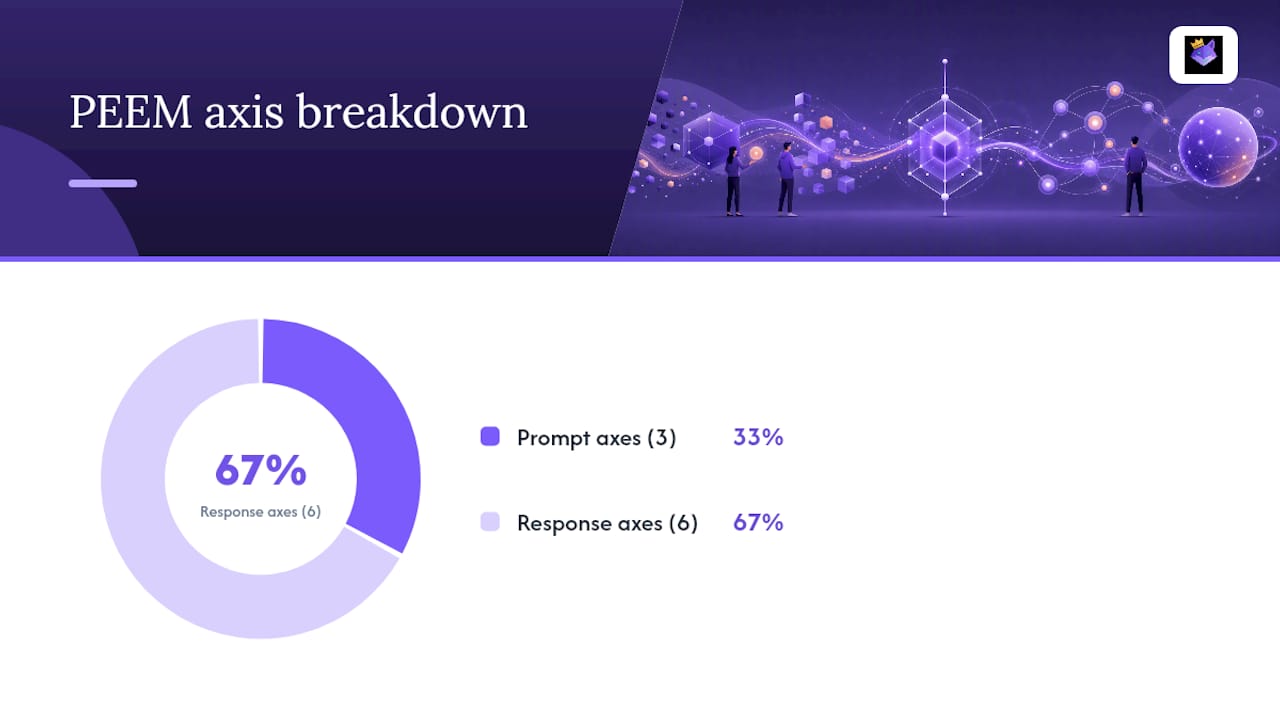
PEEM (Prompt Engineering Evaluation Metrics) defines a 9-axis rubric for joint evaluation of both the prompt and its response. Its aggregate Spearman correlation with conventional accuracy reaches approximately 0.97, and a zero-shot rewriting loop using PEEM rationales improved accuracy by up to 11.7 points in experiments. The multi-axis structure is what makes it useful for debugging: instead of a single pass/fail, you get a diagnostic profile that tells you which axis is failing and why.
The nine axes split into three prompt-level and six response-level dimensions:
Prompt-level axes:
- Clarity — is the instruction unambiguous and precisely worded?
- Specificity — does the prompt constrain the output format, scope, and constraints tightly enough?
- Contextual adequacy — does the prompt provide the background the model needs to answer correctly?
Response-level axes:
- Accuracy — is the factual content correct?
- Relevance — does the response address what the prompt asked?
- Completeness — does the response cover all required aspects?
- Conciseness — is the response free of unnecessary padding?
- Coherence — is the response logically structured and internally consistent?
- Fluency — is the language grammatically correct and natural?
To apply PEEM in practice, score each axis on a 1–5 scale and record the rationale for any axis scoring below 3. Feed those rationales directly into a prompt rewrite: if Specificity scores 2 because the output format is undefined, add an explicit format constraint to the prompt and retest.
| Axis | Level | What a low score signals |
|---|---|---|
| Clarity | Prompt | Ambiguous wording; model interprets the task differently across runs |
| Specificity | Prompt | Missing format or scope constraints; outputs vary too widely |
| Contextual adequacy | Prompt | Insufficient background; model hallucinates missing context |
| Accuracy | Response | Factual errors in output |
| Relevance | Response | Response drifts off-topic |
| Completeness | Response | Required elements missing from output |
| Conciseness | Response | Excessive padding or repetition |
| Coherence | Response | Logical gaps or contradictions in structure |
| Fluency | Response | Grammatical errors or unnatural phrasing |
Pro Tip: Sort your prompt inventory by lowest PEEM Specificity and Clarity scores first. Those two axes predict the most variance in output quality and are the cheapest to fix — a single added constraint often lifts both.
A minimal YAML test file you can run today
The example below uses prompttest's YAML format. Copy it, swap in your prompt path and model, and run prompttest run tests/ from your project root.
version: "1"
tests:
  - name: summarize_article_schema
    prompt_file: prompts/summarize.txt
    model: gpt-4o-mini
    input:
      text: "{{article_text}}"
    assertions:
      - type: contains
        value: "summary"
      - type: json_schema
        schema_file: schemas/summary_schema.json
      - type: max_tokens
        value: 300
      - type: cost_limit_usd
        value: 0.005
    runs: 5
    pass_threshold: 0.8
Key fields explained:
- runs / pass_threshold — runs the test 5 times and requires 4 passes (0.8 threshold). This handles nondeterminism without demanding perfect consistency.
- max_tokens / cost_limit_usd — hard budget guards that fail the test if the model overshoots. Set these from your production cost targets, not arbitrary numbers.
- json_schema — validates the output structure deterministically before any semantic check runs.
- prompt_file — keeps the prompt in a versioned file, not inline in the test config.
For mock vs. live runs: use a mock runner (a recorded response fixture) during local development to avoid API costs on every save. Switch to live provider calls in CI on PR branches, and always use live calls for integration and red-team tests.
Pro Tip: Start with runs=3 and pass_threshold=0.67 while you calibrate. Once you have 20+ golden cases and understand your model's variance, raise both to runs=5 and pass_threshold=0.8 for tighter regression detection.
How do you fix the most common prompt testing failures?
Flaky tests (intermittent failures on the same input) — the model is nondeterministic and your pass_threshold is too high, or your exact-match assertion is too brittle for free-text output. Lower the threshold or switch to a semantic scorer. If the test keeps failing at 0.8, the prompt itself may be underspecified.
Judge drift (scores shift between runs without prompt changes) — you have not pinned the judge model version. Pin it and re-establish your baseline. Also check whether the judge's system prompt has changed; even a minor wording update can shift scores by several points.
Cost overruns in CI — you are running LLM-judge or integration tests on every commit. Move expensive tests to a separate CI stage that only runs on PRs targeting main. Use cached responses for the fast feedback loop on feature branches.
False positives on semantic checks — your similarity threshold is calibrated too low. Collect 20–30 golden cases, compute the actual similarity distribution, and set the threshold at the 10th percentile of passing examples rather than guessing.
Distinguishing noise from real regression — a single failing run is rarely a regression. Use prompt-lab's statistical testing: McNemar's exact test for binary accuracy outcomes, paired t-tests for continuous metrics. Declare no winner when p >= 0.05.
Leaking secrets in red-team tests — never include real API keys, PII, or production credentials in adversarial test inputs. Use synthetic data and a dedicated test environment isolated from production. Store red-team test cases in a private repo or encrypted secrets manager.
Why prompt testing changes how engineering teams work
The hardest part of adopting prompt testing is not the tooling. It is convincing a team that a prompt is a code artifact that deserves the same rigor as a function. The first time you introduce versioned prompts, golden cases, and a CI gate, the reaction is usually "this is overkill." Then the first regression gets caught automatically before it reaches production, and the conversation changes.
What actually shifts when teams adopt this discipline:
- Prompt edits go through code review with test diffs attached, not Slack messages
- Regressions surface in minutes, not after a user complaint
- Cost and latency become tracked metrics, not surprises at the end of the month
- The team builds a corpus of golden cases that doubles as documentation for what the prompt is supposed to do
The operational overhead is real but front-loaded. Writing the first 20 golden cases takes an afternoon. After that, each new prompt ships with its own test file, and the suite grows organically. Teams that treat prompt engineering as a lifecycle — version, test, measure, iterate — consistently outpace teams that rely on manual review alone.
Promptchief fits naturally into a CI-first prompt workflow
Once your prompts pass CI, you need somewhere to store, search, and deploy the winning versions. Promptchief's prompt management platform gives teams a cloud-synced repository for every tested prompt, accessible from any device via a Chrome extension or web app across 27+ AI platforms including ChatGPT, Claude, and Gemini.

Relevant features for testing workflows: cloud sync keeps the latest approved prompt version available everywhere, fuzzy search surfaces the right prompt fast, and multi-step prompt chains let you store and deploy the full pipeline your integration tests validated. Teams can also use Promptchief's AI prompt rewriting in 9 styles to generate candidate variants for A/B tests, then store only the statistically validated winner. Open-source tools like promptfoo and prompteval remain excellent for the test execution layer. Promptchief handles what comes after: organizing, versioning, and deploying the prompts that earned their place. Start with a free account and connect your first tested prompt in minutes.
Sources
- prompttest-ai
FAQ
What is prompt testing?
Prompt testing is the systematic, automated evaluation of AI prompts against defined pass/fail criteria — schema checks, semantic similarity, cost limits, and more — run in CI so regressions are caught on every commit.
Where can I run prompt tests?
Run deterministic and semantic tests locally or in CI using tools like promptfoo, PromptCheck, or prompttest. Reserve live-provider integration and red-team tests for PR-targeting-main pipelines to control cost.
What are the main types of prompts used in testing?
The three core categories are deterministic prompts (structured outputs with exact or schema assertions), semantic prompts (free-text outputs scored by similarity or a judge), and adversarial prompts (red-team inputs designed to surface safety or robustness failures).
How do you handle nondeterminism in prompt tests?
Use multi-run testing with a pass_threshold — for example, requiring 4 of 5 runs to pass at a 0.8 threshold. Tools like prompt-tester support this natively, and caching judge responses keeps the cost manageable.
What is the PEEM rubric and why does it matter?
PEEM is a 9-axis evaluation framework (3 prompt-level, 6 response-level) that scores both the prompt and its output, producing interpretable rationales you can feed directly into a prompt rewrite loop. Its aggregate Spearman correlation with conventional accuracy is approximately 0.97.