
A prompt snippet is a saved, reusable piece of instruction text (a tone rule, a formatting spec, a whole workflow) that you inject into any AI chat instead of retyping it. The payoff is immediate: no more digging through old chats for that one phrasing that worked, no more inconsistent outputs because you phrased the request differently at 9 a.m. than at 4 p.m.
Three things make snippets worth building:
- Reuse — write the instruction once, fire it into ChatGPT, Claude, or Gemini a thousand times.
- Consistency — the same governance rule or persona produces the same quality bar every time.
- Speed — injecting a saved snippet beats retyping or hunting through chat history.
Because snippets are typically stored as plain text or JSON, they travel with you across models and can be dropped in through a browser extension, a hotkey, or an API call rather than copy-pasted by hand.
Key Takeaways
Prompt snippets work because they turn a one-time instruction into a reusable, portable asset instead of something you retype and risk getting wrong every time.
| Point | Details |
|---|---|
| Define snippets clearly | A snippet is a saved, modular instruction (persona, rule, or format) you inject instead of retyping. |
| Use JSON for portability | Store snippets with name, content, tags, and a templateEnabled flag so they move between tools. |
| Build with placeholders | Syntax like {{variable_name}} lets one snippet template adapt to many use cases. |
| Structure complex prompts | Tag or label sections (context, instructions, examples) to reduce model misinterpretation. |
| Adopt a cloud-synced manager | Promptchief's Chrome extension and web app let you save, search, and inject snippets across 27+ AI platforms from any device. |
Table of Contents
- What Is a Prompt Snippet, Exactly?
- How Do You Create and Manage Prompt Snippets?
- What Design Patterns Make Snippets Reliable Across Models?
- What Tools and Workflows Support Snippet Reuse?
- Why Snippet Discipline Is What Separates Casual Prompting From Real AI Leverage
- What Conventional Prompting Advice Gets Wrong
- Try Prompt Snippets Without Building the System Yourself
- Sources
- FAQ
What Is a Prompt Snippet, Exactly?
A prompt snippet is a reusable, modular building block, a tone instruction, a formatting rule, or a structured workflow step, that gets saved, searched, and injected into an AI conversation to automate repetitive tasks and keep output quality consistent. Think of it as a Lego brick for prompting: small on its own, but powerful once you start combining pieces.
A one-line text snippet might read: "Respond as a skeptical senior editor. Flag weak claims, cut filler, and never soften criticism with compliments." That single sentence, saved once, replaces re-explaining your editorial standard every session.
Behind the scenes, a snippet is often stored as structured data. A minimal JSON version looks like this:
{
  "name": "skeptical_editor_persona",
  "content": "Respond as a skeptical senior editor...",
  "tags": ["persona", "editing"],
  "templateEnabled": true
}
Most snippet libraries fall into four recurring categories:
- Persona snippets that assign a role or voice.
- Governance snippets that enforce rules (no fabricated statistics, cite sources, avoid jargon).
- Formatting snippets that lock in structure (tables, bullet counts, word limits).
- Routing snippets that direct a request to the right sub-task or model.
How Do You Create and Manage Prompt Snippets?
Building a snippet library that survives past week one comes down to naming discipline, placeholder syntax, and a storage format that won't lock you into one app.
- Name it like code, not like a note. Use snake_case (
onboarding_email_v2, not "that email thing from Tuesday"). Validate names against a simple pattern (lowercase, underscores, no spaces) so search and indexing behave consistently. - Use placeholders for anything variable. Wrap dynamic fields in double curly braces, like
{{customer_name}}or{{tone}}. WhentemplateEnabledis set to true, your snippet manager treats those placeholders as fill-in slots at run time instead of literal text, which is exactly how JSON-based snippet models handle programmatic injection. - Version and tag deliberately. Append a version suffix (
_v2,_v3) when you change behavior, not wording. Tag by function (persona,governance,client:acme) so a single snippet can surface under multiple searches. - Export as JSON for backup and portability. A flat JSON export means your library survives a browser crash, a subscription lapse, or a switch from one AI tool to another. This is the same principle behind system-agnostic snippet libraries built for import and export across platforms.
- Search by tag first, fuzzy match second. Tags narrow the field fast; fuzzy search catches the snippet you half-remember the name of.
Pro Tip: Keep a "graveyard" tag for retired snippets instead of deleting them. Six months from now you'll want to see why version 1 failed before you rebuild something similar.
Treat prompts as structured roadmaps, goals, context, and constraints, rather than ad-hoc questions, and your snippets naturally get more useful the more granular they are.

What Design Patterns Make Snippets Reliable Across Models?
The single biggest failure mode in snippet design is vagueness disguised as flexibility. A snippet that says "don't be too formal" gives the model nothing to grab onto. A snippet that says "use contractions, keep sentences under 20 words, and address the reader as 'you'" gives it a rulebook.
- Write affirmative instructions. Tell the model what to do, not just what to avoid. "Cite the source inline" beats "don't make things up."
- Include two or three examples. Few-shot examples steer tone and format far more reliably than description alone.
- Wrap complex sections in tags. Model-specific guidance recommends structuring prompts with labeled sections or XML-style tags, separating
<context>from<instructions>from<examples>so the model doesn't blend them. - Design for portability, not for one interface. A snippet that depends on a specific app's button layout breaks the moment that app redesigns. JSON plus placeholders survives redesigns; UI-dependent macros don't.
- Chain snippets like function calls. Treat each snippet as a composable unit, a persona snippet feeding into a formatting snippet feeding into a governance check, the same way developers chain API calls. Claude's own prompting guidance backs this composable pattern for complex, multi-step tasks.
- Lock versions for production, float them for drafts. Pin a specific snippet version when it feeds a client deliverable; let personal drafts reference "latest" so improvements flow through automatically.
Clearer, more granular inputs consistently produce more useful outputs, which is the core finding behind MIT Sloan's guidance on effective prompting: structured roadmaps beat casual questions almost every time.
What Tools and Workflows Support Snippet Reuse?
Snippet tooling generally splits into four patterns, and most power users end up combining at least two.
- Browser extensions add a floating sidebar or hotkey so you insert a snippet without leaving the chat window.
- Prompt indexers read the page's DOM to extract existing prompts, then use a MutationObserver with a debounce (commonly around 500 milliseconds) so they don't re-index every single token of a streaming response.
- REST/API snippet stores load a snippet by ID and resolve its placeholders at request time, which lets a backend service inject the right prompt into a live API call rather than a human pasting it manually.
- Team sync layers add cloud storage, role permissions, and a shared library so a governance snippet written by one person updates for the whole team instantly.
The debounce detail matters more than it sounds. Without it, an indexer watching a streaming chat response fires hundreds of times a second and either crashes the tab or floods the UI with duplicate entries.
Why Snippet Discipline Is What Separates Casual Prompting From Real AI Leverage
Most people treat prompting as a one-off act: type, get a response, move on. That works fine until you're running the same request fifty times a week across three different tools, and suddenly every small inconsistency compounds into wasted hours and inconsistent quality.
Snippet discipline is what turns prompting from a habit into infrastructure. The moment a persona rule or a formatting spec lives in one saved, versioned place instead of your memory, you stop losing quality to fatigue, mood, or a bad Tuesday.
Promptchief's architecture maps directly onto the workflow described above. Cloud sync means a snippet you write on a work laptop shows up on your phone. Fuzzy search means you find "that governance rule about citations" without remembering its exact name. Placeholder-driven templates mean the same skeleton snippet adapts to ten different clients without ten separate files. And a shared community hub means you're not rebuilding a persona snippet that someone else already refined.
What Conventional Prompting Advice Gets Wrong
Most prompting guides treat every request as a fresh creative act, write a clever prompt, get a clever answer, repeat. That advice works for a single blog post. It falls apart the moment you're doing this professionally, across dozens of tasks a week, because it treats consistency as accidental instead of engineered.
The bigger miss is portability. Plenty of guidance focuses on crafting the perfect prompt for whichever model you happen to be using that day, then treats switching models as starting over. That's backwards. A snippet built with JSON structure and {{placeholder}} syntax doesn't care whether it lands in ChatGPT, Claude, or Gemini. The instruction survives the platform.
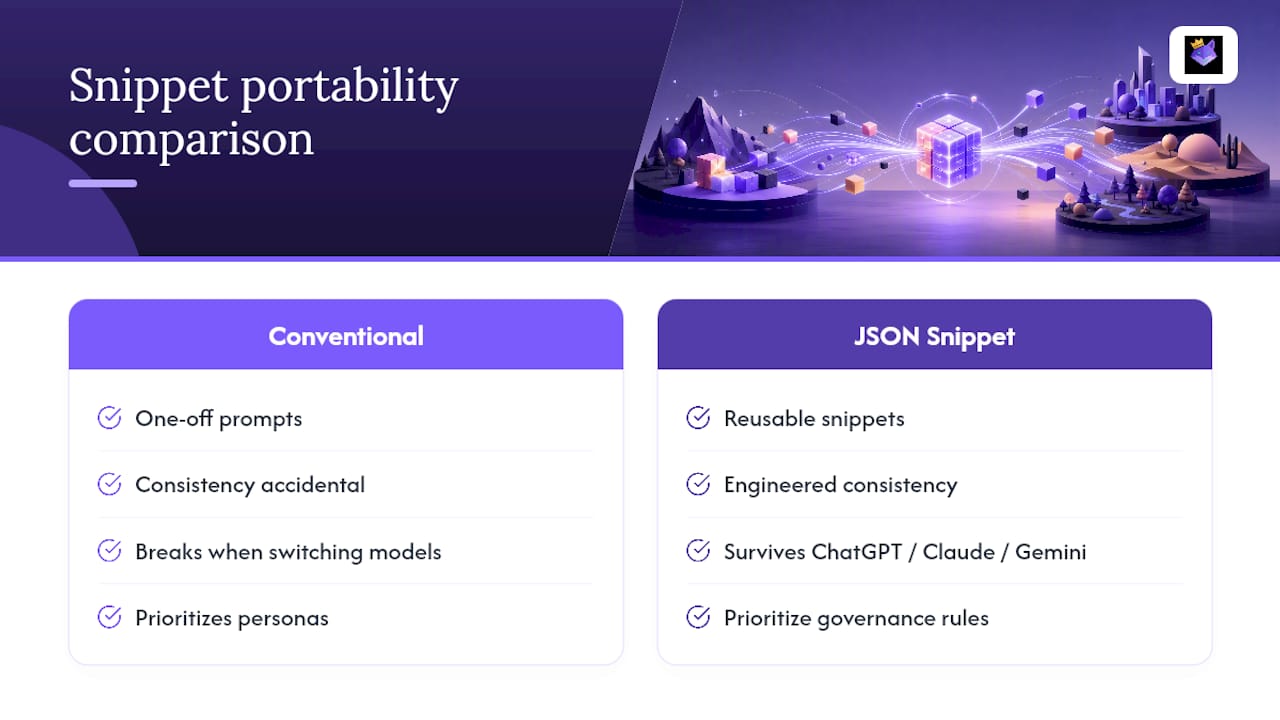
If you take one thing from this guide, prioritize building your first five snippets around governance rules, not personas. Personas are fun to write, but a governance snippet ("never cite a statistic without a source," "flag ambiguous requests instead of guessing") saves you from the errors that actually damage trust in AI-assisted work. Get that foundation right before you spend time polishing tone.
Try Prompt Snippets Without Building the System Yourself
Everything in this guide, the JSON structure, the placeholder syntax, the tagging system, the version control, is exactly what Promptchief's prompt manager with cloud sync and a Chrome extension handles automatically. You save a snippet once, and it's searchable and injectable across ChatGPT, Claude, Gemini, and dozens of other platforms from any device you log into.

If you'd rather start from proven material instead of writing every snippet from scratch, browse 30+ ready-to-use prompt examples built with the same portability-first structure covered above: persona, governance, and formatting snippets you can import and adapt in minutes. Open the extension, drop in a snippet, and see how it feels to stop retyping the same instructions every session.
Sources
FAQ
What is an example of a prompt snippet?
A tone instruction like "respond as a skeptical senior editor and flag weak claims" saved as a reusable text or JSON entry is a typical example, ready to inject into any new AI conversation.
What is an example of a prompt itself?
A prompt is the full request you send an AI, such as "Write a product description for a stainless steel water bottle in a playful tone." A snippet is often one reusable piece inserted into that larger prompt.
What does "snippet" mean in AI tools?
In AI tooling, a snippet means a small, saved, reusable block of prompt text, ranging from a single instruction to a structured template, that can be searched and injected rather than rewritten each time.
What is the purpose of a prompt snippet?
The purpose is to save time and enforce consistency: instead of retyping the same instruction, rule, or persona across sessions and models, you save it once and reuse it wherever you need it, including through tools like Promptchief.
How do I make my snippets work across different AI models?
Store them as JSON with placeholder syntax rather than plain formatted text tied to one app's interface, since that structure survives moves between ChatGPT, Claude, Gemini, and other platforms.