
TL;DR:
- Prompt placeholders are named variables within a prompt template that are replaced with specific values before sending the prompt to an AI model. Using proper syntax and ensuring validation, logging, and governance are essential for maintaining reliable and secure prompt management at scale.
Prompt placeholders are named variables inside a prompt template that get replaced with real values at runtime. The simplest form looks like this in Python:
template = "Summarize the following article for a {audience}: {article_text}"
resolved = template.format(audience="software engineer", article_text=body)
For anything more complex, use a double-brace engine like Jinja2 or Mustache:
Summarize the following article for a {{audience}}: {{article_text}}
Three things to keep in mind before you write a single template:
- Sanitize every value before substitution. Never pass untrusted user input directly into a template without validation.
- Jinja2 can execute code if templates are not sandboxed. Treat template compilation as a privileged operation.
- Tools like Promptchief, templating libraries like Jinja2, and Python f-strings each serve different complexity levels. Pick the right one for the job.
Table of Contents
- What are prompt placeholders and how do they work?
- Common placeholder syntaxes and when to use each
- How to declare placeholders and resolve them at runtime
- How to test and debug your resolved prompts
- Security risks with placeholders and how to prevent them
- Operational best practices for naming, versioning, and governance
- Why a centralized prompt registry pays off at scale
- Key Takeaways
- The part most teams skip until it hurts
- Promptchief makes placeholder management production-ready
- Useful sources
- FAQ
What are prompt placeholders and how do they work?
A placeholder is a named slot inside a static prompt template. At runtime, your code swaps each slot with a concrete value. The IBM watsonx documentation describes it plainly: "A prompt variable is a placeholder keyword that you include in the static text of your prompt at creation time and replace with text dynamically at run time."
Three distinct roles show up in production systems:
- User variables carry values that come directly from the end user: a question, a document to summarize, a target language. These are the highest-risk inputs because you do not control them.
- Orchestration variables are set by your application layer, not the user. Think
{current_date},{user_tier}, or{tool_output}. They control flow and context without exposing a user-facing attack surface. - Message placeholders are a different beast entirely. Instead of substituting a string, they inject an entire array of chat messages into a specific position in the prompt. This is what makes few-shot examples and agent memory work in chat-based flows. The PromptLayer docs describe them as a feature that "lets you inject an array of chat messages into a prompt template at a specific position."
Choosing the right role matters because user variables need sanitization, orchestration variables need access controls, and message placeholders need size limits to avoid token overruns.
Common placeholder syntaxes and when to use each
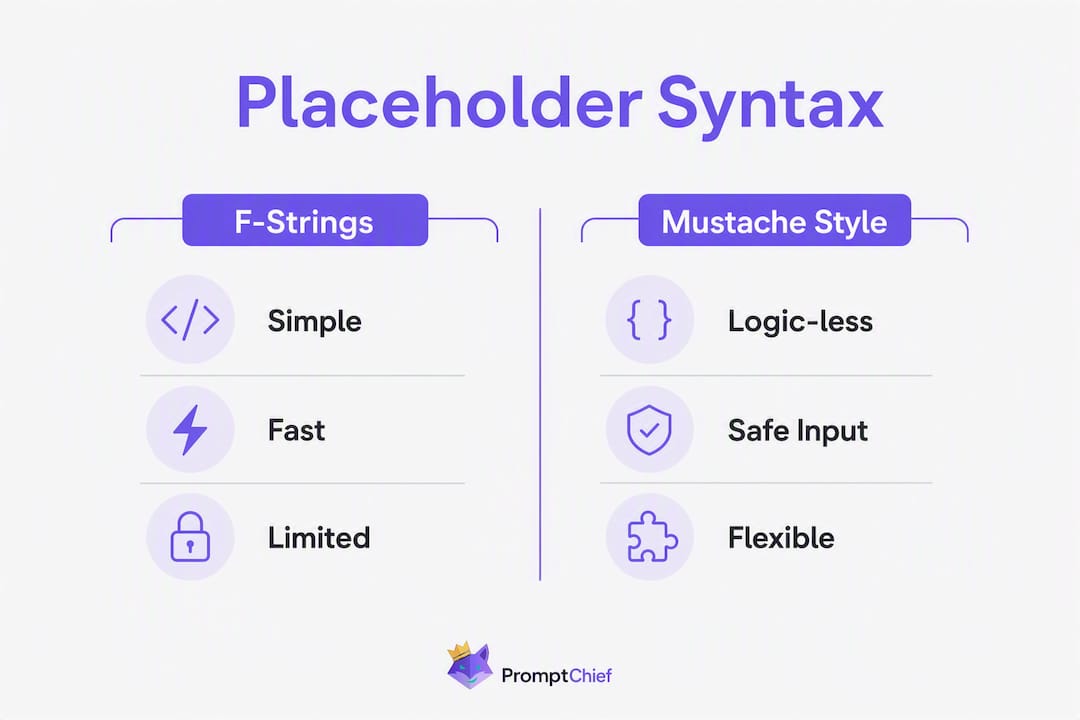
Two syntax families dominate prompt templating: single-brace f-string substitution and double-brace engines like Mustache, Handlebars, and Jinja2.
| Syntax | Example | Supports conditionals/loops | Safe for user input | Best for |
|---|---|---|---|---|
| F-string / single brace | {variable} | No | Moderate | Simple text substitution |
| Mustache / Handlebars | {{variable}} | Sections only | Yes (logic-less) | Structured prompts, JSON output |
| Jinja2 | {{variable}}, {% if %} | Yes (full) | Only when sandboxed | Trusted templates with loops |
| Message placeholder | [messages] array slot | N/A | Depends on source | Chat agents, few-shot injection |
F-strings are fast and readable, but they break the moment your template contains JSON. Single-brace f-strings conflict with JSON curly braces and cannot express loops or nested access. If your prompt generates structured output, switch to double braces.
Logic-less Mustache-style templating is often recommended for LLM prompts because it provides structured control flow without enabling arbitrary code execution. Jinja2 gives you full power, but that power is the risk.

Some toolkits, like Handlebars-based systems, add built-in support for object access, array iteration with {{#each}}, and conditional rendering with {{#if}}. These are useful for templating lists of few-shot examples or optional fields without touching a full Jinja2 environment.
How to declare placeholders and resolve them at runtime
The pattern is always the same: declare the template, define the inputs, resolve at call time, log the result, then send to the model. Here is the minimal version in Python and JavaScript.
Python (f-string style):
template = "You are a {role}. Answer this question: {question}"
inputs = {"role": "senior engineer", "question": user_input}
resolved = template.format(**inputs)
print(resolved)  # always log before sending
response = llm.complete(resolved)
JavaScript (Mustache-style with a library):
const Mustache = require("mustache");
const template = "You are a {{role}}. Answer: {{question}}";
const resolved = Mustache.render(template, { role: "senior engineer", question: userInput });
console.log(resolved); // log before sending
const response = await llm.complete(resolved);
Resolving message placeholders in a chat flow:
messages = [
    {"role": "system", "content": "You are a helpful assistant."},
    *few_shot_examples,          # injected message array
    {"role": "user", "content": user_message}
]
response = openai.chat.completions.create(model="gpt-4o", messages=messages)
IBM watsonx and similar enterprise platforms let you set default values for each variable in a UI panel, which prevents missing-key errors in staging without code changes.
Runtime guards checklist:
- Validate that all required fields are present before resolution.
- Set default values for optional fields so missing keys never reach the model.
- Enforce a character or token limit on user-supplied values.
- Log the fully resolved prompt as part of every request trace.
- Never send a prompt to the model without first confirming the resolved output looks correct.
Pro Tip: Add a RESOLVED_PROMPT log line at DEBUG level in every service that calls an LLM. When something goes wrong in production, that log is the fastest way to reproduce the exact input the model received.
How to test and debug your resolved prompts
The most common source of LLM bugs is not the model. It is a placeholder that resolved to an empty string, a wrong type, or a value that silently changed the instruction.
Debugging starts with visibility:
- Inline logging: print or log the resolved prompt before every model call during development. This single habit catches 80% of template bugs.
- Structured traces: in production, attach the resolved prompt as a field in your observability trace (Datadog, Honeycomb, or a custom log sink). This lets you replay exact inputs.
- Resolved-prompt snapshots: store a snapshot of the resolved prompt alongside the model response in your database. When a user reports a bad output, you have the exact input.
Token counts matter more than most teams realize. After resolution, a prompt that looked small can balloon when a user pastes a long document into {article_text}. Check token usage after resolution to avoid unexpected cost or truncation. Promptchief's free token counter is a quick way to spot this during development.
Testing checklist:
- Unit-test every template rendering function with fixed inputs and assert on the exact resolved string.
- Write integration tests that include a resolved-prompt snapshot so regressions are visible.
- Use mock models (deterministic stubs) for unit tests so you are testing the template, not the model.
- Test edge cases: empty strings, very long inputs, inputs with curly braces, and inputs with special characters.
Common runtime errors and fixes:
| Error | Cause | Fix |
|---|---|---|
KeyError: 'variable' | Missing input key | Add required-field validation before resolution |
| Garbled JSON in prompt | F-string + JSON body | Switch to Jinja2 or Mustache double braces |
| Prompt truncated mid-sentence | Token limit exceeded | Add a size limit on user-supplied values |
Literal {{variable}} in output | Wrong syntax for engine | Match syntax to the library you are actually using |

Security risks with placeholders and how to prevent them
Template injection is the most underestimated risk in LLM applications. When user input flows into a template that a full-featured engine then compiles, an attacker can potentially execute arbitrary code on your server.
Security checklist:
- Never compile user-supplied templates in an unsandboxed Jinja2 runtime. A user who can control the template string can run
{{ ''.__class__.__mro__[1].__subclasses__() }}and enumerate your Python environment. - Validate and escape all placeholder values before substitution. Strip or encode characters that have meaning in your template syntax.
- Use allowlists for fields that appear inside structured outputs. If
{format}gets injected into a JSON block, validate it against a fixed list of allowed values. - Prefer logic-less engines for user-facing templates. Logic-less templating reduces attack surface because data and control flow are separated from template code.
- Sign compiled templates in production so only templates your team authored can run. Treat template compilation as a privileged operation.
- Isolate the template runtime from your application's main process when you need full Jinja2 features.
Safe pattern:
import html
safe_value = html.escape(user_input)  # escape before substitution
resolved = template.replace("{{user_input}}", safe_value)
Do-not-use pattern:
# NEVER do this with untrusted input
from jinja2 import Environment
env = Environment()  # no sandbox
template = env.from_string(user_supplied_template)  # arbitrary code risk
Operational best practices for naming, versioning, and governance
Good placeholder hygiene is what separates a prototype from a maintainable system.
Naming conventions:
- Use
snake_casefor variable names:{user_question},{document_text},{output_format}. - Keep names short and descriptive.
{q}is unreadable in six months;{customer_support_question_from_form_field_3}is noise. - Avoid generic names like
{input}or{text}. They tell you nothing about what the variable holds. - Prefix orchestration variables to distinguish them from user variables:
{sys_date},{sys_user_tier}.
Versioning:
- Version every template with a
major.minorscheme. A change that alters the model's behavior is a major bump; a typo fix is minor. - Keep a deprecation window of at least two weeks before removing a template version from production.
- Store the template version alongside every logged resolved prompt so you can reproduce historical behavior.
Separating orchestration from user variables:
Mixing them in the same template without clear separation leads to accidental instruction drift. A user who figures out that {tone} is a live variable can try to inject values like "ignore previous instructions." Keep user variables in clearly bounded sections of the prompt and validate them independently.
Template metadata to store with every template:
- Author and creation date
- Purpose (one sentence)
- Input variable names, types, and descriptions
- Expected output format
- At least one example input/output pair
- Link to the test suite
Why a centralized prompt registry pays off at scale
Scattered templates across repos, notebooks, and Slack messages are a governance problem waiting to become a production incident.
and make it easier to track lifecycle, access, and consistency across playgrounds and production.The registry workflow is straightforward: save templates with metadata and tests, assign access controls, then inject into runtime via API or SDK. Every resolved prompt traces back to a versioned template in one place.
Features every team should expect from a prompt registry:
- Cloud sync so templates are available across environments and devices
- Full-text and fuzzy search across template names, variables, and content
- Template variables with default values and type hints
- Environment-specific injection (dev/staging/prod)
- Audit logs showing who changed what and when
- Access controls at the template level
Operational benefits:
- No duplicate templates drifting out of sync across services
- Consistent resolved prompts because everyone pulls from the same source
- Centralized test suite for all templates
- Auditability for compliance and debugging
| Registry feature | Operational benefit |
|---|---|
| Cloud sync | Templates available in every environment without manual copying |
| Versioned templates | Roll back a bad prompt change without a code deploy |
| Access controls | Prevent unauthorized edits to production templates |
| Audit logs | Trace every prompt change for compliance and debugging |
| Injection API / SDK | Resolve placeholders server-side before the model call |
| Search | Find the right template without browsing a flat file system |
Teams that adopt a centralized registry earlier avoid long-term fragmentation. The naming and versioning conventions you enforce in the registry become the team's shared language for prompt design.
For teams building multi-step prompt chains, a registry also enforces that every step in the chain pulls from a versioned, tested template rather than an inline string.
Key Takeaways
Prompt placeholders are only as reliable as the runtime resolution, sanitization, and governance you build around them.
| Point | Details |
|---|---|
| Use the right syntax | F-strings for simple substitution; Mustache/Jinja2 for JSON, loops, or conditionals. |
| Sanitize user inputs | Validate and escape every user-supplied value before it reaches the template engine. |
| Log the resolved prompt | Always log the fully resolved prompt before sending it to the model for debugging. |
| Version every template | Use major.minor versioning and keep a deprecation window before removing old versions. |
| Use Promptchief for scale | Promptchief's prompt management platform centralizes templates, variables, versioning, and audit logs across teams and environments. |
The part most teams skip until it hurts
The technical side of prompt placeholders is not hard. The part that bites teams is governance: who owns a template, which version is in production, and what changed last Tuesday when the model started behaving differently.
Most projects start with a handful of f-string templates in a constants file. That works fine for one developer and one model. The moment a second service starts importing those templates, or a second developer starts editing them, you have a coordination problem. The template in constants.py is not the same as the one in the notebook your colleague used to test last week, and neither matches what is actually running in the staging environment.
The instinct is to add more comments and a README. That buys a few weeks. What actually works is treating templates the same way you treat code: version control, tests, and a single source of truth. A registry is not overkill for a team of three. It is the thing that keeps three people from spending an afternoon debugging a prompt that was silently changed by someone who thought it was only used in one place.
One concrete habit worth adopting on day two of any LLM project: give every placeholder a name that includes its role. {sys_date} and {user_query} tell you immediately which variables are internal and which come from outside. That prefix convention costs nothing and saves a real debugging session later.
Promptchief makes placeholder management production-ready
Building with placeholders across multiple apps or teams means you need more than a text file. Promptchief gives you a cloud-synced prompt management platform where every template lives with its variables, default values, version history, and audit trail in one place. You get fuzzy search across your entire library, environment-specific injection via API or browser extension, and team workspace controls so the right people can edit production templates and the wrong ones cannot.

The path from scattered templates to a governed registry takes about an afternoon: sign up, import your existing templates, attach variable definitions and defaults, then point your staging endpoint at the registry API instead of your constants file. From that point, every resolved prompt traces back to a versioned, tested template. Sign up at Promptchief and bring your first template in today.
Useful sources
- Semantic Kernel prompt template syntax — Microsoft's reference for the Semantic Kernel template language, covering variables, function calls, and parameter passing.
- LangSmith prompt template format guide — Explains f-string vs. Jinja2 syntax trade-offs and when to use each in LangChain-based applications.
- Building reusable prompts — IBM watsonx — Covers UI-driven variable panels, default values, and the concept of a reusable prompt template asset.
- Server-side template injection — PortSwigger — The authoritative reference on template injection risks and why logic-less engines reduce attack surface.
- PromptTemplate security notes — LangChain reference — Documents sandboxing requirements and the risks of compiling untrusted templates in Jinja2.
- Prompt variables — PromptDesk documentation — Shows Handlebars-style variable syntax with object access, array iteration, and conditional rendering.
FAQ
What is a placeholder in a prompt?
A placeholder is a named variable inside a prompt template, written as {variable} or {{variable}}, that gets replaced with a real value at runtime before the prompt is sent to the model.
What is a placeholder example?
A simple example: "Translate the following text into {{target_language}}: {{source_text}}" — at runtime, {{target_language}} becomes "French" and {{source_text}} becomes the content you want translated.
What does "placeholder" mean in prompt templating?
In prompt templating, a placeholder is a slot in a static template string that marks where dynamic content will be inserted. The term comes from general programming, where a placeholder holds a position for a value that is not yet known.
How do prompt placeholders differ from f-strings?
F-strings use single braces and are evaluated immediately in Python, while prompt placeholders are inert markers in a template string that your application resolves at call time, often with validation and logging between the substitution and the model call.
Can Promptchief manage prompt templates with variables?
Yes. Promptchief stores templates with named variables, default values, and version history, and injects resolved prompts into many AI platforms via its API and browser extension.