
A marketing prompt library is a categorized, reusable set of role-based AI prompts built for repeatable tasks: social captions, ad headlines, email sequences, SEO briefs, reports. Instead of typing a fresh request every time, you pull a proven prompt, swap the placeholders, and get a usable draft in the time it takes to read this paragraph.
Try this one right now for a social post:
- Role: "Act as a senior social media copywriter for a [industry] brand."
- Task: "Write 3 Instagram captions promoting [product/offer], each under 200 characters."
- Format: "Output as a numbered list with a hook line, body, and one hashtag set per caption."
Paste that into any chatbot with your brackets filled in, and you'll have three usable drafts before your coffee cools.
Key Takeaways
A marketing prompt library works when prompts are organized by workflow, written with the role-context-task-format formula, and maintained with a naming convention and a result log.
| Point | Details |
|---|---|
| Start with one prompt | Copy a role-context-task-format prompt from a category you use weekly and run it today. |
| Organize by workflow, not by chat history | Group prompts into categories like social, email, ads, SEO, and reporting from day one. |
| Use the four-part formula | Every strong prompt states a role, context, task, and exact output format. |
| Maintain, don't just build | Tag, version, and log test results so the library improves instead of decaying. |
| Try Promptchief for team libraries | Promptchief syncs prompts across devices and injects them via a Chrome extension into multiple AI tools. |
Table of Contents
- What Goes Into a Marketing Prompt Library by Category
- How Do You Build and Organize a Prompt Library?
- What Makes a Marketing Prompt Actually Work?
- Where Can You Find Ready-Made Prompt Libraries?
- How PromptChief Fits Into This Workflow
- What Usually Breaks a Marketing Prompt Library?
- Connecting Your Prompt Library to Marketing Tools
- Handling Privacy and Ethics in AI-Generated Marketing Content
- A Five-Day Sprint With a Prompt Library
- Try PromptChief for Your Marketing Prompt Library
- Sources
- FAQ
What Goes Into a Marketing Prompt Library by Category
A working library isn't a pile of one-off prompts. It's organized by the jobs your team actually does every week, and each entry is written so a new hire could run it without asking what it means. Here are the seven categories worth building first, with two ready-to-use prompts in each.
- Brand and voice. "Act as a brand voice consultant. Given these three sample posts [paste samples], write a 100-word style guide describing tone, sentence length, and vocabulary to avoid." / "Rewrite this paragraph [paste text] to match a [confident/playful/technical] brand voice. Output only the rewritten paragraph."
- Social and short-form. "Act as a copywriter for [platform]. Write 5 hook lines for a post about [topic], ranked by likely engagement." / "Turn this blog post [paste URL or summary] into a 5-tweet thread with a numbered format."
- Email and sequences. "Act as an email marketer. Write a 3-email welcome sequence for [product], each under 150 words, with subject line, preview text, and body." / "Write a re-engagement subject line A/B test: 5 variants under 50 characters."
- Ad copy. "Act as a performance marketer. Write 6 headline variations (under 30 characters) for a [platform] ad promoting [offer]." / "Write 3 primary text options for a retargeting ad targeting [audience segment]."
- SEO and content briefs. "Act as a content strategist. Create a content brief for the keyword '[keyword]' including target word count, three subheadings, and one internal link opportunity."
- Analytics and reporting. "Act as a marketing analyst. Summarize this campaign data [paste metrics] into a 3-bullet executive summary highlighting the biggest win and the biggest risk."
Model choice matters here: drafting and rewriting tasks work well with any current large language model, but anything requiring live trends, pricing, or competitor data benefits from a model with current-data access rather than a purely generative one. Templates themselves stay reusable across ChatGPT, Claude, and Gemini without rewriting.
How Do You Build and Organize a Prompt Library?
The library falls apart the moment two people on your team save the same prompt under different names, or nobody remembers which version tested best. A little structure up front prevents that.
Start with a naming convention everyone follows without thinking: channel_audience_objective_v1. For example, email_newlead_nurture_v1 or social_smallbiz_awareness_v2. It's boring, and that's exactly why it works, because anyone can guess a prompt's name before they even open it.
Tag by three dimensions, not one: workflow (social, email, ads), funnel stage (awareness, consideration, conversion), and status (draft, tested, retired). A prompt can carry multiple tags, but every prompt needs at least one from each group.
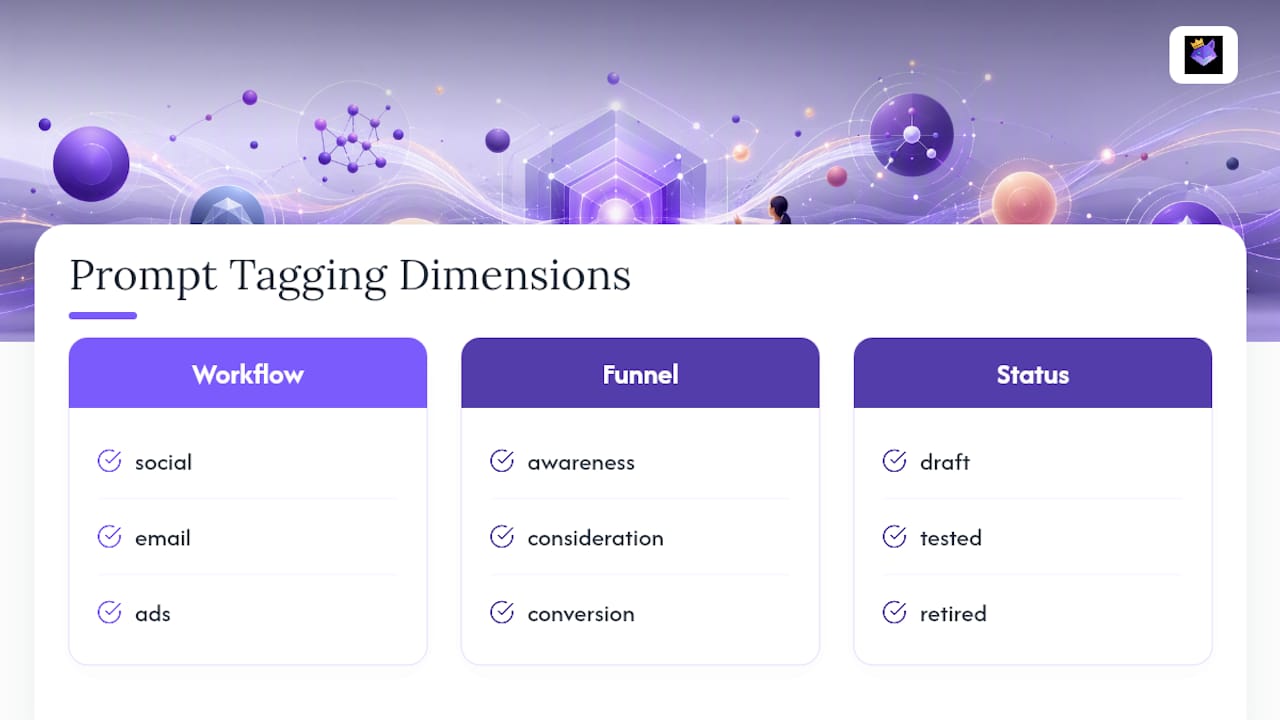
Version deliberately. When you tweak a prompt to test a new angle, save it as v2 rather than overwriting v1 — you'll want to compare results later, and you can't compare against something you deleted.
For cross-tool reuse, keep your master copies in one synced location rather than scattered across chat histories, and use a browser extension to inject them directly into whichever AI tool you're using so you're not retyping the same 200 words for the fifth time this week.

Run a simple test loop: form a hypothesis ("shorter subject lines will lift open rate"), run the prompt variant, measure the result (CTR, engagement, time saved), then update the library entry with what you learned.
Pro Tip: Attach a one-line result log to every tested prompt, something like "v2 tested 3/14, CTR up 0.4%." Six months from now, that single line saves you from re-testing something you already know doesn't work.
What Makes a Marketing Prompt Actually Work?
Most weak prompts fail for the same reason: they skip a piece of the formula. A prompt that reliably produces a usable draft has four parts.
Role. Tell the model who it is. "Act as a direct-response copywriter with 10 years in SaaS" produces different output than no role at all.
Context. Give it the specifics: audience, product, constraints, tone. Vague input produces vague output every time.
Task. State exactly what to do. Not "help with an email" but "write a 3-line follow-up email reminding a lead about an expiring discount."
Output format. Specify the shape you want: a numbered list, a table, a 50-word paragraph, five headline variants.
Compare these two:
- Weak: "Write something for our new product launch."
- Strong: "Act as a product marketer at a mid-size fitness app. We're launching a sleep-tracking feature for existing users aged 25 to 45. Write 4 push notification variants, each under 40 characters, in an encouraging tone. Output as a bulleted list."
The second version works on the first try. The first version requires three follow-up messages before it's usable, which is exactly why reusable prompts save time: once you've built the strong version, you never have to write it from scratch again.
Five rules make this repeatable: be specific about the scenario, supply real constraints (length, tone, audience), always ask for the output format, include an example when the task is unusual, and iterate with a follow-up rather than starting over. Reusable libraries that bundle role, context, task, and format together turn a blank page into a usable draft in seconds rather than minutes. And for genuinely fresh ideas, borrowing a technique from outside marketing helps: asking a model what it "wouldn't do" for a given brief tends to surface less predictable, more differentiated concepts than a straightforward request.
Where Can You Find Ready-Made Prompt Libraries?
You don't have to build everything from scratch. Four resource types cover most needs.
Vendor collections come from software companies and tend to be polished and framework-aligned. HubSpot's Loop Marketing prompt library offers 100 prompts mapped to a brand, personalization, amplification, and optimization framework, which makes it a solid reference for how a large vendor structures prompts around strategy phases.
Community repos, like threads built by marketers sharing tested prompts, tend to be scrappier but field-tested against real campaigns.
Starter kits, often 20 to 200 prompts with bracketed placeholders, work well for teams focused on a specific goal like B2B lead generation.
Before adopting any collection, check four things: total prompt count and category spread, whether it includes filled-in examples, notes on which model each prompt suits, and how often it's updated. Promptchief's own free prompt collection covers over 100 prompts across these categories with usage notes built in.
How PromptChief Fits Into This Workflow
Everything above depends on prompts being easy to find, share, and reuse across tools. That's the exact gap Promptchief closes.
- Cloud sync keeps every saved prompt available across devices, so your library isn't trapped in one browser's chat history.
- Fuzzy search pulls up the right prompt even if you don't remember its exact name.
- A Chrome extension injects saved prompts directly into ChatGPT, Claude, Gemini, and other tools without copy-pasting.
- Multi-step prompt chains let you link a brief prompt to a draft prompt to a format prompt in sequence.
- Team workspaces let marketing teams share a single library instead of five personal ones.
Explore ready-made prompt examples to see the format in action, or start from the main platform.
What Usually Breaks a Marketing Prompt Library?
Most libraries don't fail because the prompts are bad. They fail because nobody maintains them.
The first crack shows up as duplicate sprawl: three people write nearly identical email prompts under three different names, and within a month nobody knows which one is "the good one." A strict tagging taxonomy and a naming rule (channel, audience, objective, version) heads this off before it starts.
The second problem is staleness. A prompt that worked great for a product launch six months ago might produce generic output today because your brand voice shifted or your audience changed. Libraries need a review cadence, quarterly is reasonable, where someone actually reads through old entries and retires what no longer fits.
Third, teams often skip testing altogether and just trust that a prompt "feels right." Without a result log attached to each entry, tracking a metric plus a date, you're relying on memory, and memory is unreliable across a team of six people running dozens of campaigns.
Finally, over-customization creates fragility. A prompt stuffed with ten specific constraints breaks the moment one variable changes. Keep the core prompt simple and let placeholders handle the variation, rather than rewriting the whole thing for every new campaign.
None of these problems require sophisticated tooling to fix. They require someone owning the library the way you'd own a shared drive: naming rules enforced, stale entries removed, results logged.
Connecting Your Prompt Library to Marketing Tools
A prompt library that lives in isolation from your actual marketing stack does half the job. The output still has to land somewhere: your CRM, your email platform, your ad manager.
The practical pattern is to treat AI-generated drafts as an input stage feeding your existing tools, not a replacement for them. Write the email sequence with a prompt, then paste the finished copy into your email marketing software's automation builder. Generate ad headline variants with a prompt, then load them into your ad platform's testing slots. The prompt handles ideation and first drafts; your CRM and campaign tools handle segmentation, scheduling, and delivery.
Some teams go a step further and feed CRM data (lead source, deal stage, past engagement) into the context section of a prompt, so a follow-up email prompt can reference "leads who downloaded the pricing guide but haven't booked a demo" instead of a generic segment description. This only works if you strip personally identifiable details before pasting anything into a third-party AI tool, since most CRMs contain more customer information than a prompt needs.
Measuring what the prompt actually improved matters more than measuring the tool itself. Track open rate, click-through rate, or time-to-publish before and after switching a workflow to a prompt-driven process, using the same analytics discipline you'd apply to any campaign change. If a prompt-generated subject line doesn't outperform your old one after a fair test, the fix is the prompt, not the platform.
Handling Privacy and Ethics in AI-Generated Marketing Content
The privacy risk with prompt libraries isn't the prompt text itself. It's what marketers paste into the context field. Customer names, email addresses, purchase history, or internal sales notes dropped into a prompt can end up processed by a third-party AI provider under terms you may not have fully reviewed.
The safer habit is building placeholders into every prompt template, [customer segment] instead of an actual list of names, [product category] instead of unreleased pricing, so the prompt works without ever touching real customer data. Treat any prompt library shared across a team the same way you'd treat a shared document: assume anything typed into it could be seen by more people than intended.
On the ethics side, disclosure matters more as AI-generated copy scales. If a testimonial-style prompt is used to draft customer-facing copy, that copy should reflect real customer input, not fabricated quotes dressed up as feedback. AI is genuinely good at drafting structure and testing variations; it's a poor substitute for an actual customer's words, and presenting a machine-written line as a genuine testimonial misleads the audience reading it.
A reasonable rule: use AI-generated drafts for structure, tone-matching, and volume, and route anything published as a direct customer quote or a factual claim about your product through a human check before it goes live.
A Five-Day Sprint With a Prompt Library
Here's what a week actually looks like once the library is built. Day one, pick a category, ad copy, and run three variants of the same prompt with different constraints. Day two, take the strongest output and refine it by hand. Day three, split it into two A/B variants and load them into your ad platform. Day four, deploy and watch early metrics. Day five, run a short retro: which prompt won, why, and update the library entry with the result.
Watch for two early signals: draft time dropping from an hour to ten minutes, and briefs arriving more consistent across team members who used the same prompt.
— John
Try PromptChief for Your Marketing Prompt Library
You've seen the categories, the formula, and the maintenance rules. Putting all three into practice by hand, across five browser tabs and a shared spreadsheet, is exactly the friction that kills most prompt libraries within a month.

Promptchief replaces that spreadsheet with a searchable, cloud-synced library your whole team can pull from, tag consistently, and inject straight into ChatGPT, Claude, or Gemini through a Chrome extension instead of retyping prompts by hand. Team workspaces mean your naming convention and version history live in one place instead of five personal chat histories. If you're managing prompts solo right now, start with the free AI prompt examples to see the categories and formula in action, then move to a team workspace once more than one person is pulling from the same library.
Sources
- 100 Best AI Marketing Prompts 2026 (Copy-Paste)
- HubSpot’s Loop Marketing Prompt Library
- Creative Marketing Prompts (From a Creative Genius) | Conductor
FAQ
What is the best marketing prompt library?
There's no single "best" library. The right one has model-agnostic prompts organized by workflow (social, email, ads, SEO), includes filled-in examples, and gets updated regularly rather than sitting static for years.
What are some good prompts for marketing?
Strong marketing prompts follow the role-context-task-format formula, for example: "Act as a performance marketer. Write 6 ad headlines under 30 characters for [offer], targeting [audience]. Output as a numbered list."
What does prompt library mean?
A prompt library is a categorized, reusable collection of role-based AI prompts built for repeatable tasks, so a team can pull a proven prompt instead of writing a new request from scratch every time.
Where can I find a free AI prompt library?
Promptchief offers a free collection of over 100 marketing prompts, and vendor packs like HubSpot's Loop Marketing library and community repositories on forums like Reddit also offer free, tested prompts.