
A developer prompt library is an organized, tool-agnostic collection of reusable prompt artifacts that lets you treat prompts as code instead of throwaway chat messages. The best ones live in version control, get tagged by complexity, and chain together for real work. Developers reach for one to:
- Debug a stack trace without re-explaining project context every time.
- Generate unit and integration tests from existing code.
- Run structured code reviews that catch the same issues a senior engineer would.
Start with PromptChief's free prompt library or browse a canonical repo like codingthefuturewithai/software-dev-prompt-library to see the pattern in practice.
Key Takeaways
A developer prompt library works best when prompts are versioned, tagged by complexity, and chained with explicit verification steps rather than treated as one-off chat messages.
| Point | Details |
|---|---|
| Structure beats volume | A /prompts, /workflows, /docs layout with a manifest file matters more than how many prompts you have. |
| Use the four-part template | Role, Task, Constraints, and Output Format prevents the model from guessing at missing context. |
| Verify before merging | Chain prompts through spec, implement, test, report, fix, and human review, never skip the test step. |
| Govern like code | Route prompt edits through pull requests with the prompt text included for review. |
| Centralize with PromptChief | PromptChief syncs prompts across devices and adds fuzzy search, chains, and team workspaces on top of a forked or self-built library. |
Table of Contents
- What Goes Into a Developer Prompt Library?
- What Structure Makes a Prompt Library Actually Usable?
- What Does a Good Engineering Prompt Template Look Like?
- How Do You Chain Prompts Without Losing Control?
- How Do You Roll Out a Prompt Library on Your Team?
- Which Real Prompt Libraries Are Worth Studying?
- What Should You Know About Prompt Security Before Sharing One?
- Who Should Be Able to Edit and Approve Prompts?
- How Do You Adapt a Prompt Library to Your Own Stack?
- Prompts Are Specs, Not Suggestions
- Get Your Prompt Library Off Scattered Notes and Into One Place
- Sources
- FAQ
What Goes Into a Developer Prompt Library?
A real one is more than a folder of saved messages. It typically holds three kinds of files: the prompt itself (usually a .md recipe), a paired .meta.md file documenting purpose and expected inputs, and workflow definitions that chain multiple prompts into a sequence. That structure is exactly what you find in public repos like codingthefuturewithai/software-dev-prompt-library, which pairs prompt files with usage notes and organizes workflows separately from single-shot prompts.
The reason this matters more than it sounds: prompts written for one assistant's UI tend to die there. A tool-agnostic library, one that works whether you're pasting into Claude, GitHub Copilot Chat, or a local LLM, keeps that knowledge portable instead of locked into a single vendor's product decisions.
Most mature libraries organize prompts into a handful of recurring categories:
- Init prompts for scaffolding new projects or features.
- Generate prompts for writing code, endpoints, or boilerplate.
- Debug prompts for tracing errors and stack traces.
- Test prompts for unit and integration coverage.
- Security prompts for reviewing auth, input validation, and dependencies.
- Docs prompts for README files, changelogs, and API references.
Repos like keploy/engineering-prompts take a similar approach, splitting prompts by domain (DevOps, Backend, Frontend, Testing) rather than by AI tool, which is the pattern worth copying.
What Structure Makes a Prompt Library Actually Usable?
Folder layout is where most homegrown libraries fall apart. A structure that scales usually looks something like this:
/promptsfor individual, single-purpose prompt files./workflowsfor multi-step chains that combine several prompts in sequence./docsfor onboarding notes and category explanations.manifest.yamlat the root, listing every prompt with its tags so tools can index the library automatically.
Each prompt file should carry consistent metadata: purpose, expected inputs, output format, a complexity level (Beginner, Intermediate, or Advanced), relevant tags, and at least one example input. GitLab's public prompt collection follows this exact convention, tagging every prompt by complexity across a library the company says contains more than 100 prompts spanning the full software lifecycle.
Commit prompts to source control the same way you commit code. Every edit gets a history, every regression is traceable, and a simple manifest file means you can bootstrap the whole library into a new IDE integration in minutes rather than re-explaining conventions from scratch. Microsoft's PromptKit takes this further, treating prompts as composable, versioned artifacts with CLI tooling to assemble them on demand.
Pro Tip: Tag by complexity before you tag by anything else. It's the single fastest way for a new team member to find a prompt they can trust without breaking something downstream.
What Does a Good Engineering Prompt Template Look Like?
Every reliable engineering prompt follows the same four-part skeleton: Role, Task, Constraints, and Output Format. Skip any one of the four and the model fills the gap with a guess, usually the wrong one. This structure shows up consistently across engineering prompt guides, and developers who apply it report large gains in output reliability compared to freeform requests.
Here are four templates worth keeping in your own library:
- Code generation (endpoint): "You are a backend engineer working in [language/framework]. Build a REST endpoint that [does X]. Constraints: follow existing error-handling conventions, no external dependencies beyond what's already imported. Output: full function with inline comments."
- Debugging with a stack trace: "You are a senior debugger. Here is the stack trace: [paste]. Constraints: identify root cause before suggesting a fix, reference the exact line numbers involved. Output: a numbered list of causes ranked by likelihood, then one fix."
- Test generation: "You are a QA engineer. Write unit and integration tests for the function below: [paste]. Constraints: cover edge cases and one failure path. Output: test file in [framework], no explanatory prose."
- Security review checklist: "You are a security reviewer. Audit this code for injection risks, auth gaps, and unsafe dependencies: [paste]. Constraints: flag severity per issue. Output: a table of findings with severity and fix suggestions."
When your assistant supports it, reference files directly with @filename instead of pasting entire blocks. It keeps the prompt shorter and gives the model live context instead of a stale copy. PromptChief's own coding prompt collection uses this exact Role, Task, Constraints, Output Format skeleton across its debugging and code-quality prompts.
How Do You Chain Prompts Without Losing Control?
A single prompt can write code. It can't verify that code actually works, and that's where most one-shot AI coding attempts quietly fail. A workflow chain fixes this by breaking the task into stages with a checkpoint at each one.
The standard chain looks like this:
- Spec: describe the feature or fix in plain terms, including acceptance criteria.
- Implement: generate the code against that spec.
- Run tests: execute the test suite, not just eyeball the output.
- Report: have the assistant summarize what passed and what didn't.
- Fix: feed failures back in as a targeted follow-up prompt.
- Human review: a person signs off before merge.
Verification belongs at steps three and six, never skipped. Run tests, run a linter, run a security scan, and only then let a human review the diff. Encoding explicit stop conditions (what "done" looks like, what counts as a failure) is a habit borrowed from senior engineering prompt discipline, which treats prompts less like conversation and more like specs with acceptance criteria attached.
Pro Tip: Map each chain step to a real CI stage where you can. If "run tests" is already a pipeline job, your prompt chain should call that job, not reinvent it in a chat window.
GitLab's approach mirrors this: its published prompts are organized by lifecycle stage, plan, create, verify, so a chain naturally maps onto stages your team already tracks.
How Do You Roll Out a Prompt Library on Your Team?
You don't need a quarter-long initiative. A prompt library can go from zero to useful in a single sprint if you keep the first pass small.
- Pick five starter prompts that solve your team's most common friction (usually debugging and test generation).
- Tag each one with a complexity level and commit it to
/prompts. - Write a short rules file, ideally under 100 lines, that captures invariants every prompt should respect. Patterns like
.cursorrulesorCLAUDE.mdfiles keep this deliberately compact so agents don't drown in instructions. - Require prompt edits to go through a pull request, with the prompt text included in the PR description for reviewers.
- Set basic review criteria: does the prompt name its inputs, does it define an output format, does it avoid vague instructions.
For integration, keep it simple at first: IDE snippets in VS Code, a browser extension for quick access mid-task, and CI hooks that run your verification chain automatically after a prompt-generated change. GitLab's own prompt library recommends starting teams on Beginner-tagged prompts before raising complexity, which avoids both tool misuse and premature security exposure.
| Point | Details |
|---|---|
| Start small | Five tagged starter prompts committed to /prompts beat fifty untagged ones nobody trusts. |
| Keep rules compact | A rules file under 100 lines is easier to enforce than a sprawling style guide. |
| Review prompts like code | Route prompt edits through pull requests with the prompt text in the description. |
Which Real Prompt Libraries Are Worth Studying?
A few public and vendor libraries are worth forking or at least reading closely before you build your own.
codingthefuturewithai/software-dev-prompt-library is the clearest example of the /prompts, /workflows, /docs layout, with .meta.md files documenting each prompt's purpose and example inputs. GitLab's prompt library demonstrates lifecycle-stage tagging at scale, more than 100 prompts sorted by complexity across an entire software delivery pipeline. Microsoft's PromptKit shows a different pattern entirely: composable layers, persona, protocol, format, template, that snap together instead of living as monolithic prompt files.
Before adopting any repo, run it through a quick checklist:
- Does every prompt carry tags and a complexity level?
- Is there at least one example input per prompt?
- Are verification steps built into the workflow, or is it single-shot?
- Can you copy a prompt and use it in under a minute, or does it need heavy editing first?
Once you've forked a repo that passes that check, import the prompts you'll actually use into a manager like PromptChief so they're searchable and synced across your devices instead of scattered across browser tabs and Slack messages.
What Should You Know About Prompt Security Before Sharing One?
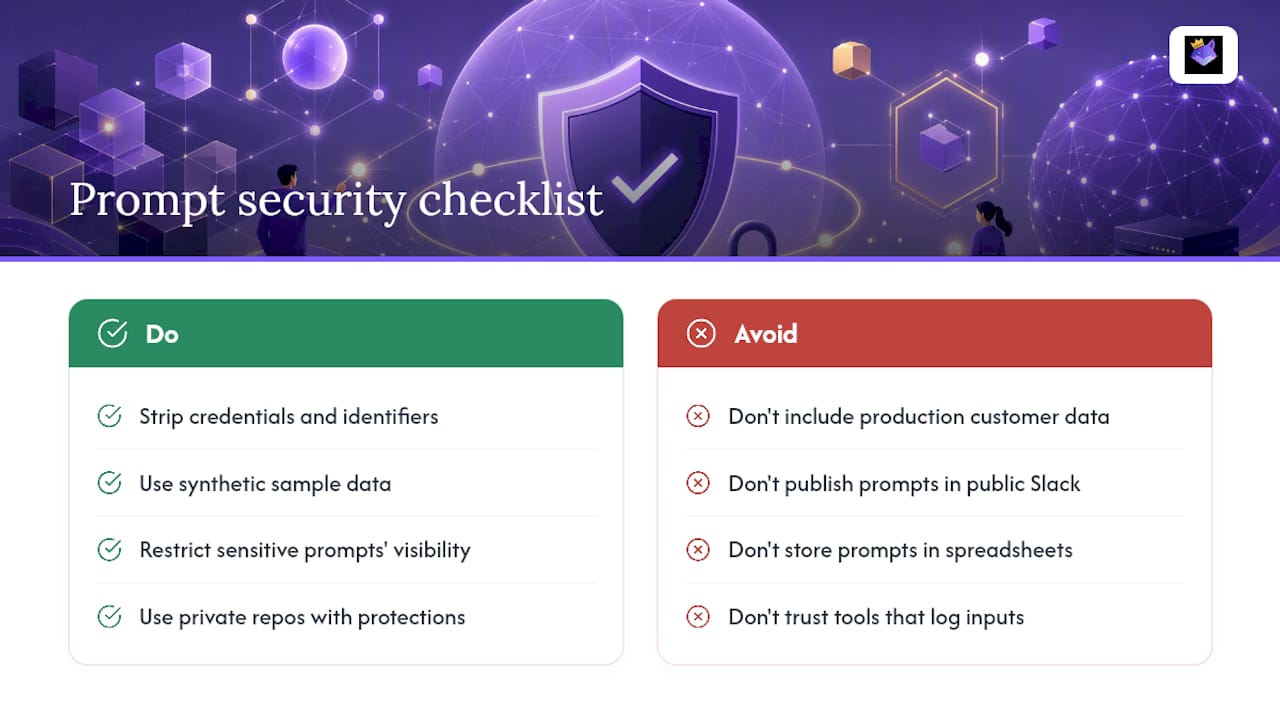
Prompts often carry more sensitive context than developers realize. A debugging prompt built from a real stack trace can leak internal file paths, API endpoint names, or database schema details. A code-review prompt pasted with real customer data attached is a compliance problem waiting to happen.
Treat prompt content with the same discipline you apply to code review. Strip real credentials, tokens, and customer identifiers before a prompt goes into a shared library, even an internal one. If a prompt needs sample data to be useful, use synthetic examples instead of production data pulled from a live database.
Access control matters just as much as content hygiene. Not every prompt needs to be visible to the whole company. Security-review prompts, especially ones that reference known vulnerabilities in your stack, are reasonable to restrict to a smaller group rather than publishing them in a company-wide channel. Version control naturally supports this: private repos with branch protections work the same way for prompts as they do for source code.
Third-party AI tools raise a separate question: where does a prompt's content actually go once it leaves your machine? Some assistants log inputs for model training unless you opt out; others process everything transiently. Before standardizing on a tool for prompts that touch sensitive systems, check its data retention policy the same way you'd check a new dependency's license before adding it to a project. A cloud-synced prompt manager with clear access controls, rather than a shared spreadsheet or public Slack channel, is the more defensible place to keep prompts that reference real infrastructure.
Who Should Be Able to Edit and Approve Prompts?
A prompt library without permissions eventually turns into a junk drawer, someone adds a prompt that half-works, nobody reviews it, and six months later new hires are copying broken instructions. The fix borrows directly from how engineering teams already manage code.
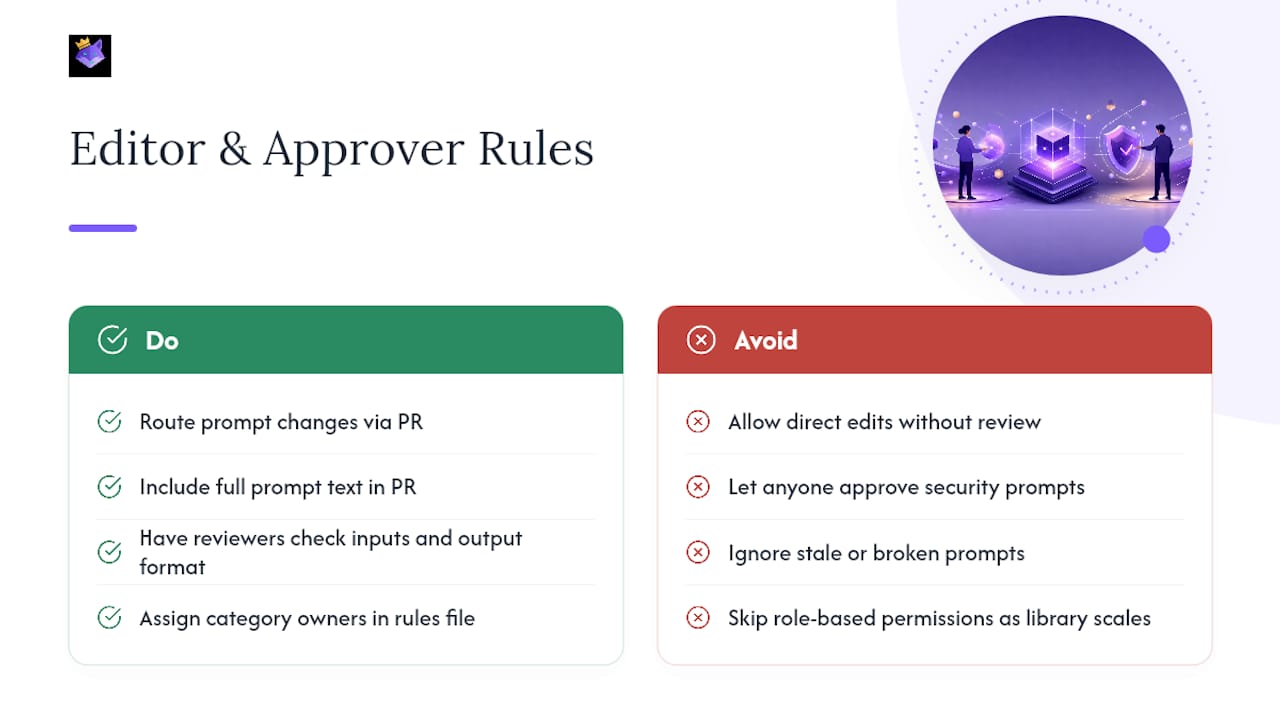
Route every prompt change through a pull request, exactly as you would a code change. Include the actual prompt text in the PR description so reviewers don't have to open a separate file to evaluate it. Reviewers check for the same basics every time: does the prompt name its inputs, does it specify an output format, does it avoid ambiguous instructions that different team members would interpret differently.
Role-based access makes sense once a library grows past a handful of contributors. A junior developer might have read access to the full library but write access only to prompts tagged Beginner or Intermediate. Security and infrastructure prompts, the ones most likely to reference real systems, often warrant a smaller approval group, maybe two senior engineers who both sign off before a change merges.
Ownership matters too. Assign a rough owner to each category, one person accountable for the debug prompts, another for test generation, so stale or broken prompts get fixed instead of quietly ignored. This doesn't need to be formal. A line in the rules file naming category owners is often enough for a team under twenty engineers.
Tools built for team prompt management typically support this natively: shared workspaces with role-based permissions, so a prompt library scales without turning into a free-for-all where anyone can silently break a prompt the whole team depends on.
How Do You Adapt a Prompt Library to Your Own Stack?
No public repo will match your codebase's conventions out of the box, and that's fine. The goal isn't to use GitLab's or Microsoft's prompts verbatim, it's to use their structure and rewrite the content for your stack.
Start by forking the folder layout, not the prompts themselves. Keep /prompts, /workflows, and a manifest file, but replace the actual prompt bodies with versions that reference your framework, your naming conventions, and your test runner. A test-generation prompt written for Jest needs real edits before it works cleanly against pytest or Go's built-in testing package.
Layer in project-specific constraints directly into the Constraints section of your templates. If your team requires a specific error-handling pattern, name it in the prompt. If PRs need a certain commit message format, put that in the template's Output Format section instead of hoping the model infers it. This is exactly the composable approach PromptKit uses: keep persona and reasoning protocol separate from the task template, so you can swap out one layer, say, your team's coding style, without rewriting the entire prompt from scratch.
Extend rather than replace where you can. If a public repo already covers debugging and test generation well, don't rebuild those from zero. Fork them, adjust the constraints for your stack, and spend your actual effort on the categories that are unique to your project, domain-specific security checks, custom deployment scripts, or internal API conventions nobody outside your company would think to write a prompt for.
Prompts Are Specs, Not Suggestions
Treating a prompt as disposable text you retype every session is the single biggest waste of engineering time I see teams accept without questioning it. A prompt that names its inputs, states acceptance criteria, and defines a stop condition is a spec. Specs get reviewed, versioned, and reused. Chat messages don't.
The teams that get real leverage from AI-assisted development aren't the ones with the fanciest prompts, they're the ones who stopped treating prompt quality as a personal skill and started treating it as shared infrastructure.
Get Your Prompt Library Off Scattered Notes and Into One Place
Everything in the adoption checklist above, starter prompts, tags, versioning, PR-based review, works a lot better with a tool built to hold it. PromptChief is the practical next step once your team has forked a repo or written its first five prompts: import them, sync them across every device through the cloud, and search your entire library in seconds instead of scrolling through old chat threads or a shared doc nobody updates.

You get fuzzy search across every saved prompt, magic placeholders for reusable variables, multi-step prompt chains for the spec-implement-test-review workflow, and team workspaces so prompt edits don't live in one person's browser bookmarks. Instead of copy-pasting the same debugging prompt into ChatGPT for the tenth time this week, you inject it directly where you're working. Start with the free prompt management plan, pull in a few prompts from your own repo, and see how much faster a tagged, synced library feels compared to a folder of .md files nobody remembers to open.
Sources
- 10 AI prompts to speed your team’s software delivery
- codingthefuturewithai/software-dev-prompt-library
- Best AI Prompts for Engineering: A Complete Guide for Developers in 2026
FAQ
What Is a Developer Prompt Library?
It's an organized, version-controlled collection of reusable AI prompts, usually stored as files with metadata and tagged by complexity, that developers use across debugging, testing, and code review instead of retyping instructions each session.
How Is a Prompt Library Different From a Prompt Manager?
A prompt library is the content, the actual prompt files, tags, and workflows, while a tool like PromptChief is the software that stores, syncs, and searches that content across your devices and AI tools.
Do I Need to Know Every AI Tool to Use a Prompt Library?
No. Tool-agnostic libraries are written to work across ChatGPT, Claude, GitHub Copilot, and local LLMs alike, since the prompt structure, not the tool's interface, does the heavy lifting.
How Many Starter Prompts Should a Team Begin With?
Five is a practical starting point, focused on your team's biggest friction points like debugging and test generation, tagged by complexity and committed to source control from day one.
Can I Fork a Public Prompt Repo Instead of Building From Scratch?
Yes. Repos like codingthefuturewithai/software-dev-prompt-library are built to be forked, though you should still rewrite the prompt content to match your own stack and conventions.